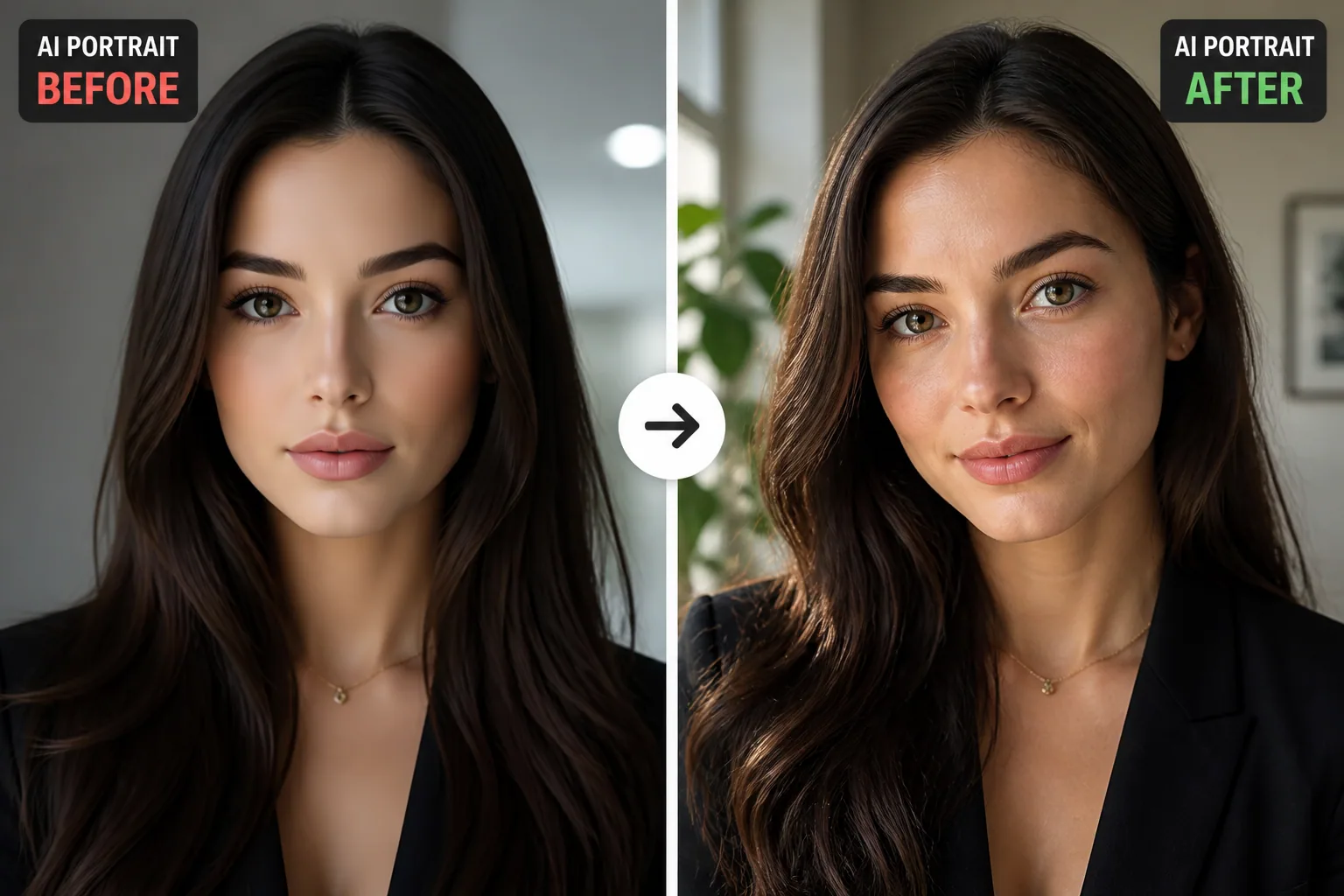
Why Your AI-Generated Portraits Cause Trust Issues And How to Fix Them
AI-generated portraits can look impressive at first glance and still feel strangely off. The lighting may be cinematic, the skin may be flawless, and the face may be beautifully detailed, yet something about the image does not land as believable. That discomfort is not random. People are very fast at judging faces, and trust is closely tied to expression, realism, and whether a portrait feels emotionally consistent. When an image slips into the uncanny valley, viewers often react with unease, even if they cannot explain why.
The good news is that this is fixable. If you understand what makes a portrait feel human, you can steer your results away from the polished-but-fake look and toward something warmer, more familiar, and more trustworthy. That usually means paying attention to expression, light, texture, symmetry, and the quality of your source selfies, then making small edits that preserve realism instead of over-perfecting it.
Why Some AI Portraits Instantly Feel Untrustworthy
A portrait can feel untrustworthy even when it is technically strong because humans are not evaluating only resolution or sharpness. We are scanning for cues that signal emotional truth. Research on face evaluation shows that trustworthiness judgments are made quickly and are strongly influenced by facial expression, which means even small deviations from expected emotional cues can reduce trust. If the smile is slightly forced, the eyes do not match the mouth, or the face appears frozen in an in-between expression, the image can feel false almost immediately.
Another reason is that AI portraits often inherit the aesthetics of idealized training data. Many models are trained on heavily retouched or highly curated photos, so they tend to produce smooth skin, perfect symmetry, and even lighting. Those features can look beautiful, but they can also read as synthetic. Instead of a lived-in face, you get a face that feels designed. That design quality is exactly what makes some viewers hesitate.
This is why trust issues in AI portraits are often less about realism in a technical sense and more about realism in a human sense. A portrait does not need to be imperfect in a sloppy way. It needs to feel like a real person being photographed in a real moment.
What Trust Means in a Portrait: Expression, Light, and Texture
Trust in a portrait is built from a few core ingredients. First is expression. People instinctively respond to whether a face looks relaxed, open, tense, guarded, or emotionally congruent. A portrait with a believable expression feels easier to read, and that readability supports trust.
Second is light. Lighting shapes how the face sits in space. When the source, direction, color temperature, and contrast are coherent, the portrait feels grounded. When the light is flat or inconsistent, the image can feel pasted together, even if the face itself is detailed. Explicit lighting descriptions are often recommended because they improve depth perception and make portraits feel more three-dimensional and trustworthy.
Third is texture. Real skin is not plastic. It has visible pores, micro-shadows, subtle uneven tone, and tiny irregularities. Guides on realistic skin texture consistently note that diffuse shadows and soft falloff help reduce the waxy, over-smoothed look that causes so many AI portraits to feel artificial. Hair matters too. When strands, edges, and flyaways are too perfect, the result can feel more like a render than a photograph.
AI Realism vs. Human Realism: Where the Gap Shows
AI realism often means visual coherence at a distance. Human realism means the portrait survives close inspection and emotional scrutiny. That is where the gap opens up. A portrait may be symmetrical, polished, and high definition, yet still miss the subtle irregularities that make a human face feel alive.
This gap shows up in several places. AI tends to over-smooth the skin, clean up asymmetry too aggressively, and normalize lighting so much that the face loses depth. It may also blur the line between confidence and stiffness. Human faces naturally shift in tiny ways, especially around the eyes, mouth, and cheeks. When those micro-movements disappear, the portrait can become less relatable.
Research on uncanny valley reactions supports this. A meta-analysis found that the uncanny valley effect is large in magnitude, and distortions in face realism produce the strongest negative response. A systematic review also found that virtual faces are often judged eerier and less familiar than real faces because of realism mismatches. In other words, it is not enough for an AI portrait to be detailed. It has to be believable in the same messy, uneven way a real photo is believable.
The Biggest Red Flags Behind the Uncanny Valley Effect
The most obvious red flags are distortion and structural errors. Warped eyes, mismatched pupils, unnatural teeth, melted earrings, broken hairlines, and odd hand placements are the obvious ones. But some of the strongest uncanny signals are subtler. Face distortion has been shown to produce the highest effect size in uncanny valley research, which means even small anatomical weirdness can have a big emotional impact.
Perfect symmetry is another red flag. Real faces are asymmetrical, and that asymmetry is part of what makes them feel alive. When an AI portrait becomes too evenly balanced, the result can look stylized rather than authentic. Likewise, skin that is too uniform or too glossy often triggers the plastic look that viewers notice even if they cannot name it.
Lighting mismatches also create distrust. If the face is lit one way but the neck, hair, or background suggests a different light source, the brain notices the contradiction. The same is true for expression mismatch. A smile that does not reach the eyes or a neutral expression that feels oddly posed can make an image seem emotionally disconnected.
There is also a behavioral factor worth noting. A 2025 human factors study found that people’s ability to detect AI-generated portraits depends not just on the image itself, but on variables like age, sex, device, and confidence, with humans averaging about 85 percent accuracy. That tells us something important: people are sensitive to these cues, and different viewers may pick up on different flaws.
How to Take Better Selfies for Better AI Portrait Results
If your source selfies are weak, the AI has less to work with. That is why better input usually leads to better output. For personalized portrait tools like Selfie AI: AI Photo Generator, the quality of your upload set matters a lot because the model learns your face from those images. If the selfies are blurry, overly filtered, or taken from inconsistent angles, the final portraits are more likely to drift into generic or uncanny territory. You can explore it here: https://findthe.app/selfie-ai-0xi7wd
Good source selfies should show your face clearly, with a mix of angles that still feel consistent. Use natural expressions instead of extreme poses. Aim for clean lighting, but not harsh flash. Try to include close-up images where your eyes, jawline, hairline, and skin texture are visible. The goal is to teach the model what is distinctive about you, not what a beauty filter thinks you should look like.
Avoid overediting the selfies before uploading them. Heavy smoothing, face reshaping, and strong color filters can confuse the model and push it toward an artificial ideal. You want the AI to learn your face, not the app’s version of your face. That may feel less glamorous at the start, but it usually leads to much more credible results.
Why Lighting, Angles, and Consistency Matter More Than You Think
People often focus on style prompts and forget that physical consistency is what makes portraits believable. Lighting is one of the biggest contributors. If you explicitly define the source, direction, and temperature of light, the portrait gains depth and clarity. Soft, directional light with natural shadow falloff usually works better than flat, even illumination because it creates dimension without making the face look overproduced.
Angles matter too. If your source selfies all come from wildly different heights, distances, and perspectives, the model may struggle to preserve facial proportions. Consistent framing helps the AI understand what your face looks like in space. This is especially important if you want portraits that feel professional or socially usable, not just stylized.
Consistency also applies to pose and expression. If you want a trustworthy portrait, the model needs a stable emotional baseline. This does not mean the images must all look identical. It means your inputs should not send conflicting signals about your face shape, your usual smile, or the way your features sit under light. The more consistent the source material, the less likely the output is to drift into visual noise.
Simple Editing Tweaks That Make AI Portraits Feel More Real
The best edits are usually the smallest ones. Instead of chasing perfection, aim to preserve the cues that make a face feel human. If the skin looks too smooth, bring back subtle texture. If the contrast is too flat, add gentle shadow separation. If the eyes feel overprocessed, reduce sharpening so they stop looking glassy.
Prompting can also help before you even generate the image. Many guides recommend combining negative prompts such as no plastic skin, no over-smoothing, and no 3D render appearance with positive prompts like visible pores, subtle imperfections, and weathered texture. That balance helps prevent the model from defaulting to a shiny, idealized result.
It can also help to introduce a little asymmetry. Real people do not have perfectly mirrored faces, and tiny differences can make a portrait feel more grounded. The same logic applies to hair and skin. A few flyaways, a slight skin tone variation, or soft imperfections can improve believability far more than another round of smoothing.
If you are editing for a professional use case, keep the realism tuned to the context. A business portrait should still look clean and polished, but not airbrushed into anonymity. The face should feel approachable, not manufactured.
How to Use Friend Feedback to Spot What You’re Missing
One of the simplest ways to improve trustworthiness is to ask other people what they notice. Friends, peers, or colleagues can often identify the exact thing that feels off long before you can. That is because you are looking at the image with familiarity bias. They are looking at it like an audience.
When you ask for feedback, do not ask only whether the portrait looks good. Ask more specific questions. Does it feel like a real photo? Does the expression seem natural? Does the lighting look believable? Does anything feel overly edited or strangely perfect? Those questions generate more useful answers than a vague yes or no.
You can also test different versions side by side. Sometimes the most polished portrait is not the one people trust most. A slightly softer image with more texture and a less dramatic pose may come across as warmer and more authentic. This is where feedback loops become valuable. Over time, you learn which cues your audience reads as credible and which ones trigger skepticism.
Cross-modal cues can help too. Research on AI streamers suggests that vocal warmth can reduce uncanny reactions when visuals feel slightly off. While that finding comes from a different context, the principle still matters: trust is often rebuilt when the image feels emotionally coherent with the surrounding cues, whether that is a caption, a profile, or a video animation.
Building a Repeatable Style That Still Feels Authentic
Once you find a portrait style that works, the next challenge is consistency without sameness. A repeatable style should feel like you across different contexts, not like a template that flattens your personality. That means keeping a few things stable, such as facial angle, lighting mood, and textural realism, while allowing wardrobe, background, and setting to vary.
A strong repeatable style usually has a recognizable emotional tone. Maybe your portraits feel warm and approachable, or crisp and professional, or creative and cinematic. Whatever direction you choose, the style should support the same identity every time. If one image feels like a corporate headshot and the next feels like a fantasy render, the viewer may stop trusting the image set as a whole.
This is where a tool with varied categories can help, as long as you treat it as a framework rather than a shortcut. For example, Selfie AI lets you create portraits across business, beach, wedding, superhero, historical, fitness, and holiday styles, which makes it easier to test how far you can stretch your look while keeping your likeness intact. The key is to preserve the visual signals that say this is still me.
Final Checklist: Make Your AI Portraits Look Believable and You
Before you share an AI portrait, run through a quick reality check. Does the expression match the mood you want to project? Does the lighting make sense from one part of the face to the next? Does the skin still show texture, pores, and subtle variation instead of a plastic finish? Are the eyes, mouth, and hairline free from distortion? Does the image feel like a real photograph rather than a polished simulation?
If the answer is no, do not assume the portrait is a failure. It probably just needs better source selfies, more consistent angles, more explicit lighting cues, and lighter editing. Trustworthiness in portraits is rarely about adding more drama. It is about removing the small signals that break the spell.
The best AI portraits are not the ones that look the most perfect. They are the ones that feel like a real version of you, with believable light, believable texture, and a face that says something emotionally true. When you get those details right, people stop noticing the AI and start seeing the person.