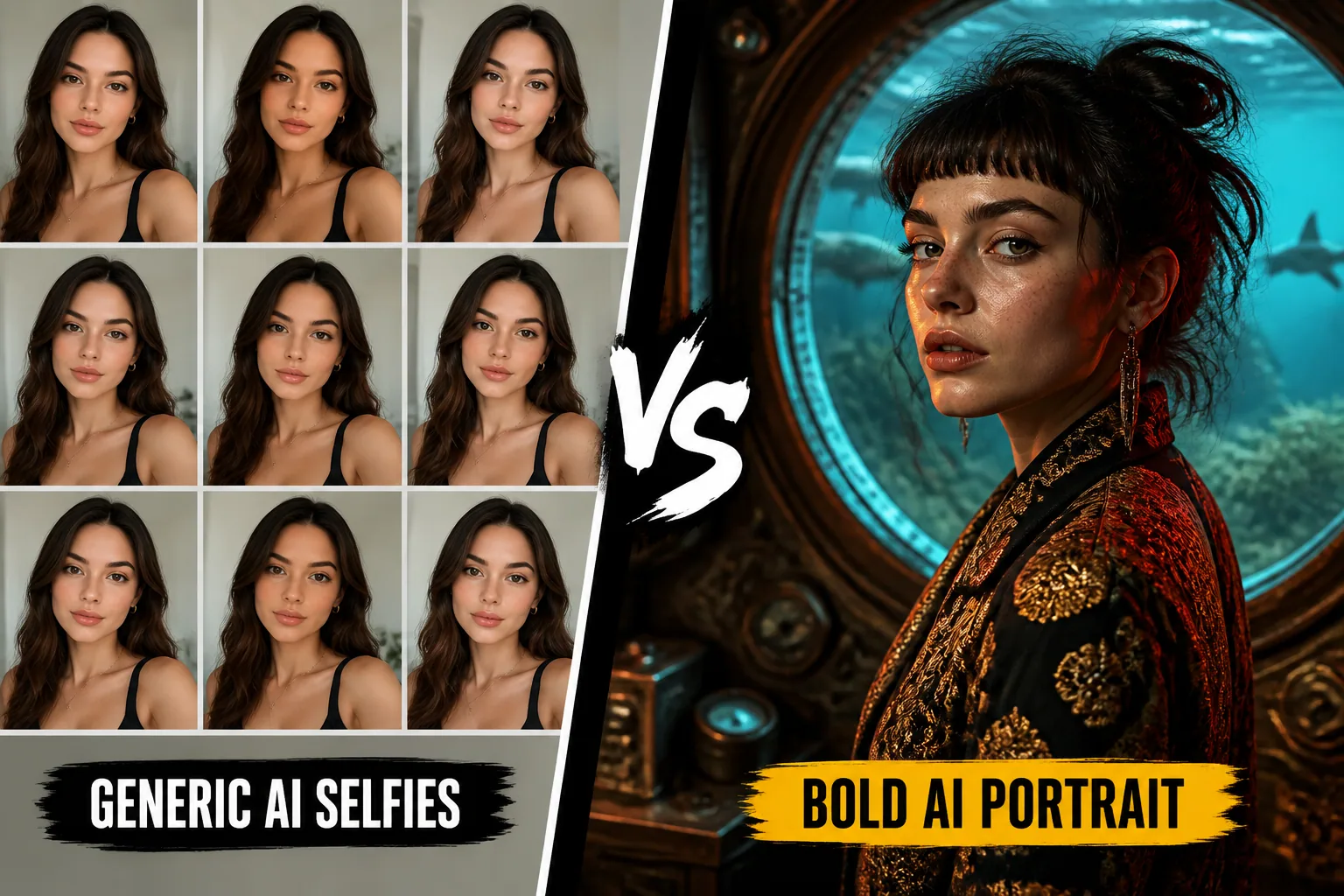
Why Most AI Selfies End Up Looking Generic — And How to Make Yours Stand Out
AI selfies can be impressive at first glance, but after a while many of them start to blur together. The lighting looks eerily similar, the skin is overly polished, the faces are centered in the same way, and the background feels like it came from the same pastel mood board. If that sounds familiar, you are not imagining it. A lot of AI portrait systems are nudged toward a narrow visual average, and many users unknowingly reinforce that average with prompts and source photos that leave the model very little room to be inventive.
The good news is that generic does not have to be the default. Once you understand why these portraits converge on the same look, you can start making deliberate choices that push the results toward something more expressive, more personal, and much more memorable.
Why So Many AI Selfies Start to Look Identical
The short answer is that AI models are often trained to recognize what is statistically common, not what is artistically daring. When a model is asked to generate a selfie, it usually leans toward the patterns it has seen most often in training data. That means smooth skin, flattering lighting, centered framing, and a safe, approachable expression. These choices are not random. They are model defaults shaped by the visual culture that dominates large internet-scale image datasets.
Research supports this tendency. A study published in the Journal of Fairness, Accountability, and Transparency, using 26,400 synthetic faces from Stable Diffusion 2.1 and 3.5 Medium, found that newer models increasingly constrain aesthetic expression by favoring age homogenization, gendered exposure patterns, and geographic reductionism. In other words, the model keeps pulling faces back toward dominant cultural norms instead of letting them feel truly varied or specific. Source: https://doi.org/10.1145/3805689.3806810
This is why so many portraits end up with the same polished look. The system is not trying to be boring on purpose. It is trying to be safe, legible, and likely to please the widest possible audience.
The Most Common Visual Clichés in AI Portraits
Once you start looking closely, the clichés become easy to spot. Many AI portraits rely on soft glam lighting, symmetrical composition, smooth and blemish-free skin, muted or pastel backgrounds, and a slightly dreamy expression that feels borrowed from beauty advertising. These choices can look attractive, but when they repeat across image after image, they erase personality.
A separate analysis of text-to-image systems noted that models trained on massive internet image corpora often reproduce stereotyped beauty norms by default, including smooth skin, symmetrical facial features, and soft glamour lighting, even when those elements are not explicitly requested. Source: https://arxiv.org/abs/2304.06034
There is also a broader convergence problem. In one study summarized by Digital Camera World, thousands of AI-generated images without human guidance clustered into only 12 clichéd visual motifs, many of them based on stock photography aesthetics such as generic lighting, typical compositions, neutral backgrounds, and popular subject matter. Source: https://www.digitalcameraworld.com/tech/artificial-intelligence/researchers-let-an-ai-generate-thousands-of-images-without-human-input-the-lack-of-originality-was-sobering-for-computational-creativity-with-images-only-falling-into-12-cliched-styles
That is the pattern you want to break if you want portraits that feel more like art direction and less like template output.
How Model Training Bias Shapes Your Results
Most people think the prompt is the whole story, but the model’s training history matters just as much. If a model has seen more examples of certain beauty standards than others, it will tend to reproduce those standards as its default visual language. Research on AI-generated faces shows that models trained on datasets such as LAION-5B can underrepresent darker skin tones and non-Western features while oversampling light, smooth skin, symmetrical faces, and neutral or pastel palettes. Source: https://pmc.ncbi.nlm.nih.gov/articles/PMC12032156/
That helps explain why many AI selfies feel culturally familiar in a very narrow sense. They often reflect a beauty ideal that has been normalized online, not necessarily the diversity of real faces or lived aesthetics. Another audit of DALL-E-3, Midjourney-6.1, and Stability AI Core found that default outputs frequently included cues aligned with Western beauty standards, and that prompt refinement reduced the Social Stereotype Index substantially when assumptions were actively countered. Source: https://arxiv.org/abs/2505.20692
So if your results keep drifting toward the same polished look, that does not just mean your prompt is weak. It may also mean the model is filling in gaps with its own cultural defaults.
The User Habits That Accidentally Create Generic Selfies
It is easy to blame the model, but users also create repetition. One common habit is uploading source selfies that are too similar. If every input photo is front-facing, evenly lit, and taken from the same distance, the model learns very little about your face from different angles or expressions. The output then becomes a polished version of the same pose over and over again.
Another habit is using vague prompt language. Words like beautiful, nice background, or cinematic lighting sound helpful, but they are so broad that the model fills in the blanks with familiar archetypes. Prompting guides explicitly warn against this because it encourages the system to fall back on standard image clichés. Source: https://fiddl.art/blog/en/ai-portrait-prompts
Users also tend to pick safe settings. Centered composition, evenly lit face, calm expression, plain background, and fashion-style framing all produce clean results, but they also produce highly repeatable results. If every portrait is optimized for conventional attractiveness, the feed quickly starts to look like an endless variation on the same face.
How to Tell When Your Portrait Feed Is Repeating Itself
A repeating feed is not always obvious until you compare multiple generations side by side. A useful check is to ask yourself whether the faces differ in more than just clothing or background color. If the lighting, pose, expression, framing, and facial polish all stay nearly the same, you are probably in a default loop.
Another sign is emotional sameness. Even if the outfits change, many AI selfies carry the same gentle smile, the same relaxed eyes, and the same half-fashion, half-lifestyle mood. That is usually a sign that your prompts are not asking for enough contrast. A healthy portrait set should contain some tension, some asymmetry, some variation in gaze, and some visual surprise.
You can also look for identity drift versus style drift. If the face changes too much, the model is unstable. But if the face stays stable while the styling becomes repetitive, the issue is usually overconstrained aesthetics. The goal is to preserve identity while expanding the visual range.
Choosing Better Input Photos for More Varied Outputs
Better source photos are one of the fastest ways to improve variety. Instead of uploading a batch of nearly identical selfies, use images that give the model more information. Include different angles, distances, facial expressions, and lighting conditions. A three-quarter profile, a candid smile, a neutral expression, and a slightly dramatic shot will help much more than six identical front-facing portraits.
There is also evidence that identity locking works better when reference images include multiple dimensions of the subject, such as face, body posture, and clothing, especially when you want to change mood, pose, or scene without losing consistency. Source: https://img2prompt.art/blog/portrait-photography-ai-prompts
Think of your input photos as creative constraints. If they only describe one version of you, the output will keep returning to that same version. If they show variation, the model has room to explore while still staying recognizable.
Using Lighting, Angles, and Expressions to Break the Pattern
One of the easiest ways to escape the generic look is to stop asking for idealized lighting all the time. Soft beauty lighting is useful, but it should not be your only tool. Try directional light from the side, low light with a stronger mood, window light that creates contrast, or backlight that gives the portrait more shape. Specific lighting instructions are far more effective than vague phrases like good lighting.
Angles matter too. A straight-on face reads as clean and stable, but it is also the most common AI fallback. Tilt the camera slightly, ask for a lower or higher angle, or introduce a profile view. Those small changes can immediately make the portrait feel more editorial and less like a profile picture template.
Expressions do a lot of heavy lifting as well. A neutral smile is safe, but it is also one of the most repeated AI expressions. Ask for a skeptical look, a candid laugh, a thoughtful gaze, or a relaxed expression with imperfect posture. The more emotionally specific the image feels, the less it will resemble the generic AI beauty mode.
Writing Prompts That Push Past the Default Look
If you want stronger results, your prompt needs to behave like a mini art brief. Strong prompts are specific about subject, style, composition, lighting, mood, technical parameters, and negative prompts. That seven-slot structure is recommended in prompt engineering best practices because it gives the model more guidance and fewer excuses to drift back to the default look. Source: https://zerotwo.ai/how-to-write-image-prompts
You should also avoid leaving style empty. The Google Gemini image generation guide encourages users to specify subject, composition, action, location, and style, and even suggests applying a style, texture, or design from one concept to another to move beyond generic defaults. Source: https://blog.google/products-and-platforms/products-and-platforms/products/gemini/image-generation-prompting-tips/
A stronger prompt is not just more detailed. It is more decisive. Instead of saying portrait of a woman with beautiful lighting, try something like a close-up portrait with hard side light, slight motion blur, a quiet expression, and a muted urban background, shot like a 1990s magazine editorial. That kind of prompt gives the model something to interpret instead of something to average out.
Style Blending: Mixing Eras, Aesthetics, and References
One of the best ways to make AI selfies stand out is to stop thinking in single-style terms. When you blend eras, materials, and visual references, the result usually feels more original because the model cannot lean as easily on a standard beauty template. This can mean combining vintage color palettes with modern portrait framing, or mixing documentary realism with a touch of surreal fashion photography.
Research on concept blending in diffusion models suggests that combining distinct styles and concepts through methods such as textual prompt scheduling, embedding interpolation, or layer-wise conditioning can produce more novel and less derivative images. Source: https://arxiv.org/abs/2506.23630
Even without advanced tooling, you can get a lot out of simple style combinations. For example, you might ask for a portrait that feels like 1970s film photography meets contemporary streetwear, or Renaissance lighting applied to a modern office setting. The key is to create productive tension between familiar categories.
How to Use Backgrounds and Image Conditioning More Creatively
Backgrounds are often treated like an afterthought, but they strongly shape whether a selfie feels generic. A plain pastel gradient tells the model to stay safe. A messy studio, a rainy street, a reflective interior, or a location with a clear narrative can push the portrait into more distinct territory. The environment should support the identity you want, not merely decorate it.
Image conditioning can help as well. If your platform allows reference image or style conditioning, use it intentionally to guide the mood, setting, or texture of the output. Instead of conditioning on the same polished beauty reference each time, try varying the source inspiration with editorial, film, candid, or even historical references. The more deliberate the conditioning, the less likely the system is to fall back on stock-like portrait defaults.
This is also where negative prompts can matter. If your system supports them, you can actively suppress the familiar clichés you do not want, such as overly smooth skin, centered studio pose, pastel background, or airbrushed beauty lighting. That does not guarantee originality, but it does reduce the model’s easiest escape routes.
Customizing Styles to Make Portraits Feel More Personal
A portrait feels personal when it reflects something specific about the subject, not just something generally attractive. That may mean including a hobby, a profession, a favorite era, a cultural influence, or a particular visual mood. The more the portrait connects to a real identity, the less it reads like a generic AI face with interchangeable styling.
This is where customization tools become especially useful. If you want to explore a wide range of looks without losing your likeness, Selfie AI: AI Photo Generator can help by turning a few selfies into a personalized AI model and then generating portraits in custom scenarios, historical eras, beach scenes, superhero concepts, and more: https://findthe.app/selfie-ai-0xi7wd
The important part is not just variety for its own sake. It is variety with intention. A personalized portrait should feel like a creative extension of you, not just a different filter over the same template.
A Simple Workflow for Creating AI Selfies That Stand Out
If you want a practical process, start with three steps. First, improve your inputs by uploading varied source selfies with different angles, expressions, and lighting. Second, write prompts that specify subject, composition, lighting, mood, and style instead of relying on vague aesthetic language. Third, test deliberate variations by changing one major artistic variable at a time, such as era, lens style, background, or emotional tone.
From there, review your results as a group instead of one image at a time. Ask whether the portraits feel distinct, whether the identity remains stable, and whether the styling tells a story. If the images begin to look interchangeable, you are probably using too many of the same defaults. If they feel unstable, your constraints may be too loose. The sweet spot is where the subject stays recognizable while the creative direction keeps shifting.
That is ultimately how you get beyond generic AI selfies. You stop asking the model to make you look universally polished, and you start asking it to interpret you with specificity. Once you do that, the portraits become less like recycled internet beauty and more like something that actually belongs to you.