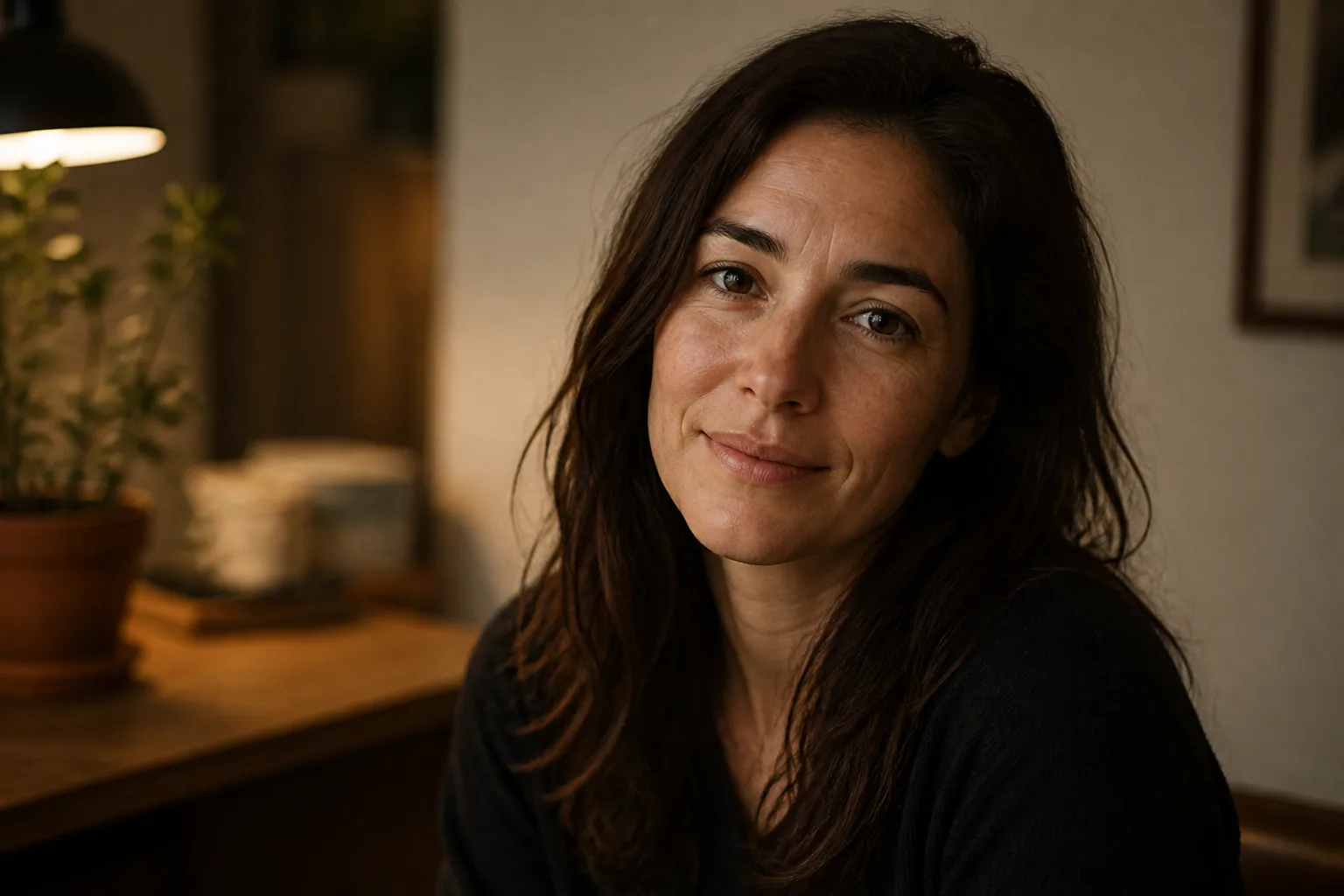
Why Imperfect Angles & Real Textures Make Your AI Portrait Pop
When people talk about a great portrait, they often mean one that feels alive. Not perfect in a technical sense, but believable. That is exactly why slightly imperfect AI portraits often land better than overly polished ones. A face with a little asymmetry, a three-quarter angle, a touch of skin texture, and lighting that feels borrowed from real life can create more emotion than a flawless front-facing image ever could. The result is a portrait that feels human, memorable, and easier to connect with.
For creators, casual users, and personal branding enthusiasts, this matters more than you might think. AI can produce extremely clean images, but too much cleanliness can make a portrait feel stiff or synthetic. Real portraits are full of tiny visual cues such as contour, shadow, unevenness, and environmental context. Those details help viewers read personality and presence. In other words, a little imperfection is often what gives an AI portrait its spark.
Why Perfect AI Portraits Often Feel Emotionally Flat
A perfectly centered, perfectly symmetrical, perfectly smooth face can look impressive at first glance. But it can also feel distant. Human beings do not actually read faces as sterile objects. We respond to small variations, subtle tension, and visual cues that suggest a real person with a real inner life. When those signals are removed, the image may become technically attractive but emotionally flatter.
Research supports this idea in an interesting way. Faces shown in three-quarter views are often judged more attractive than front or profile views, and that angle improves esthetic perception, especially when combined with gaze. That suggests there is a sweet spot between full face and profile that feels more relational and engaging. Source: https://pmc.ncbi.nlm.nih.gov/articles/PMC5319968/
There is also a memory benefit. In recognition tasks, unfamiliar faces learned in three-quarter views led to better memory and naming performance than full-face or profile views, which suggests that this angle gives viewers more useful shape and contour information to work with. Source: https://pmc.ncbi.nlm.nih.gov/articles/PMC6310264/
That is one reason overly perfect AI portraits can feel forgettable. They may show the face too directly, with too little contour or tension. A more natural portrait lets the viewer notice the structure of the cheek, the line of the jaw, the fall of light across the nose, and the small asymmetries that make the face feel alive.
The Power of Three-Quarter Angles and Slight Facial Asymmetry
If you want your AI portrait to feel more authentic, start with the angle. A three-quarter view, usually around 45 degrees, creates depth instantly. It gives the face dimension, lets light shape the features, and avoids the flattening effect that can happen in a direct frontal shot. It also feels less posed and more observational, which makes it easier for viewers to imagine the person in a real setting.
Three-quarter angles are especially useful because they reveal both familiarity and mystery. The viewer can still read the eyes, mouth, and expression clearly, but the turn of the face adds nuance. That nuance matters. It creates a portrait that feels less like a catalog image and more like a moment captured in passing.
Slight facial asymmetry also helps. We tend to think of symmetry as the ideal, but too much symmetry can make a face feel artificial. Research has shown that while symmetry contributes to attractiveness, slight asymmetries, especially in emotional expression, can increase the perception of genuineness and emotional authenticity. Source: https://www.frontiersin.org/journals/psychology/articles/10.3389/fpsyg.2021.727446/pdf
In practice, this means you should not try to make both sides of the face identical. Let one eyebrow sit a little higher. Let the smile lean slightly to one side. Let the head tilt just enough to create character. These small deviations are not defects. They are the details that help the portrait feel emotionally real.
How Off-Center Composition Creates Warmth and Personality
Composition shapes how a portrait feels before the viewer even notices the face itself. Centered framing can be powerful, but it can also feel formal or static. Off-center placement, on the other hand, creates motion. It gives the eye a path to follow and makes the portrait feel more open, more casual, and more human.
A common way to do this is to place the eyes or face along the rule of thirds rather than directly in the center. Off-center framing tends to make portraits more engaging and dynamic because it invites the viewer’s eye to move across the image and creates a little narrative tension. Source: https://www.photoworkout.com/rule-of-thirds-in-photography/
This works especially well for social media portraits and personal branding images. A subject that is slightly off-center can feel like they are part of a living environment instead of being isolated against a blank backdrop. It also makes space for negative space, which can help the image breathe and feel more editorial.
Warmth comes from this sense of ease. When a portrait is not perfectly locked into the middle of the frame, it feels less rigid and more spontaneous. Even if the image is AI-generated, the composition can suggest a real human moment rather than a staged digital object.
Using Skin Texture to Add Depth Without Looking Harsh
One of the quickest ways to make an AI portrait feel more convincing is to ask for texture. Real skin is not a smooth plastic surface. It has pores, tiny variations, soft shadow transitions, and subtle marks that catch light differently across the face. When these details are present, the portrait gains depth immediately.
Research on portrait texture has linked shading direction, light-dependent shadows, pores, and fine detail with likeness assessments. In other words, realistic texture and believable lighting make a portrait feel more like the person it is meant to represent. Source: https://www.researchgate.net/publication/346961394_Analysing_Texture_in_Portraits
The key is balance. You want realism, not harshness. If you ask for too much texture, the image can start to look gritty, overprocessed, or tired. The goal is to suggest skin detail naturally, so the viewer feels the person is real without being distracted by every pore. Good prompts usually ask for “natural skin texture,” “soft visible pores,” or “subtle skin detail” rather than extreme realism or heavy sharpening.
Think of texture as a way to restore human scale. Smooth AI skin can erase personality, while gentle irregularities reintroduce it. A portrait with a bit of visible texture often feels warmer because it no longer looks surgically perfected. It looks lived in.
Freckles, Pores, and Fine Lines: The Details That Signal Realism
Small facial details are some of the most powerful realism signals in AI portrait generation. Freckles suggest individuality. Pores suggest physical presence. Fine lines suggest age, expression, and experience. Together, these details tell the viewer that this is not a manufactured mask but a person with history and character.
Freckles can be especially effective because they break up uniformity in a pleasing way. They create visual rhythm and make skin appear less airbrushed. Pores do something similar by adding micro-variation across the cheek, forehead, and nose. Fine lines around the eyes or mouth can bring warmth and maturity, especially when the goal is to make the subject look thoughtful, approachable, or established.
The most important thing is subtlety. You do not need to exaggerate these traits. In fact, subtle freckles scattered across the nose and cheeks, soft laugh lines, and lightly visible pores are usually enough. The image should still feel flattering. The goal is not to make the person look flawed. It is to make the portrait feel believable and emotionally grounded.
This is particularly useful for personal branding, where trust matters. A portrait that looks too perfect may feel polished but distant. A portrait with authentic detail can feel more honest, which often translates into stronger connection and credibility.
Why Shadows and Raw Lighting Make Portraits More Compelling
Light is one of the most important tools for making an AI portrait feel real. Flat lighting can erase contour and flatten the face. Shadows, on the other hand, create depth and help the viewer understand the form of the face. They define the nose, cheekbones, jawline, and eye sockets in a way that feels naturally photographic.
Natural and ambient lighting, including golden hour, open shade, and directional light through windows, tends to produce softer shadows and gradients that wrap around the face. That softness makes portraits feel warmer, more intimate, and less harsh than bright studio-style lighting. Source: https://photographyicon.com/ambient-light/
Raw lighting can be compelling because it preserves some unpredictability. A little shadow under the cheekbone or across the temple suggests a real environment. It makes the image feel less like a rendered object and more like a captured moment. When shadows are too clean or evenly distributed, the portrait can lose depth and personality.
This does not mean the lighting should be dark or muddy. It means it should have shape. The viewer should be able to sense where the light is coming from, how it touches the face, and what parts of the image are quietly falling away into shadow. That tension is what gives the portrait mood.
Using Mixed Light and Ambient Context for a Lived-In Look
One of the easiest ways to make an AI portrait feel less synthetic is to add mixed lighting and environmental context. Mixed lighting means combining ambient light with an artificial source in a way that feels intentional and balanced. When done well, it adds visual depth and creates richer mood without making the image look overworked. Source: https://www.whitewall.com/us/magazine/inspiration/photography-for-advanced/mastering-lighting-and-illumination/mixed-lighting-scenarios
A portrait lit by soft window light and a faint warm practical lamp, for example, will often feel more believable than one lit by a single uniform source. The contrast between light types gives the face dimension and helps the scene feel inhabited. It suggests a room, a time of day, and a real atmosphere.
Ambient surroundings matter too. A blurred background with a hint of a desk, curtain, street reflection, or textured wall can make the image feel grounded. The portrait becomes less about a face floating in empty space and more about a person existing in a specific moment. That sense of place is often what makes AI imagery emotionally compelling.
If you want a lived-in look, think in layers: a face with texture, light with direction, and a background with context. Together, those elements create depth that feels natural rather than manufactured.
Prompt Language That Encourages Imperfection and Authenticity
The words you use in your prompt can strongly influence whether the image feels polished or alive. If you want realism, prompt for it directly. Ask for a three-quarter angle, slight asymmetry, natural skin texture, soft pores, subtle freckles, fine lines, gentle shadowing, and realistic ambient light. These phrases help steer the model away from plastic smoothness and toward human variation.
You can also use language that implies spontaneity. Terms like “candid,” “unposed,” “natural expression,” “softly lit,” “off-center framing,” and “editorial realism” can help the output feel less staged. If you want a warmer result, include words such as “golden hour,” “window light,” “open shade,” or “mixed indoor light.”
It also helps to specify what to avoid. Words like “over-smoothed,” “hyper-retouched,” “perfect symmetry,” and “plastic skin” can reduce the chances of an overly artificial result. If your AI tool supports negative prompts, use them to discourage shine, waxy texture, and overly centered composition.
A strong prompt is not just a list of features. It is a direction for mood. If you describe a portrait as slightly imperfect, warmly lit, and naturally framed, the model has more room to create something that feels emotionally believable rather than mechanically polished.
Best AI Settings and Styling Choices for Natural Results
Settings matter just as much as wording. If your generator gives you control over stylization, prompt strength, realism, or detail enhancement, it is usually worth reducing anything that pushes the image too far into glossy perfection. Strong stylization can be beautiful, but for portrait realism, it often smooths away the details that make a face feel genuine.
Choose reference images carefully if your tool allows them. Real selfies with natural lighting, relaxed expressions, and slight asymmetry usually produce better results than highly filtered photos. The AI learns from the visual tone of the input, so the more human and grounded your source material, the more believable the output tends to be.
Styling choices matter too. Clothing with texture, such as knitwear, linen, denim, or structured fabric, can support the realism of the face. Simple backgrounds often work well, but not empty ones. A little context helps. Even a softly blurred interior or outdoor environment can make the portrait feel more complete.
If you are using a portrait app, one helpful option is a tool that lets you experiment with different looks while keeping the likeness consistent. Selfie AI: AI Photo Generator can do that, and it is especially useful if you want to create natural-feeling portraits from your own selfies while exploring different styles and settings: https://findthe.app/selfie-ai-0xi7wd
The general rule is simple. The more your settings push toward realism, the more your styling should support human variation. Let the portrait breathe. Let it keep a little edge, a little softness, and a little imperfection.
How to Use These Techniques for Social Media, Personal Branding, and Gifts
These portrait techniques are useful across many different use cases because they make the image feel more personal. For social media, a slightly imperfect portrait can stop the scroll better than a generic glossy avatar. It suggests confidence, approachability, and a real human presence, which is often what people respond to most.
For personal branding, the goal is usually trust. You want to look polished enough to feel professional, but natural enough to feel accessible. A three-quarter angle, soft shadows, and visible texture can create that balance beautifully. The image feels elevated without becoming distant. That makes it ideal for profile photos, speaker bios, website headers, and about pages.
For gifts, emotional resonance matters even more. A portrait that captures freckles, fine lines, or a familiar tilt of the head feels thoughtful and specific. It can become a memorable keepsake because it looks like the person, not just a generic version of them. That makes AI portraits especially meaningful for birthdays, anniversaries, graduations, and family celebrations.
At the end of the day, the best AI portraits are not the most perfect ones. They are the ones that feel like someone you might actually know. A slightly turned face, a small asymmetry, a bit of texture, and light that behaves like real light can turn an AI image from impressive to unforgettable. That is where the portrait starts to pop.