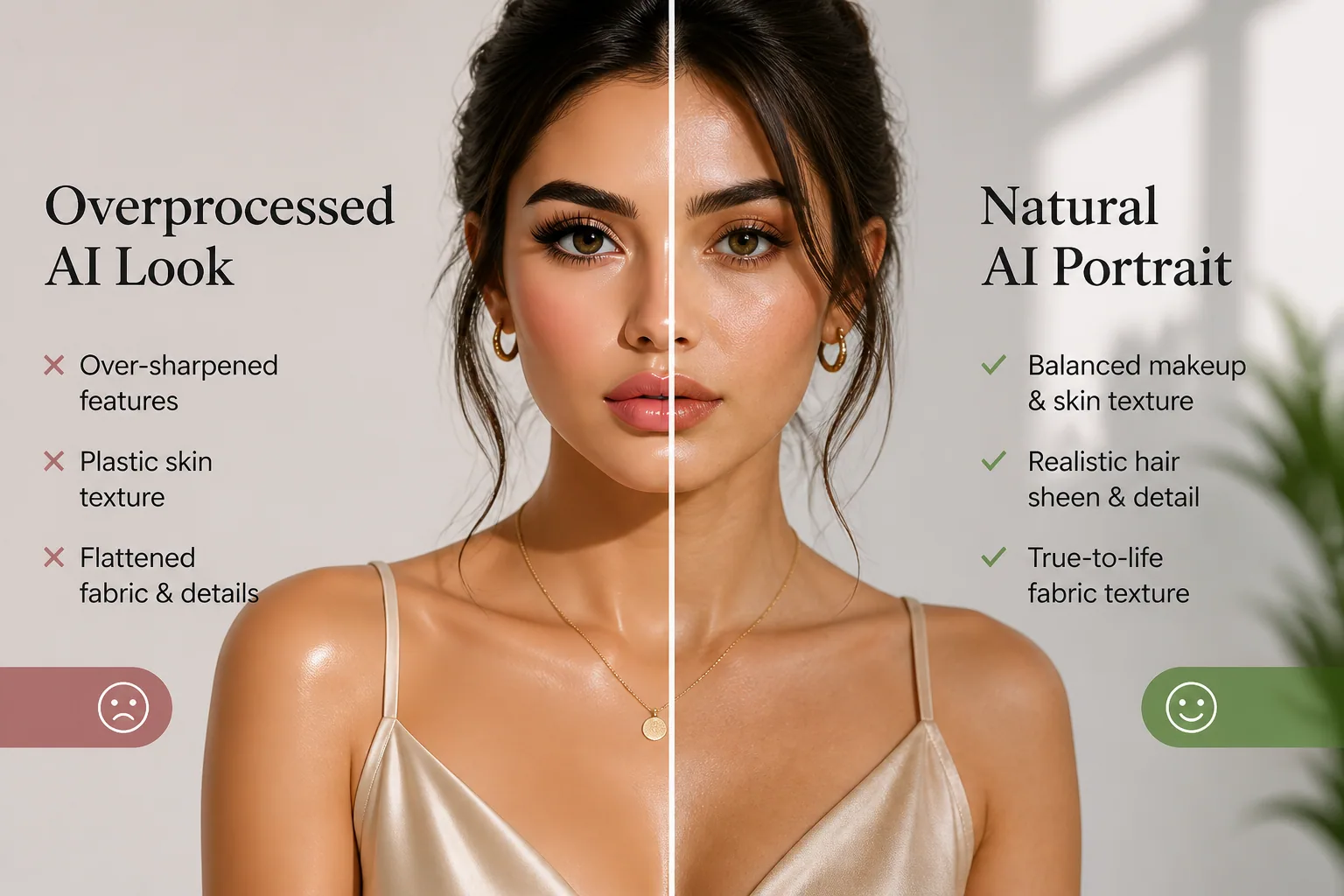
Why AI Portraits Make Filtered Lashes Look Fake: Makeup, Hair, and Fashion Fixes That Actually Work
AI portraits can look stunning at first glance, but many of them fall apart in the details. The lashes look too sharp, the eyeliner drifts off the lash line, the skin turns waxy, the hair gets an odd glossy shine, and the clothing starts to lose the texture that made the outfit interesting in the first place. That is why a portrait can feel polished and fashionable in one frame, then suddenly look overprocessed, photoshopped, or just slightly unnatural in the next.
The good news is that these problems are not random. They follow patterns. Once you understand how AI tools interpret makeup, hair, lighting, lenses, and fabric, you can make better styling choices, write smarter prompts, and capture source photos that translate much more cleanly into believable AI fashion portraits.
Why AI Portraits Make Beauty Details Look Overprocessed
Most portrait generators are trained to optimize for visual drama, not subtle realism. That means they often exaggerate the features that read strongly at a glance, especially eyes, lashes, shine, and contrast. A human viewer notices the shape of the face and the overall mood first, but the model may prioritize crisp edges, symmetry, and enhancement artifacts that make the face feel more “finished” than real.
This is especially obvious around the eyes. The Alibaba research summary notes that AI tools over-sharpen eyelashes so aggressively that a 2023 Imaging Science Foundation study found 78% of AI-enhanced beauty portraits inflated lash width by about 34% at the distal ends, while 62% introduced false bifurcations, where one lash splits into two lines, creating a spider-lash effect. That kind of detail can instantly make the image feel synthetic rather than glamorous. Source: https://www.alibaba.com/product-insights/why-do-ai-photo-enhancers-over-sharpen-eyelashes-in-beauty-shots-and-how-to-apply-selective-masking-pre-enhancement.html
The same thing happens with skin and fabrics. If the system smooths too much, the face can look plastic. If it sharpens too much, pores, makeup edges, hair strands, and textile weave can all become harsh and artificial. In other words, the problem is not just “too much editing.” It is often the wrong kind of detail enhancement.
Do Matte, Dewy, or Bold Makeup Looks Render Best in AI?
If your goal is realism, matte and softly dimensional makeup tends to survive AI rendering best. Matte foundation, neutral contour, softly blended blush, and defined but not overdrawn brows usually give AI less room to invent strange shine patterns or blur the face into a uniform surface. The reason is simple: the model can understand clear structure more easily when the skin finish is controlled and the contrast is moderate.
Dewy makeup can still work, but it is more fragile. A subtle highlight on the high points of the face can look beautiful, yet heavy glow products or ultra-reflective skin often confuse AI into creating oily patches, overbright cheekbones, or forehead shine that looks less like skincare and more like plastic. Bold-color makeup can also render well because strong pigment gives the model a clear visual anchor. A red lip, colored liner, or a saturated monochrome eye look can stay more consistent than a delicate barely-there wash of color.
The practical takeaway is that AI likes deliberate makeup shapes. Soft matte base, clean color blocks, and controlled highlight usually render better than complex micro-reflections. If you want a fashion-forward portrait that still feels natural, avoid makeup that depends on tiny shimmer particles, ultra-wet finishes, or extremely fine graphic lines near the eye area.
Why False Lashes and Eyeliner Often Turn “Photoshopped”
False lashes are one of the first things to break in AI portraits because they combine everything the model struggles with: thin lines, repeated spacing, tapering ends, and delicate shadow. When AI tries to “improve” lashes, it often creates unnaturally thick fans, doubled strands, or even discontinuous lash clusters that do not match how human lashes grow.
Eyeliner has its own problem. The Alibaba research summary cites a 2023 study in ACM Transactions on Management Information Systems showing that in 92% of AI beauty apps tested, eyeliner outputs misaligned with the subject’s true lash root by at least 1.7 mm. That may sound tiny, but on a face, a misalignment like that is enough to make the eyeliner look pasted on instead of anchored to the eye. Source: https://www.alibaba.com/product-insights/why-do-ai-generated-eyeliner-looks-never-match-my-eye-shape-customizing-facial-landmark-inputs.html
To improve results, it helps to keep the eye makeup clean and simple. Smudged tightlining, very thin wing tips, or extremely elaborate lash spikes tend to confuse the system more than a classic softly lifted cat-eye. If you are prompting an AI portrait, ask for “natural lash density,” “soft mascara definition,” “eyeliner aligned to the upper lash line,” or “clean eye makeup with realistic lash spacing.” Those small wording changes can reduce the fake-lash look significantly.
How Skin Finish Changes AI Realism
Skin finish can make or break a portrait because it changes how believable the entire face feels. Smooth skin is not automatically bad, but over-smoothed skin tends to look disconnected from the rest of the image. Real skin has tiny tonal shifts, pores, soft shadow transitions, and slight imperfections. AI often removes those cues in the name of perfection, leaving the face flat and airbrushed.
A matte or satin base often gives the best results because it keeps the face dimensional without adding too many bright specular highlights. A dewy finish can look beautiful when it is localized to the cheekbones and a little on the nose, but all-over shine can confuse the portrait model and make the skin appear glossy in an unnatural way. If the goal is high-fashion realism, a restrained finish usually survives better than a hyper-glam reflective one.
This is also where over-smoothing becomes dangerous. Alibaba’s coverage of textured fabrics notes that AI photo enhancers often treat micro-texture as noise, which leads not only to flattened materials but also to plastic-looking skin. When that happens, the face loses the subtle roughness that tells the viewer it is human. So the best skin finish in AI portraits is rarely the smoothest one. It is the one that keeps depth.
The Hair Problem: Sheen, Flyaways, and Texture Mismatches
Hair is another area where AI tends to overdo the “perfect” look. Human hair has a mix of shine, softness, flyaways, and directional strand groups. AI often collapses those layers into a uniform glossy curtain or, on the opposite end, turns the hair into dry-looking fragments with strange edge noise. Both extremes can look fake.
The most believable hair usually has controlled sheen, visible direction, and a few soft flyaways. Too much gloss can make hair look like varnish, while too little sheen can make it look dusty or stiff. The issue is similar to fabric: the model may either smooth out the texture or invent a shine pattern that does not match the lighting. If the hair color is dark, this effect becomes even more noticeable because highlight bands stand out more sharply.
When prompting or selecting reference images, avoid hair descriptions that stack too many qualities together, like ultra-sleek, mirror-shiny, voluminous, perfectly textured, and windblown all at once. That can lead to visual conflict. Instead, aim for one clear hair story: soft waves with natural sheen, clean straight hair with light movement, or textured curls with controlled definition.
Lighting Setups That Help Fashion Portraits Look Natural
Lighting is one of the biggest reasons some AI portraits feel authentic and others feel overly filtered. As B&H eXplora explains in its article on photographing textures, side lighting with minimal diffusion emphasizes texture such as skin pores, hair details, and fabric weave, while front lighting and heavy diffusion flatten texture and produce a smoother appearance. Source: https://www.bhphotovideo.com/explora/photography/tips-and-solutions/lighting-to-photograph-textures
That means if you want realism, you need to decide whether your portrait should be softly polished or highly detailed. Broad front light can be flattering, but it can also erase the very cues that make an AI portrait feel grounded. Side light, on the other hand, creates shape and keeps materials from becoming flat. It is especially useful for hair strands, cheek structure, lash edges, and clothing weave.
A good compromise is soft directional light. Think window light from the side, a large diffuser with slight angle, or a clean studio setup that still leaves a little shadow on the face and under the jaw. This gives the AI more texture to work with without pushing it into harsh contrast.
Lens Style, Depth, and Why Some AI Portraits Feel More Believable
Even when a portrait is AI-generated, it often borrows the visual logic of real photography. That is why focal length matters. Longer lenses, such as 85 to 150 mm, compress facial features and create a more flattering portrait look, while wider lenses distort proportions, especially near the camera. ePhotozine’s portrait guide explains that longer focal lengths flatten features more naturally and isolate the subject, while wider lenses can exaggerate noses, ears, and nearby features. Source: https://www.ephotozine.com/article/using-different-focal-lengths-in-portraits-24164
For AI fashion portraits, this matters because a more compressed, classic portrait perspective usually looks more believable. It reduces the chance of odd facial stretching and helps the image feel like a real camera captured it rather than a synthetic rendering trying too hard to be dramatic. Depth of field also matters. A shallower background can keep attention on the face and outfit, but if everything is blurred too much, the portrait can feel detached from reality.
If your AI portraits often feel uncanny, check whether the framing is too wide or too “selfie-like” for the style you want. A tighter portrait crop with a realistic lens perspective often helps beauty details land more naturally.
How Clothing Textures Get Flattened, Smoothed, or Misread
Fashion is where AI portrait tools often struggle the most. Complex garment details such as prints, logos, patterns, stitching, and layered trims can get distorted because the model prioritizes the silhouette over the material. Style3D notes that 93% of AI-generated fashion images show detectable distortion in complex garment details, citing BoF Insights. Source: https://www.style3d.com/blog/fixing-pattern-distortion-in-ai-renders-for-2d-fashion-drafting/
That distortion becomes even more obvious with textured materials. Rewarx reports that texture rendering fails in roughly 67% of AI fashion model outputs when it comes to thread density, weave patterns, and material surface properties. Source: https://www.rewarx.com/blogs/why-ai-fashion-models-fail-texture-shadow-issues
Certain fabrics are especially vulnerable. Linen slubs, corduroy ribs, fine knits, brushed finishes, sheer overlays, and shiny synthetic materials can all get flattened into generic surfaces. Alibaba’s coverage of over-smoothing fabrics explains that AI enhancers often treat these micro-textures as noise, which leaves clothing looking flat and plastic. Source: https://www.alibaba.com/product-insights/how-to-stop-ai-photo-enhancers-from-over-smoothing-textured-fabrics-like-linen-or-corduroy.html
The safest wardrobe choices for AI portraits are often the ones with clear structure and moderate texture. A clean blazer, a solid knit, a satin dress with visible drape, or a simple blouse can render more reliably than a garment covered in busy embroidery, tiny checks, shiny metallic threads, or dense pattern work. If texture is central to the outfit, make sure the source photo is sharp enough to preserve it without letting the system invent fake detail.
Common AI Portrait Failure Points and the Prompt Tweaks That Fix Them
A lot of AI portrait problems can be reduced with prompt language that guides the model away from overprocessing. If lashes look fake, say “natural mascara, realistic lash separation, no clumped extensions.” If eyeliner drifts, say “clean eyeliner following the upper lash line.” If skin gets plastic, use “natural skin texture, soft matte finish, subtle pores.” If hair becomes too shiny, say “realistic hair sheen, individual strands, soft flyaways.”
For clothing, the best prompts usually name the fabric behavior instead of only the garment type. For example, “structured wool blazer with visible weave,” “soft ribbed knit,” or “matte satin with realistic folds” is more useful than simply saying “fashion outfit.” The same is true for lighting. “Soft side light” or “natural window light” often produces more believable results than vague terms like “glamorous light” or “cinematic.”
If your tool supports negative prompts, use them carefully. Words like over-sharpened, waxy skin, plastic hair, fake lashes, distorted fabric, and overly glossy can help steer the output back toward realism. The goal is not to eliminate polish. It is to reduce the visual tells that make the portrait look manufactured.
How to Prep a Selfie So Your Fashion Look Translates Better
The quality of the source selfie matters more than most people expect. If the input image already has harsh filtering, strong beauty mode smoothing, uneven lighting, or a wide-angle lens distortion, the AI has to build on top of those problems. A cleaner source gives the model a better chance of preserving your real features while stylizing the rest.
For better results, take selfies in soft natural light, ideally near a window. Keep the camera at a comfortable distance and avoid ultra-close shots that distort the nose and eyes. Look slightly above the lens, keep your expression relaxed, and use makeup that has clear shape without being overly intricate. If you wear lashes or eyeliner, keep them neat and balanced rather than extremely dramatic or highly detailed.
Hair should be styled simply, with a shape that is easy to read. Clothing should be tidy, unwrinkled where possible, and not overloaded with tiny patterns or highly reflective surfaces. The best source photos are not necessarily the most glamorous. They are the ones that preserve clean facial landmarks, readable textures, and enough natural light for the model to understand what is real.
Best Backgrounds, Angles, and Framing for AI-Ready Portraits
Backgrounds should support the subject, not compete with it. Plain walls, soft indoor settings, or lightly blurred outdoor backdrops usually work best because they keep attention on the face, hair, and outfit. Busy backgrounds can introduce edge confusion, especially around flyaway hair and shoulder lines, which makes AI more likely to invent weird transitions or smudge the subject into the scene.
Angles matter too. A slight turn of the face often looks more natural than a straight-on passport pose, but extreme angles can distort symmetry and make the model overcorrect. The most reliable framing tends to be a clean head-and-shoulders shot with enough room around the face for the AI to preserve hair volume and clothing shape.
If you are preparing content for a fashion portrait, think in layers: the face should be readable, the hair should have controlled movement, the outfit should have enough texture to identify, and the background should stay quiet. When all four are competing for attention, AI tends to simplify too aggressively.
A Simple Checklist for More Realistic AI Glam Portraits
Before generating or styling an AI portrait, run through a quick realism check. Does the makeup have a clear finish, not too glossy and not too flat? Are the lashes separated naturally, or do they look overbuilt? Is the eyeliner sitting on the lash line rather than floating above it? Does the hair have believable shine and a few soft flyaways? Does the outfit still show its fabric identity, or has the texture disappeared?
Also check the lighting and lens feel. Side light and moderate depth usually preserve more realism than harsh front light and extreme smoothing. A portrait perspective closer to an 85 mm look will usually feel more natural than a wide selfie distortion. If the image still looks too edited, simplify the styling rather than adding more effects.
If you want an easy place to experiment with these ideas, Selfie AI: AI Photo Generator lets you upload a few selfies to build a personalized AI model, then try different portrait categories, custom prompts, and high-definition results in a wide range of styles. You can check it out here: https://findthe.app/selfie-ai-0xi7wd
The bottom line is that realistic AI glamour is less about piling on enhancement and more about controlling the details that AI tends to misread. Keep the makeup structured, the lashes natural, the hair believable, the fabric readable, and the lighting clean. When those pieces work together, the result looks less filtered and much more like a portrait that could actually exist.