What to Know Before Using Your AI Portraits in Official Documents & ID Photos
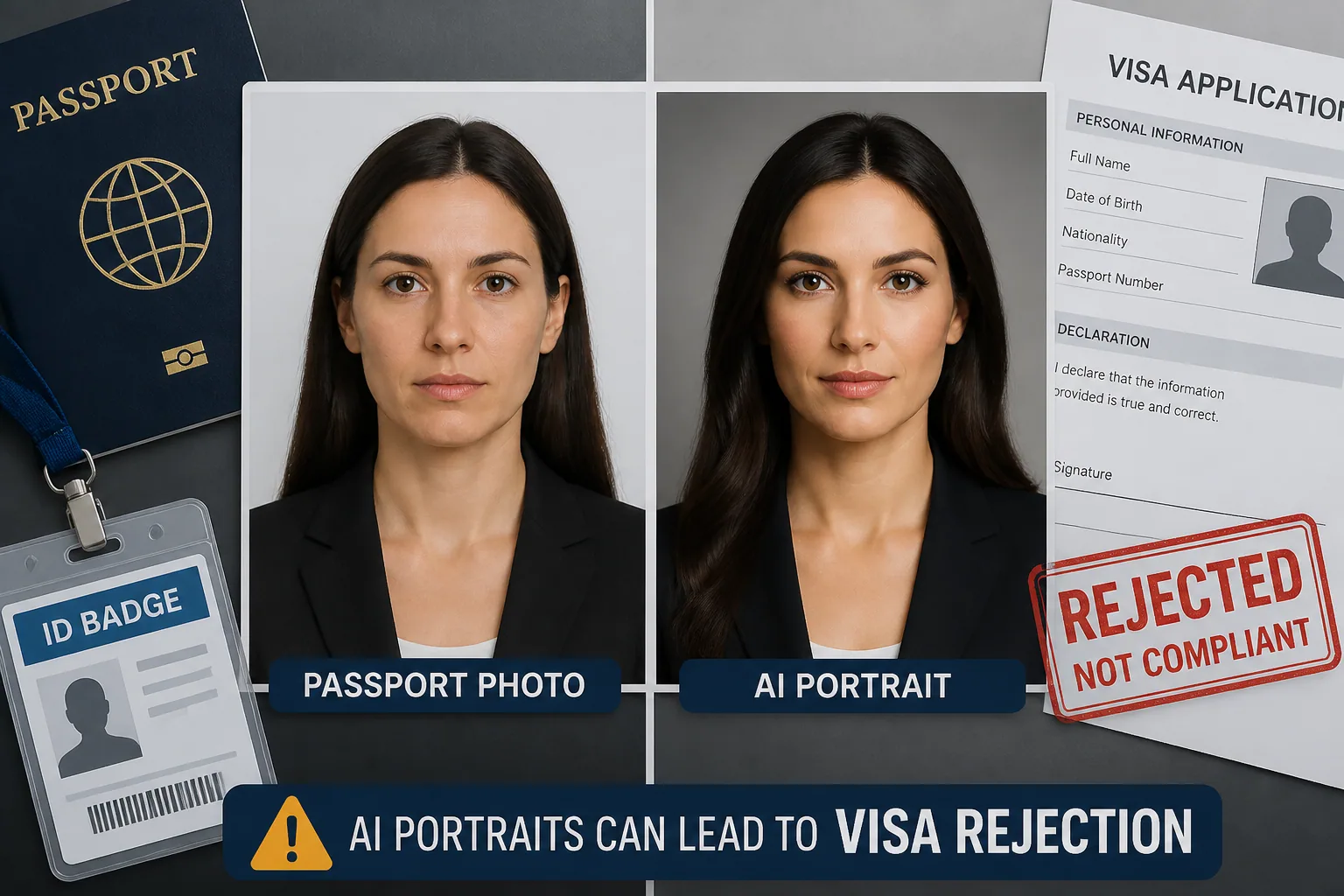
AI portraits can look polished, flattering, and impressively realistic, but official documents are a very different category from social media, dating profiles, or personal branding. A passport, visa, driver’s license, employee badge, or professional certification photo is not mainly about style. It is about identity verification, facial recognition, and legal acceptance. That is why AI-generated portraits and heavily enhanced selfies sit in a risky gray area: they may look better than a normal snapshot, but the more they improve or alter your face, the more likely they are to run into compliance problems.
If your goal is simply to look clean and professional, a light edit may be fine in some contexts. But once an image changes facial geometry, skin texture, shadows, proportions, or likeness, it can stop being a usable ID photo. In the sections below, we will walk through the standards most agencies use, where AI portraits tend to fail, and how to avoid costly delays or rejections.
Why AI Portraits for Official IDs Are a Risky Gray Area
The key issue is that AI portraits are designed to optimize appearance, while ID systems are designed to verify identity. Those two goals often conflict. A portrait generator may smooth skin, sharpen jawlines, brighten eyes, adjust symmetry, or even subtly change facial structure to create a more attractive image. That is useful for creative or professional presentation, but it can be a problem when the photo must match your live face and pass biometric checks.
Official photo rules usually care less about whether you look good and more about whether you look like yourself under neutral, standardized conditions. If an AI tool makes you look like an idealized version of yourself, it may still be visually appealing, but it can fail the real test: does the image represent a true likeness that can be matched against your identity documents and in-person appearance?
What Official ID Photo Rules Usually Require
Although the exact requirements differ by country and issuing authority, the same themes show up again and again. The background is typically plain, light, and free of shadows or patterns. The face must be clearly visible, centered, and correctly framed. The expression is usually neutral, with eyes open and mouth closed. Lighting should be even, with no strong flash reflection or dark shadow across the face.
The U.S. Department of State says passport photos must have a white or off-white background without shadows or patterns, and the face must be directly facing the camera with eyes open and the head not tilted. It also forbids changes made with computer software, phone apps, filters, or AI, including color correction for submitted photos. Source: https://travel.state.gov/content/travel/en/passports/how-apply/photos.html?linkId=33555566
The UK’s passport photo rules are similarly strict. GOV.UK requires uniform lighting with no shadows or flash reflection on the face, a neutral expression with the mouth closed, and no software manipulation such as softening lines, removing blemishes, or altering the hairline. The reason is straightforward: digital alterations can interfere with facial biometrics. Source: https://www.passport.service.gov.uk/help/photo-rules?lang=en
The international ICAO guidance used in passport systems is also very specific. The face from chin to crown should take up roughly 70 to 80 percent of the image, eyes must be visible and open, no shadows should fall on the face or background, the background should be plain and light, and skin tones should remain natural. Source: https://www.cgisf.gov.in/docs/1632783591ICAO Guidelince for Passport Photographs.pdf
How AI Portrait Tools Differ From Standard Compliant Photos
AI portrait tools are built to create enhancement, variety, and visual appeal. They often do this by altering features in ways that a compliance checker may see as material changes. For example, a portrait app might smooth blemishes, reduce facial lines, retouch under-eye areas, reshape the jaw, whiten teeth, brighten eyes, or generate more dramatic lighting than what was actually captured. In a creative context, those edits are the point. In an identification context, they can be a liability.
Even when the result still resembles you, the issue is that compliant ID photos are expected to be straightforward representations, not beautified renderings. That means image enhancements that seem minor on a phone screen can become a problem when checked against biometric rules, print quality standards, or manual review by a clerk who is trained to look for inconsistencies.
A further complication is that AI tools may produce synthetic textures or unnatural transitions that are not obvious at first glance. Skin may look too smooth, shadows may not match the lighting direction, and details around hair, ears, or the jawline can become subtly distorted. Those are exactly the kinds of issues that can cause the image to feel “off” even when it is hard to explain why.
Where AI Images Are Most Likely to Be Rejected
AI-edited images are most likely to be rejected in systems with strict biometric enforcement, especially passports and visa applications. These are the areas where likeness and image integrity matter most, because the photograph may be used not just for visual identification but also for automated matching across borders and databases.
U.S. passport and immigration submissions that are overly edited or that show only idealized features increase the risk of delays, resubmission requests, or rejection. The same logic applies to other identity workflows that rely on standardized comparisons. Source: https://assets.aila.org/files/8f9d13b2-715c-498b-a06c-e3e6492d21b5/25121764.pdf?1765990429=
Employee badges and professional certifications may seem more flexible, but they can still have internal standards. A company may reject a portrait that looks too artistic or too heavily retouched because it does not match HR records or security systems. The safest assumption is that the more formal the use case, the less tolerance there is for AI-style beautification.
Passports, Visas, Driver’s Licenses, and Work IDs: Policy Differences to Know
Not every ID photo is governed by the same level of scrutiny, and that is where confusion often starts. Passports and visas usually sit at the strictest end of the spectrum because they are tied to travel, border checks, and cross-system identity verification. Driver’s licenses and state ID cards can also be strict, but the practical enforcement may vary by jurisdiction. Work IDs and badges often depend on company policy rather than a national standard, although security teams still tend to reject photos that are too stylized.
For example, Dutch ID and passport photo standards require a natural likeness that is unaltered by computer software, and the photo must be recent, in color, sharp, and printed on high-quality photo paper. Source: https://www.government.nl/themes/justice-security-and-defence/identification-documents/requirements-for-photos
Greece likewise requires a uniform background free of patterns, shadows, or objects, a neutral expression with a closed mouth, eyes open and visible, no sheen or reflection, and natural colors without oversaturation. Source: https://www.passport.gov.gr/en/tools/faq/downloads/texnikes-prodiagrafes-photo/specificationphoto.html
In practice, the lesson is to treat each issuing authority as its own rulebook. If you are applying for a passport in one country, a visa in another, and a workplace badge at a third organization, do not assume that one edit style will be acceptable everywhere.
The Legal Risks of Submitting an Altered or Synthetic Likeness
The legal risk is not just rejection. In some jurisdictions, submitting an image that materially changes your appearance can create misrepresentation issues if the photo is considered part of an official identity declaration. That is especially important when the photo is used for identity verification, fraud prevention, or a legal credential.
This does not mean every small touch-up is illegal. The problem starts when the image no longer reflects your real face in a reliable way. If the alterations are significant enough to interfere with recognition or make you appear materially different from the person standing in front of the camera, the submission can create compliance, fraud, or documentation problems depending on the rules in that place.
Because those consequences vary by country, state, and agency, the safest approach is to assume that any AI-generated face swap, facial reshaping, or strong beautification effect is too risky for official use unless the authority explicitly says otherwise.
Common Quality Problems That Trigger Photo Rejection
Photo rejection is often caused by problems that seem small to the applicant but are obvious to reviewers and biometric systems. Some of the most common include altered facial geometry, over-retouching, inconsistent shadows, synthetic skin texture, and incorrect crop ratios. Those issues can make a face harder to match, even when the photo looks impressive at first glance.
A common example is heavy contouring or dramatic makeup that changes the apparent shape of the nose, jaw, or cheekbones. In U.S. state DMV contexts, natural makeup is generally allowed, but heavy contouring or anything that materially alters facial appearance can lead to rejection. Source: https://legalclarity.org/can-you-wear-makeup-in-a-driver-s-license-photo/
Lighting problems also matter more than people think. Harsh flash can flatten the face, create glare, or produce strong shadows. Uneven lighting can make one side of the face look different from the other, which is especially problematic when the image is compared with biometric templates or an in-person inspection.
Cropping is another frequent failure point. The face may be too small, too large, too high, too low, or tilted. ICAO guidance expects the face to occupy a specific portion of the image, and U.S. passport rules specify a 2 by 2 inch photo with the correct head size between 1 and 1 3/8 inches from chin to top of head. Source: https://travel.state.gov/content/travel/en/passports/how-apply/photos.html?linkId=33555566
How Much Retouching Is Too Much for Formal Identification
A useful rule of thumb is that retouching should never change identity, only image quality. That means minor exposure correction, straightening a scan, or removing accidental dust from a printed copy may be acceptable in some workflows if the authority allows it. But once the edit removes blemishes, softens wrinkles, changes hairlines, narrows the face, enlarges eyes, or artificially improves symmetry, you are moving away from compliance and into alteration.
The UK guidance is especially direct about what not to do: do not soften lines, remove blemishes, or alter the hairline. The U.S. State Department similarly prohibits computer software, apps, filters, and AI on submitted photos. That is a strong signal that formal ID photos are not the place for beautification edits. Sources: https://www.passport.service.gov.uk/help/photo-rules?lang=en and https://travel.state.gov/content/travel/en/passports/how-apply/photos.html?linkId=33555566
If you are unsure whether an edit crosses the line, ask one question: would a stranger comparing the edited photo to your real face immediately recognize you without hesitation? If the answer is no, the edit is probably too much for official use.
When You Should Disclose That an Image Was AI-Generated
Disclosure becomes important when the receiving authority asks about source, editing, or authenticity, or when the workflow includes any statement about unaltered likeness. In formal settings, honesty matters because the decision-maker is not judging creativity; they are deciding whether the photo can be trusted as an identity document component.
If an agency specifically bans software manipulation, AI, or filters, then disclosure is not just courteous, it is functionally required by the rules. If a workplace or licensing body has a less explicit policy, you should still be cautious. When in doubt, ask directly whether AI-assisted edits are allowed and, if so, what kinds of edits are acceptable.
The safest wording is straightforward: ask whether the image must be an unedited photograph, whether light corrections are allowed, and whether photos generated or enhanced by AI are acceptable. If the answer is unclear, do not guess. A quick clarification can save you from a costly resubmission later.
Safer Ways to Edit a Selfie Without Breaking Compliance
If you want the cleanest possible official photo, the safest method is to start with a normal, well-lit selfie or camera photo and keep edits minimal. Focus on basic corrections only: straighten the image, make sure the face is centered, and remove accidental background distractions if the rules permit that kind of cleanup. Avoid any edit that changes your facial shape, skin texture, or expression.
Natural makeup is usually less risky than digital retouching because it does not alter the image file itself. Still, makeup should not create strong highlights, heavy contouring, or a dramatic look that changes how your features read on camera. The goal is a clear, neutral, recognizable face, not a glamorous portrait.
If you are using AI tools for creative portraits, keep those separate from compliance photos. An app like Selfie AI: AI Photo Generator can be great for polished business portraits or styled personal images, but it is not the place to experiment with features you plan to submit to a passport office or DMV. You can see it here: https://findthe.app/selfie-ai-0xi7wd
Best Practices for Cropping, Printing, Scanning, and Digital Submission
Even a compliant image can fail if it is exported, printed, or scanned poorly. For digital submission, use the format and dimensions requested by the authority, and avoid compressing the file so much that details become blurry. For printed photos, use high-quality photo paper and make sure the colors stay natural, not overly saturated or washed out.
If you are preparing a printed image for scanning, keep the original photo crisp and well lit before it is printed. Re-scanning a print can introduce shadows, moiré patterns, or loss of detail that can make the photo unusable. This is why some authorities, such as the Dutch government, explicitly mention sharpness, sufficient contrast, and high-quality photo paper as part of the standard. Source: https://www.government.nl/themes/justice-security-and-defence/identification-documents/requirements-for-photos
Always check the submitted size requirements before you finalize anything. U.S. passport photos, for instance, must be 2 by 2 inches, with a specific head size. If your face is cropped too tightly or left too small in the frame, the photo may be rejected even if the face itself looks perfect.
A Pre-Submission Checklist to Avoid Delays, Rejections, or Legal Trouble
Before you submit any official photo, run through a simple compliance check. Is the background plain and light? Is the lighting even, with no shadows or flash reflections? Is your expression neutral, with eyes open and mouth closed if required? Is your face centered and sized correctly? Does the image still look like you without obvious AI smoothing, reshaping, or beautification?
Next, verify that the image meets the specific rules of the issuing authority. Do not rely on general internet advice if you are submitting a passport, visa, driver’s license, badge, or certification photo. Jurisdiction matters, and small differences in standards can change whether a photo is approved or rejected.
Finally, keep in mind the most important principle of all: official documents reward accuracy, not enhancement. If you want an AI portrait for a website, profile, or creative project, that is a different use case entirely. But if the image is for identity verification, the closer it stays to an ordinary, truthful photograph, the safer you are.