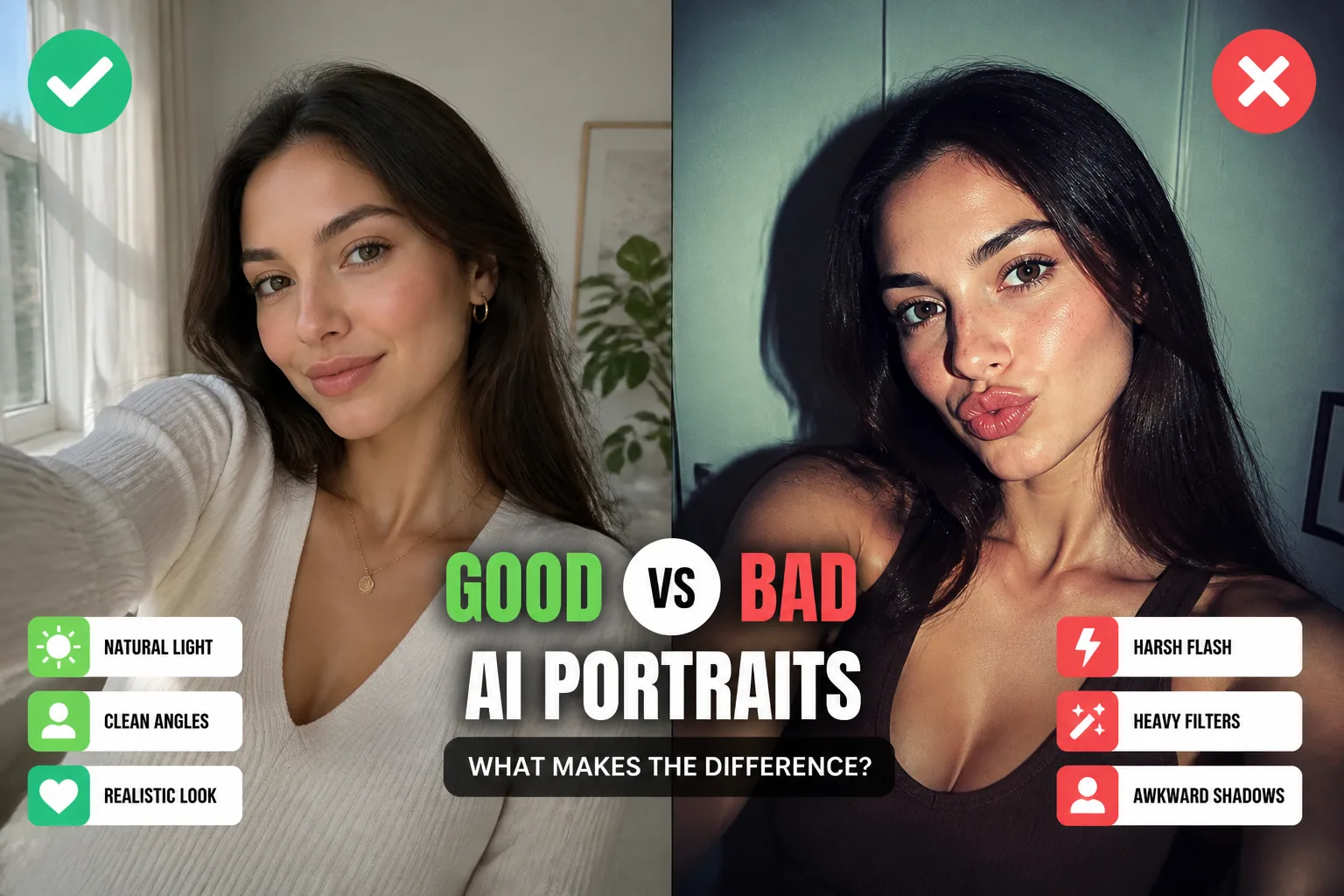
How to Choose the Best Input Selfies: Lighting, Angles, and Authenticity for AI Portraits
If you want AI portraits that actually look like you, the quality of your input selfies matters a lot. The AI can only work with what you give it, so the best results usually come from photos that are clear, natural, and consistent without being overly polished. That means paying attention to three essentials: lighting, angles, and authenticity.
A great selfie set does not need to be perfect. In fact, too much editing, heavy filters, or dramatic poses can make it harder for AI to preserve your real facial structure. The goal is simple: help the model see your face as clearly as possible so it can reproduce your likeness in a flattering, believable way.
Why Input Selfies Matter for AI Portrait Quality
AI portrait tools learn patterns from the photos you upload. If those photos are blurry, shadowy, filtered, or inconsistent, the model has to guess more often. That guessing can lead to strange skin texture, misplaced features, or a portrait that feels close but not quite you.
On the other hand, strong input selfies give the AI a clean reference for your face shape, eye placement, smile, jawline, and natural coloring. When those details are visible, the system can build a much better personal model. This is especially important if you want portraits that look realistic across different styles, from professional headshots to creative or themed images.
What Makes a Selfie Good for AI Training or Generation
The best selfie for AI is usually one that is sharp, well lit, and taken in a straightforward pose. You want your face to be easy to read. That means the camera should capture your features clearly, without heavy occlusion from hair, hands, hats, sunglasses, or strong shadows.
Consistency also helps. If one photo is taken indoors under yellow light, another in bright sun, and another with a beauty filter, the AI may struggle to understand what your face really looks like. A good selfie set gives the model multiple angles and expressions, but still keeps the core look of your face easy to identify.
The Best Lighting: Natural Light, Open Shade, and Even Exposure
Lighting is one of the biggest factors in whether a selfie works well for AI portraits. The strongest upgrade is soft, diffused natural light, especially when you are facing a window that is not in direct sunlight. According to HowToGeek, this kind of light reduces shadows, smooths skin texture, and creates more flattering portrait results: https://www.howtogeek.com/747634/6-tips-for-taking-better-selfies/
If you are shooting outdoors, open shade is another excellent option. Viewbug notes that shade from trees, buildings, or a porch softens shadows and helps you avoid the squinting that comes with direct midday sun: https://www.viewbug.com/blog/how-do-i-use-natural-light-for-photography
For an especially nice effect, place window light at roughly a 45° angle to your face. PhotoWorkout explains that this creates subtle shadowing and depth, often called a Rembrandt-style look, which helps define facial shape without making features difficult to see: https://www.photoworkout.com/portrait-photography-lighting/
Golden hour can also be a strong choice. This is the short time after sunrise or before sunset when the light is warm, soft, and gentle on skin tones. It gives a natural glow without the harsh contrast of midday sun, which often makes portraits look more uneven or washed out.
Lighting Setups to Avoid: Harsh Sun, Flash, and Deep Shadows
Not all light is helpful. Harsh direct sun can create strong shadows under the eyes, nose, and chin, making your face harder for AI to read. It can also cause squinting, blown highlights, and uneven exposure, all of which reduce image quality.
Camera flash is another common issue. Flash often flattens the face, creates bright hot spots, and removes the natural depth that helps the AI identify your features. Deep shadows are just as problematic because they hide key details like the eyes and contours of the jawline.
If a photo is dark, overly contrasted, or has one side of your face hidden, it may still look dramatic to a human viewer but less useful to an AI system. For best results, aim for even exposure where your features are visible and the light feels soft rather than harsh.
Best Angles for Preserving Likeness
Angle matters because AI needs to understand the structure of your face, not just the front of it. Front-facing shots and slight three-quarter angles are usually the best choices. CrushFrame recommends angles around 0° or 20 to 30° turn because they help the model read symmetrical and structural details more accurately, including the eyes, nose, and jawline: https://crushframe.com/blog/selfie-checklist-for-ai-generation
This does not mean every photo must look exactly the same. A small amount of variety is useful because it gives the AI multiple views of your face. But extreme side profiles, tilted heads, or unusual camera angles can confuse the model if they dominate your selfie set.
A good rule is to keep most of your reference photos simple and natural. If you include some slightly different viewpoints, make sure the core facial features stay clearly visible in each one.
How Much Variety to Include in Your Selfie Set
Variety is important, but too much variety can be counterproductive. You want a set of selfies that shows your face in a few different ways without changing your identity too much. Different angles, a couple of expressions, and a mix of indoor and outdoor light can help AI build a better picture of your appearance.
Pict.AI notes that multiple high-quality reference photos are better than one, because they help anchor identity features more reliably: https://pict.ai/blog/how-to-keep-same-face-in-ai-images/
In practice, that means choosing photos that are consistent enough to be clearly about the same person, but varied enough to show important details from more than one perspective. Think of it as giving the AI a balanced portrait of you, not a random collection of selfies.
Why Authenticity Beats Perfection
When it comes to AI portraits, authenticity usually beats perfection. A photo that looks a little more real is often more useful than one that has been heavily edited to look flawless. That is because AI works best when it can observe your natural face texture, proportions, and expression.
A Getty Images survey found that 65% of adults globally prefer brands that use real, unedited photos in advertisements, according to DigitalCameraWorld: https://www.digitalcameraworld.com/photography/photo-editing/put-down-the-photoshop-brushes-i-just-read-a-statistic-on-how-many-adults-prefer-unedited-photos-and-im-stunned
The same instinct applies to your selfie set. Real skin texture, natural lighting, and everyday expression give the AI more honest information to work with. The result is usually a portrait that feels more like you instead of a stylized approximation.
Filters, Makeup, Glasses, and Styling: What Helps or Hurts
Beauty filters are one of the biggest mistakes people make. CrushFrame and CiCi Cam both point out that filters, skin smoothing, and heavy blur can remove distinguishing details and force AI to invent features that were never really there: https://crushframe.com/blog/selfie-checklist-for-ai-generation and https://cici-cam.com/blog/do-beauty-filters-look-fake/
Makeup can be fine if it reflects your everyday look, but dramatic contouring, strong color effects, or very different makeup styles across photos can create inconsistency. The same is true for glasses. If you normally wear glasses, include some photos with them, but make sure you also have clear shots where your eyes and brows are fully visible.
Hair styling matters too. If your bangs cover one eye in some photos but not others, the AI may have trouble seeing that area consistently. Try to keep at least several photos with your face fully open and visible.
Backgrounds, Framing, and Photo Quality Basics
A clean background makes a bigger difference than many people expect. Busy patterns, clutter, or distracting objects can confuse the edges of your face and introduce unwanted artifacts into the AI-generated portrait. A neutral wall, simple outdoor background, or softly blurred setting is usually ideal.
Framing also matters. Your face should be large enough in the image for the details to be clear, but not so tightly cropped that features are cut off. Keep the top of the head, chin, and both sides of the face visible when possible. Sharp focus is just as important, since blurry photos make it harder for the model to learn your real features.
High-resolution photos are helpful, but clarity matters more than megapixels alone. A well-lit smartphone selfie can work better than a technically larger image that is dark, grainy, or overprocessed.
Common Selfie Mistakes That Lead to Weird AI Results
Many strange AI portraits come from avoidable selfie mistakes. One of the most common is harsh shadowing, especially around the eyes or jawline. Another is hiding part of the face with hair, hands, sunglasses, a hat, or a strong pose that blocks important features.
Other problems include using too many heavily edited photos, mixing wildly different hairstyles, or uploading images that do not actually look like the same person because of filters or old photos. Even if each photo looks attractive on its own, the set can become confusing when combined.
If your results look off, the problem is often not the AI itself but the input set. Cleaning up the source photos usually fixes a lot of the weirdness.
A Simple Checklist for Choosing Your Best Input Photos
Before uploading selfies, run through a quick checklist. Is the lighting soft and even? Is your face clearly visible? Are your eyes, nose, mouth, and jawline unobstructed? Is the background simple? Are the photos sharp and mostly unfiltered? If the answer is yes, the photo is probably a strong candidate.
It also helps to choose a small collection of photos that cover the basics: one or two front-facing shots, a few slight three-quarter angles, a couple of relaxed expressions, and maybe one outdoor image in open shade or golden hour. That gives the AI enough information without overcomplicating the set.
In short, choose photos that look like the best natural version of you, not the most edited version of you.
Final Tips for More Realistic and Consistent AI Portraits
If you want more realistic AI portraits, start with better selfies. Soft natural light, clear facial visibility, simple backgrounds, and honest expressions do more for quality than most people realize. The best input is usually not the most glamorous selfie, but the one that shows your face most clearly and accurately.
Once you have a strong set, tools like Selfie AI: AI Photo Generator can turn those photos into polished portraits, themed looks, and even animated videos while keeping your likeness at the center of the result: https://findthe.app/selfie-ai-0xi7wd
The bottom line is simple. If you want AI portraits that feel true to you, give the system a true version of you to learn from. Natural light, sensible angles, and authentic photos are the easiest way to get there.