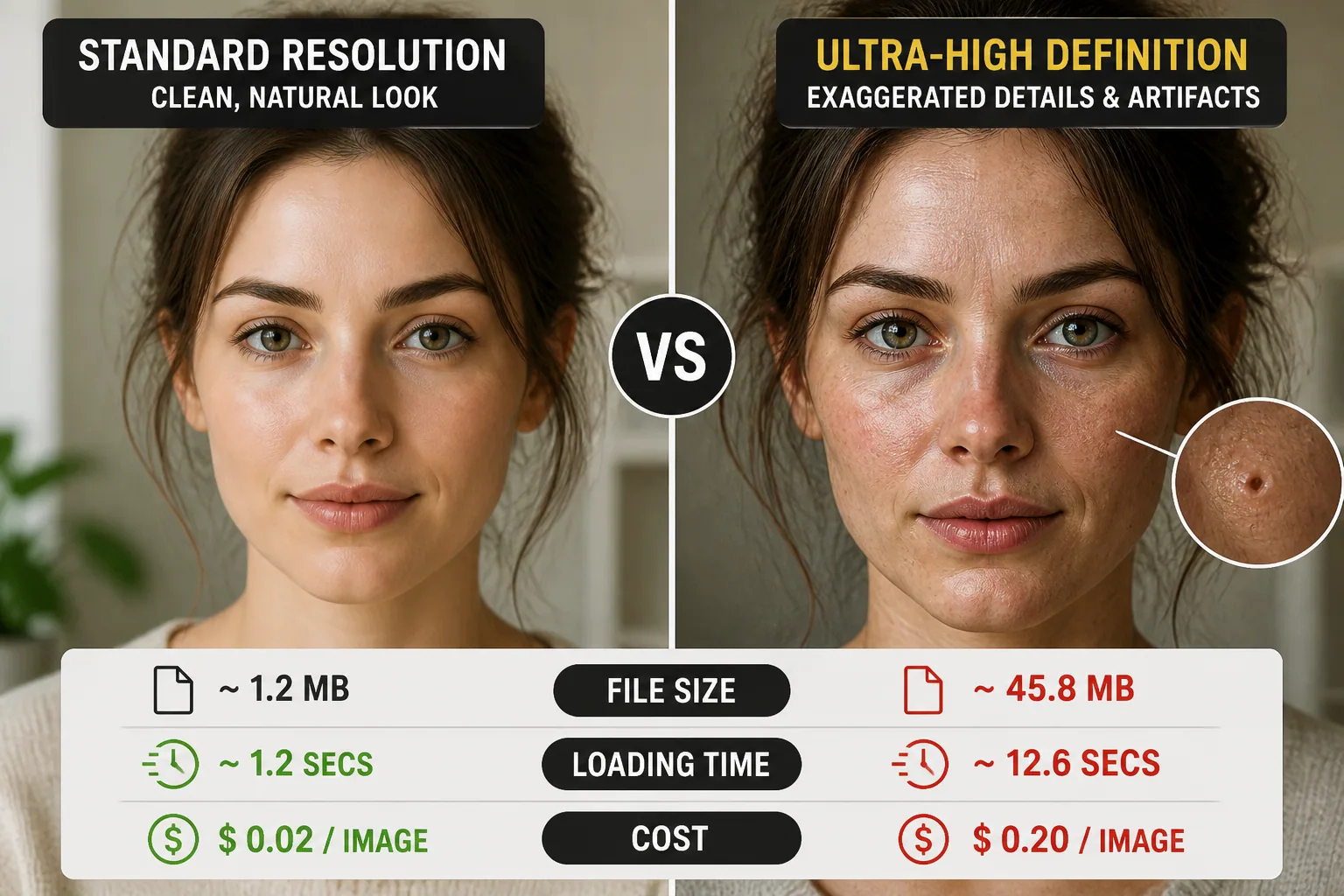
The Hidden Cost of Pixel Perfection: Why Ultra-High Definition AI Portraits Can Backfire
Ultra-high definition sounds like an automatic upgrade. More pixels, more realism, more professionalism. In practice, that promise is only sometimes true. For AI portraits, chasing the highest possible resolution can create bigger files, slower rendering, more storage demand, and higher costs, while delivering only a small visual gain in many everyday situations. In some cases, it can even make a portrait look less natural by exaggerating skin texture, sharpening odd details, and exposing artifacts that would have stayed hidden at a lower size.
The real question is not whether a portrait can be made bigger. It is whether it needs to be. For social media profiles, website bios, creator headshots, and many marketing uses, the smartest choice is often a resolution that looks clean and credible without overloading the workflow. And if you want to experiment with different portrait styles, a tool like Selfie AI: AI Photo Generator can help you generate polished results in a range of looks without making resolution the only thing that matters: https://findthe.app/selfie-ai-0xi7wd
Why Ultra-High Definition Sounds Better Than It Often Is
The phrase ultra-high definition carries a built-in sense of quality. People naturally associate more detail with better cameras, more advanced tools, and more premium results. That is not entirely wrong. Higher resolution can absolutely help when a portrait needs to hold up on a large screen, in a printed brochure, or in fine-art output. But for many AI portraits, the extra pixels are not solving a real problem. They are solving an imagined one.
What matters most in a portrait is usually composition, lighting, expression, skin tone consistency, and how believable the face feels at the size it will actually be viewed. A sharp 8K image of a face with awkward symmetry or strange eye placement still feels off. A well-made 2K or 4K portrait with a natural expression can often look better in the real world because it matches the way people actually see images online.
Research supports the idea that the improvement from more resolution can be modest rather than dramatic. A recent study on facial images in ultra-high resolution found that 8K faces received slightly higher attractiveness ratings than low-resolution versions, especially when the faces were already judged as attractive, but the gain was modest overall. That suggests resolution can help, but it is not a magic wand for making a portrait convincingly better. Source: https://pubmed.ncbi.nlm.nih.gov/42275306/?fc=20240423213146&ff=20260612060511&v=2.20.0
The Real Technical Cost of Bigger AI Portraits
Higher resolution does not just mean a bigger file. It also means more work at every stage of the pipeline. More pixels require more GPU memory, more bandwidth, more compute, and more time. Since image processing generally scales with pixel count, doubling both width and height from 4K to 8K means about four times as many pixels, which can mean roughly four times the processing overhead. That is why ultra-high-definition generation and upscaling feel slower, heavier, and more expensive than they first appear.
The energy cost can rise as well. A study on AI image generation found that doubling the resolution of a model can increase energy consumption by a factor between 1.3x and 4.7x depending on the architecture. In other words, the jump to ultra-high definition can meaningfully increase the computational footprint even when the final image is only slightly better for the viewer. Source: https://arxiv.org/abs/2506.17016
Cost in commercial APIs shows the same pattern. For example, GPT Image 2 pricing rises sharply with size and quality, with a 3840×2160 image at high quality costing around $0.40 per output image, while smaller or lower-quality settings can fall below $0.01. That kind of pricing gap matters for creators, teams, and businesses producing images at scale. Source: https://blog.laozhang.ai/en/posts/gpt-image-2-api-pricing
Storage is another hidden expense. Modern 45-megapixel camera RAW files commonly average 50 to 70 MB each, while 24-megapixel RAWs are closer to 25 to 30 MB. JPEGs are smaller, but the difference still adds up fast when you export many versions, keep backups, or maintain archives. Source: https://photocalcs.com/guides/storage-planning-for-photographers/
For working photographers in 2026, delivery storage, archive storage, and backup storage all add up quickly. The guidance from current storage planning estimates puts delivery JPEGs at roughly 45 to 100 GB per year, with 1 to 4 TB per year needed for RAWs and edits, plus similar backup space under the 3-2-1 rule. That is a lot of overhead for portraits that may only be used as a profile photo or website bio image. Source: https://framekit.ai/blog/how-much-storage-do-photographers-need-2026
When More Detail Improves Realism and Trust
There are cases where higher resolution genuinely helps. If a portrait will be shown on a large monitor, included in a press kit, printed in a magazine, or used in a premium brand setting, more detail can support trust. The face looks cleaner at larger sizes, edges remain stable, and the image can survive cropping without immediately falling apart.
Higher resolution is also useful when the image needs to communicate professionalism. Corporate bios, speaker pages, author pages, and investor-facing materials often benefit from a portrait that feels crisp and current. A sharper image can suggest care and polish, especially when the portrait is part of a broader brand identity that values precision.
For fine art and gallery prints, resolution matters even more. A 4K image, which is roughly 3840×2160 or about 8.3 megapixels, can print beautifully up to about 13×7 inches at 300 DPI. An 8K image, about 7680×4320 or 33.2 megapixels, can reach around 25.6×14.4 inches at 300 DPI. Past typical print sizes, the visual gain from 8K starts to diminish unless viewers are standing very close. Source: https://www.gallerixes.com/guide/8k-vs-4k
So yes, more detail can matter. But it matters most when the viewing distance, output format, and brand context can actually take advantage of it. Otherwise, the extra pixels are just carrying extra cost.
How UHD Can Magnify Flaws and Uncanny Artifacts
One of the most important trade-offs with ultra-high-definition AI portraits is that greater detail can reveal problems more clearly. That sounds obvious, but it has a real aesthetic effect. A portrait that looks smooth and flattering at moderate resolution may become distracting when every pore, hair edge, and lighting inconsistency is pushed into view.
Upscaling algorithms can also introduce their own problems. Common artifacts include halos around hair, waxy skin, and edges that look overly sharpened. The more you enlarge the image, the easier it becomes to notice these issues. What once looked impressive can start to feel synthetic. Source: https://blog.picassoia.com/how-to-upscale-portraits-without-artifacts
This is especially true with AI-generated faces, which often already trend toward flattened skin texture. Many models smooth pores, erase fine lines, normalize color, and intensify symmetry. At a lower resolution, those tendencies may be less obvious. At ultra-high resolution, they can become glaring and contribute to the plastic, uncanny look people often complain about. Source: https://prompture.app/blog/why-ai-portraits-look-plastic
That means a higher-resolution portrait is not always more believable. Sometimes it is just more honest about its flaws. If the face has small inconsistencies in the eyes, mouth, ears, or hairline, UHD can make them easier to spot. In that sense, resolution can act like a spotlight, and not every portrait benefits from being put on stage under bright lights.
Choosing the Right Resolution for Social Media, Bios, and Print
The best resolution depends on where the portrait will live. For social media profiles, most platforms compress images aggressively and display them at small sizes. That means extremely high resolution often provides little practical advantage. A portrait that looks clean at 2K to 4K on a long side is usually more than enough for a profile picture, avatar, or creator bio image.
For website bios and personal landing pages, the same logic applies. Visitors often see the portrait in a narrow column or small card. If the image loads faster and still looks sharp in that context, the user experience improves. This is one reason many creators and brands find diminishing returns beyond roughly 2K to 4K for common web uses. The image is larger, but the audience is not actually seeing more of it.
Marketing materials are a little different. A portrait used in a banner, pitch deck, brochure, or ad can benefit from higher resolution if it will be cropped, enlarged, or printed. In those cases, aim for the largest size that genuinely serves the layout, not the largest size the tool can produce. That reduces the chance of unnecessary bloat while keeping the image flexible enough for design work.
Print is where resolution becomes most important. If the final output is a poster or fine-art print, the extra detail may be worth the cost because the image will be viewed up close and at larger dimensions. But if the print is small, such as a business card or a single-page flyer, the same ultra-high-resolution file may offer little visible benefit compared with a clean, well-exported medium-resolution version.
Smart Ways to Optimize Large AI Portrait Files
If you do need higher resolution, there are several ways to keep the workflow practical. First, export only what you need. Do not keep every portrait in its largest possible version by default. Make a master file if necessary, then create smaller deliverables for web, social, and email use. That keeps the working set manageable and prevents repeated uploads of oversized files.
Second, choose the right format. JPEG is often the best choice for standard portraits because it delivers a strong balance of quality and file size. PNG can be useful when you need transparency or very clean edges, but it usually produces larger files. For most portrait applications, a well-compressed JPEG is enough.
Third, compress deliberately. Good compression is not about ruining the image. It is about removing wasted bytes while preserving the features that people actually notice. A portrait that loads quickly and looks natural at the intended display size will usually outperform a giant file that takes too long to open.
Fourth, create size variants for different channels. A square profile image, a vertical website portrait, and a print-ready file do not need to be identical. Matching the export to the use case saves time, reduces storage, and keeps the file system easier to manage.
What Premium Users Should Consider Before Paying for Higher Resolution
Premium subscriptions often promise higher resolution, better quality, watermark removal, and sometimes video features. That can be a worthwhile upgrade, but only if those extras fit your actual needs. If you mostly post portraits to Instagram, LinkedIn, or a personal website, premium resolution alone may not justify the price. The stronger value may come from access to more styles, better prompt control, or video animation rather than raw pixel count.
This is where the feature set matters more than the spec sheet. For example, if you need custom scenarios, professional business portraits, or animated portrait content, premium tools can save time and expand creative options. Selfie AI: AI Photo Generator offers personalized AI model creation, custom prompts for premium users, higher-resolution results, and animated videos, which can be more useful than resolution alone for many creators and casual users alike: https://findthe.app/selfie-ai-0xi7wd
Before paying for higher resolution, ask a few practical questions. Will the image be printed large? Will it be cropped heavily? Will clients inspect it closely? Will it be shown on high-density displays at full size? If the answer is mostly no, then premium quality may not need to mean maximum resolution. The value may come from better consistency, faster production, or more flexible styling instead.
A Practical Rule: Match Resolution to the Job
The easiest way to avoid the hidden cost of pixel perfection is to stop treating resolution as a badge of quality and start treating it as a tool. The right size is the one that serves the job with the least waste. If the portrait is for social media or a website bio, choose a clean, efficient resolution that looks natural and loads quickly. If it is for print or a polished brand asset, go higher only as far as the output truly requires.
A simple rule works well in practice. Use moderate resolution for most online portraits, higher resolution for marketing and print, and ultra-high definition only when the final viewing conditions justify it. That approach protects realism, keeps files easier to manage, and prevents the uncanny exaggeration that can happen when AI portraits are pushed too far.
In the end, the best AI portrait is not the biggest one. It is the one that looks convincing in context, fits the platform, and delivers value without unnecessary cost. Pixel perfection sounds impressive, but smart resolution choices usually win in the real world.