Perfect Your Portraits: How to Avoid the Top AI Selfie Blunders
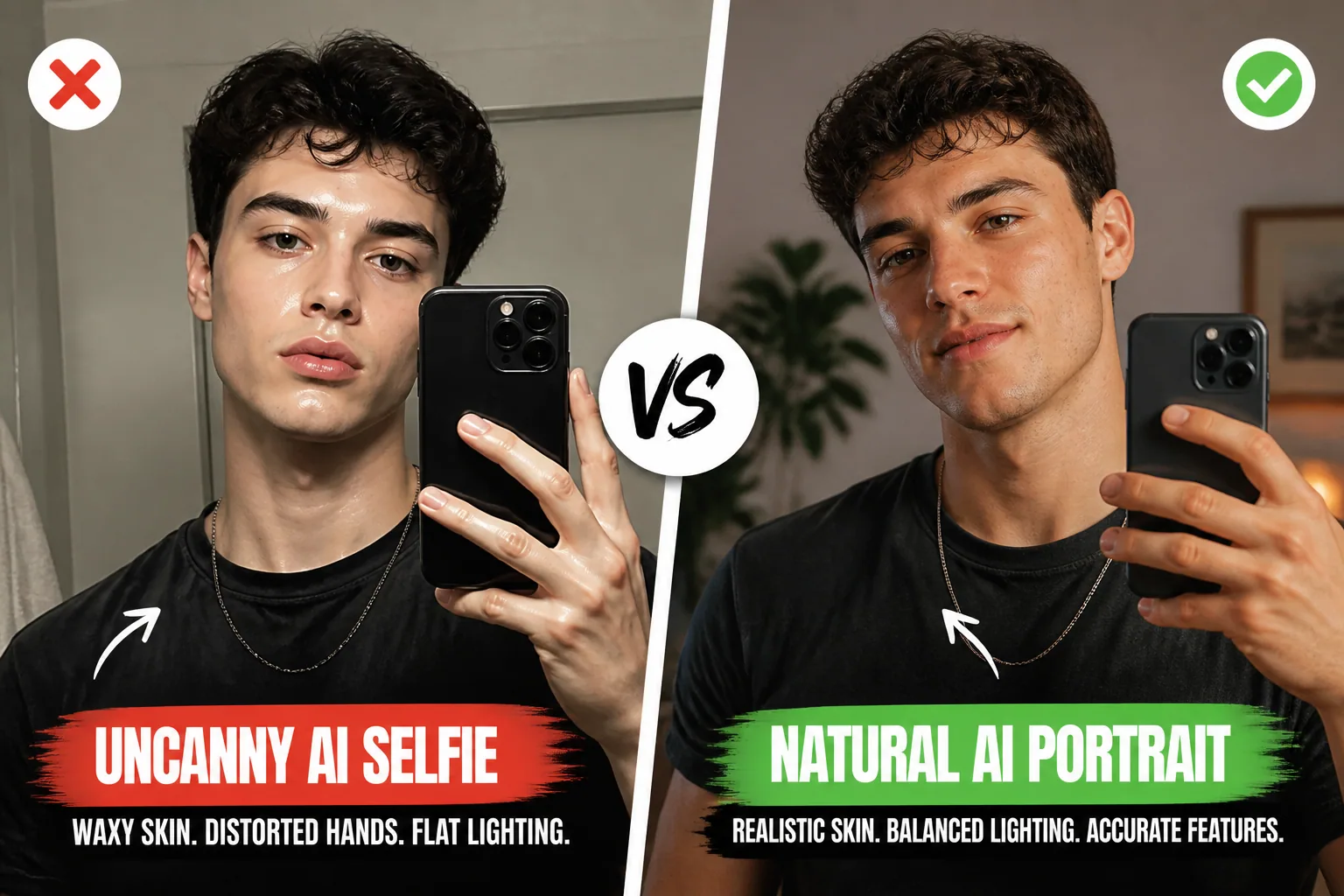
AI selfies can look amazing at first glance, but the moment something feels slightly off, the whole illusion breaks. A face may be too smooth, the eyes may look glassy, the lighting may disagree with the background, or a hand may appear with extra fingers and strange proportions. That is the uncanny valley problem in a nutshell: the image is close to real, but not quite believable enough to feel human.
The good news is that most AI portrait mistakes are predictable. Once you know what to watch for, you can guide the generator toward better skin texture, more accurate facial structure, natural asymmetry, and cleaner lighting. With the right references, stronger prompts, and a careful final check, you can create portraits that feel like you instead of a filtered version of a stranger.
Why AI Selfies Still Go Wrong in 2026
Even in 2026, AI portrait tools still tend to optimize for visual polish over human truth. That is why so many outputs look eerily perfect but emotionally flat. The model may sharpen cheekbones, erase pores, smooth away lines, and balance facial features until the result feels less like a person and more like a beauty-rendered mannequin.
Another reason is identity drift. General-purpose generators often average features together, especially when they are not trained or tuned for portrait consistency. The result is a face that resembles your selfie only loosely, or changes from one generation to the next. That is why using a portrait-focused model matters if you want recognizable results, not just attractive ones. Research from Narkis.ai notes that general-purpose image generators can fail at professional headshots because they drift away from identity and produce inconsistent faces across runs: https://narkis.ai/blog/why-general-purpose-ai-image-generators-fail-at-professional-headshots
There is also a technical mismatch between how humans see faces and how many generators construct them. Real people have uneven skin texture, slight asymmetries, imperfect hairlines, and subtle lighting variations across the face. AI often tries to regularize all of that, which is exactly why the image can feel uncanny instead of convincing.
The Uncanny Valley: What Makes a Portrait Feel Off
The uncanny valley is not just about realism. It is about believability. A portrait becomes unsettling when some parts look highly detailed but others do not obey the same logic. Eyes may be sharp but lifeless. Skin may look airbrushed while hair looks too synthetic. Shadows may point one way while the subject seems lit from another.
The eyes are especially important. According to Starkie.ai, AI headshots often suffer from mismatched catchlights, flat irises, and a glassy gaze that fails to reflect realistic light and texture: https://starkie.ai/articles/ai-headshot-uncanny-valley-why-ai-portraits-look-off
Facial symmetry can also push a portrait into the uncanny valley. Human faces are naturally asymmetrical, and AI sometimes overcorrects that, making eyebrows, nostrils, cheeks, and jawline look nearly mirrored. Starkie.ai highlights this as a common tell because perfect symmetry reads as synthetic rather than human: https://starkie.ai/articles/ai-headshot-uncanny-valley-why-ai-portraits-look-off
The fix is not to make the face messy or distorted. It is to preserve the quiet irregularities that real people have. A slightly uneven eyebrow, a subtle smile asymmetry, or a mild difference in eye openness can make a portrait instantly more believable.
Waxy Skin and Plastic Faces: How to Keep Natural Texture
One of the most common AI selfie problems is the plastic skin effect. Skin becomes over-smoothed, pores disappear, fine lines vanish, and the face ends up with that waxy, mannequin-like finish that screams AI. Bestphoto.ai describes this issue clearly, noting that many generated portraits erase pores and micro-blemishes until the skin looks unnaturally polished: https://bestphoto.ai/blog/why-ai-headshots-look-fake
The solution is to protect texture rather than remove it. In your prompt, you should ask for natural skin detail, visible pores, subtle facial texture, and realistic complexion variation. If you can influence the generation settings, avoid pushing beauty filters too far. The more you ask for perfection, the more likely the model is to erase the tiny details that make a face feel alive.
It helps to think in terms of realism cues. Freckles, faint under-eye texture, smile lines, a bit of redness around the nose, and gentle skin shine are not flaws in an AI portrait. They are authenticity markers. Starkie.ai points out that natural imperfections like blemishes, wrinkles, and facial fatigue are strong signals of realism when they are preserved or selectively added: https://starkie.ai/articles/ai-headshot-uncanny-valley-why-ai-portraits-look-off
If your portrait looks too airbrushed, do a simple texture check at full resolution. Zoom in and ask whether the skin has believable variation or whether it looks like smooth digital clay. If it is the latter, regenerate with stronger texture language and less beauty-driven phrasing.
Why Small Imperfections Make You Look More Human
A lot of people assume that perfect facial symmetry and flawless skin are the goal. In reality, those are often the exact things that make a portrait feel less human. Real faces carry history. They show expression, sleep, weather, movement, and age in small ways. Those micro-signals are what help our brains read an image as a real person.
That means a tiny asymmetry is not a defect to erase. It is part of what makes the portrait feel like you. If one eyebrow sits slightly higher, or one side of the mouth lifts more in a smile, keep it. If the face has slight under-eye shadows or natural skin variation, preserve them. AI often tries to tidy these away, but those details are exactly what anchor identity.
This also applies to hair, ears, and the outline of the face. Starkie.ai notes that hairlines can merge into skin, flyaway strands may behave unrealistically, and accessories like glasses can warp or glow at the edges: https://starkie.ai/articles/ai-headshot-uncanny-valley-why-ai-portraits-look-off
So when you review an image, do not just ask if it looks attractive. Ask if it looks lived in. A believable portrait often wins by being slightly imperfect in exactly the right places.
Match the Lighting to the Real Scene
Lighting is one of the fastest ways to make an AI portrait look fake. If the face is lit like a studio shot but the background suggests outdoor shade, or if one cheek is bright while the shadow direction makes no sense, the illusion collapses. Starkie.ai notes that lighting and shadow inconsistencies are a major realism breaker because the face and background no longer agree on where the light is coming from: https://starkie.ai/articles/ai-headshot-uncanny-valley-why-ai-portraits-look-off
To fix this, think about the environment before you think about the style. Is the subject indoors near a window, outdoors in noon sun, under warm evening light, or in a studio with softboxes? Once you decide that, describe the source and direction of light clearly. Side light, backlight, golden hour, soft frontal window light, or diffused studio lighting are all much better than vague references to good lighting.
If you are using reference photos, make sure the lighting in the references is coherent too. A face photographed in soft daylight will generally generate more believable portraits than a reference with mixed flash, overhead light, and colored reflections. The more consistent the visual input, the less the model has to invent.
A useful habit is to compare the face, neck, and hands under the same imagined light. If the face looks warm but the hands look cool, or the shadows do not match the background, regenerate. Realism usually lives in consistency.
Hands Are the Giveaway: How to Frame, Hide, or Fix Them
Hands remain one of the most obvious AI giveaways. They are difficult because they are complex, expressive, and often small in the frame. Pict.ai notes that AI frequently produces strange or incorrect hands, including extra fingers, fused joints, wrong proportions, and blurred details, especially when the hands are partially obscured or poorly lit: https://pict.ai/blog/why-ai-generated-hands-look-weird/
The easiest strategy is to simplify the composition. If hands are not important to the portrait, do not force them into the frame. Crop higher, rest the hands out of view, or choose a pose where they are not a focal point. AI is much better at faces than at hand choreography, so the less it has to invent, the better the result.
If hands are necessary, make them clearly visible and well lit. Do not ask the model to create hands in shadow, behind objects, or in awkward overlapping positions. Those are exactly the cases where it tends to fail. And if the hands still look off, regenerate or reframe rather than trying to rescue a broken pose.
The best quality check here is simple: count the fingers, check the joints, and compare the skin tone and lighting on the hands with the face. If the hands do not belong to the same world as the head, people will notice immediately.
Use Multi-Angle Reference Photos for Better Facial Accuracy
If you want the portrait to really resemble you, one selfie is not enough. Multi-angle reference photos give the model a better sense of your facial structure, including jawline shape, nose profile, eye spacing, and hairstyle behavior from different views. That is especially important when the model otherwise tries to guess or average your features.
A good reference set should include front-facing, three-quarter, and slight profile angles, ideally in similar lighting. Keep expressions natural and avoid heavy filters, dramatic makeup changes, or extreme lens distortion. The goal is not to make the references glamorous. The goal is to give the system stable identity information.
This is one of the most practical ways to reduce identity drift. If the model sees your face from multiple angles, it can anchor the portrait more accurately instead of inventing a generic version of a person. That usually means fewer strange jawlines, more believable cheek structure, and eyes that sit more naturally in the face.
If you are using a tool like Selfie AI, this is where creating a personal AI model can help. With a few clean selfies, you can build a stronger likeness foundation before exploring styles or scenarios. You can try it here: https://findthe.app/selfie-ai-0xi7wd
Stop Using Vague Prompts Like “Photorealistic”
One of the biggest prompt mistakes is relying on empty quality words. Photorealistic, ultra-detailed, highly realistic, and cinematic are not enough on their own. Models often default to generic beauty portrait behavior when the prompt does not tell them what makes the image believable.
A better prompt includes specifics: light direction, camera feel, skin texture, mood, lens character, and setting. Research from Reddit community discussions on layered prompting emphasizes that leaving out lighting direction, texture descriptors, or camera reference often leads to flat, glazed, or generic results, while more precise prompts improve realism: https://www.reddit.com/r/AI_Artz/comments/1uf36qj/why_your_ai_portraits_look_fake_and_the_fivelayer/
Instead of saying photorealistic portrait, try describing the actual visual logic of the shot. For example, ask for soft window light from the left, natural skin texture, subtle asymmetry, realistic catchlights, and a 50mm lens look. Those details give the model a framework for how the image should behave, not just how it should be labeled.
Good prompting is less about buzzwords and more about constraints. The more useful information you give the model, the less likely it is to fill the gaps with glossy, artificial defaults.
Prompt Formulas That Create More Lifelike Portraits
If you want more human portraits, build prompts around three things: identity, light, and texture. Identity keeps the face recognizable. Light keeps the scene coherent. Texture keeps the skin and features believable.
A simple structure can look like this: subject description, expression, lighting condition, environment, camera style, and realism cues. For example, a prompt might request a close-up portrait of a smiling woman by a window in soft morning light, natural skin texture, visible pores, slight facial asymmetry, subtle catchlights, and realistic hair strands. That is far more useful than stacking generic style adjectives.
You can also add pose and composition guidance. If hands are included, specify relaxed hands, visible fingers, and natural placement near the face or at the side of the body. If the subject is outdoors, mention the expected shadow direction and color temperature. Every extra piece of context reduces the chance of artificial guesswork.
It also helps to keep the prompt grounded in one scene at a time. Trying to combine too many styles, eras, and effects often creates visual conflict. The strongest portraits usually come from one clear idea, not ten competing ones.
Quick Checks Before You Share Your AI Selfie
Before posting or saving a portrait, do a short quality pass. First, zoom in to 100% and inspect the skin texture. Does it still look like skin, or does it look smoothed into plastic? Then look at the eyes. Are the catchlights aligned with the light source, and do the irises have depth? After that, check the face for symmetry. Is it so perfect that it feels artificial?
Next, compare the lighting across the whole image. Face, neck, hair, background, and hands should all agree on where the light is coming from. If anything feels disconnected, the portrait will probably read as AI even if you cannot explain why at first glance.
Finally, inspect the smaller details. Count fingers, look for warped glasses, check hairlines, and make sure accessories are structurally consistent. Pict.ai specifically recommends zooming in, matching skin tone and lighting between face and hands, counting fingers, and checking catchlights in the eyes because those details often reveal the AI look: https://pict.ai/blog/why-ai-generated-hands-look-weird/
This final review does not take long, but it can dramatically improve what you share. A few seconds of scrutiny can turn a suspicious-looking render into a convincing portrait.
How to Make AI Portraits Feel Like You, Not a Filter
The best AI portraits are not the most dramatic ones. They are the ones that preserve your identity while making the image feel polished and intentional. That means keeping the features that make you recognizable, preserving texture, respecting asymmetry, and matching the light to the scene instead of relying on generic beauty effects.
Think of the goal as controlled realism. You want enough refinement to look professional, but not so much smoothing or symmetry that the portrait loses its humanity. The face should still have slight complexity. The eyes should still reflect believable light. The skin should still feel like skin. And the hands, if visible, should look intentional and anatomically sound.
If you want an easier way to explore portraits, styles, and animated variations while keeping your likeness centered, Selfie AI: AI Photo Generator is a practical option for building custom looks from your own selfies. It can help you create personalized portraits, experiment with different scenes, and generate higher-quality results without starting from scratch every time.
In the end, a great AI selfie is not about perfection. It is about trust. If the viewer can look at the portrait and believe the person exists, the image has done its job. Keep the texture, respect the light, and guide the model with enough detail to stay human.