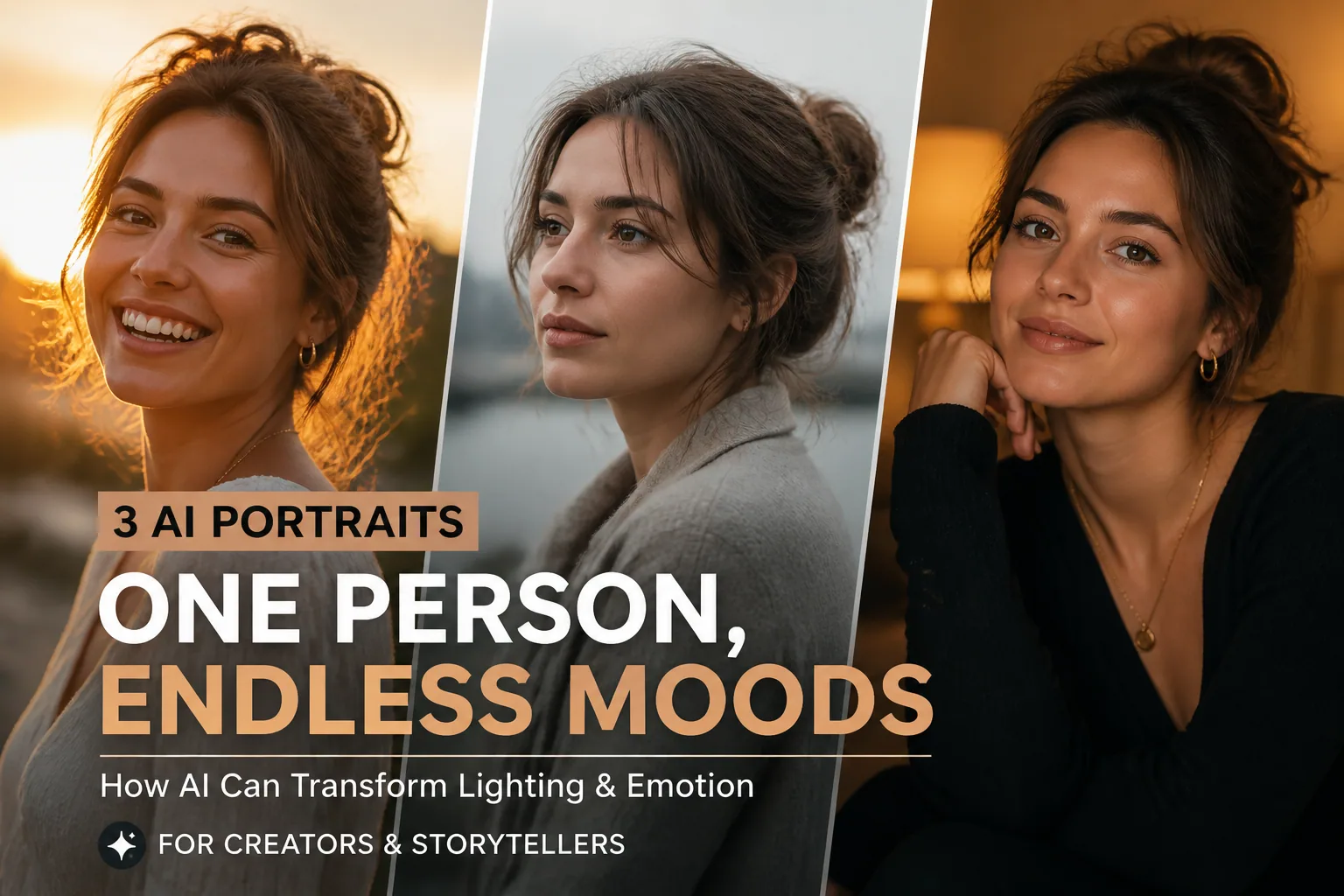
Mastering AI Photo Prompts for Realistic Lighting and Emotion
If you want your AI portraits to look believable, lighting and emotion matter more than almost anything else. A selfie prompt can describe a person, an outfit, and a background, but if the light feels flat or the expression feels mismatched, the whole image can look artificial. The good news is that AI can respond very well when you give it clear, photography-inspired instructions. The trick is to think less like you are asking for a generic portrait and more like you are directing a photoshoot.
This guide will show you how to write Selfie AI prompts that create realistic lighting, natural skin tone, and genuine emotion. You will learn how to translate familiar photography concepts like golden hour, soft overcast light, and warm indoor light into prompt language the model can follow. You will also see how small details like a slight smile, a downward gaze, or relaxed shoulders can completely change the emotional tone of a portrait.
Why Realistic Lighting and Emotion Matter in AI Portraits
When people look at portraits, they do not consciously analyze every technical detail. They respond to the overall feeling first. Does the image feel warm, calm, confident, playful, or sincere? Lighting and expression are the fastest ways to create that impression. If the lighting is too flat, the image can feel lifeless. If the shadow is too dramatic, the portrait may feel theatrical or unnatural. If the expression does not match the scene, the image can feel fake even when the face itself looks good.
There is also a practical reason to care about realism. Most AI portrait problems become obvious in the face and light. Overly smooth skin, strange shadows, mismatched color temperature, and odd reflections are the details that make viewers immediately sense something is off. In other words, realistic lighting is not just about beauty. It is about consistency. The more consistent the subject, light, and mood are with each other, the more convincing the final portrait becomes.
Research supports this idea. High-contrast lighting tends to make portraits feel intense or dramatic, while low-contrast lighting is more likely to feel joyful, calm, or neutral, according to a psychological study on visual perception and light. Warm ambient tones can also increase positive affect and perceived warmth, while cooler tones often feel calmer or more subdued. That means your prompt is not just describing a look. It is shaping emotion at the same time.
How Selfie AI Interprets Lighting Cues in Prompts
AI image models do not truly understand photography the way a human does, but they are very good at pattern matching. That means vague words like “good lighting” or “nice light” often produce bland, neutral results because the model has too little information to work with. If you want dimensional portraits, you need to name the light source, the direction, and the quality of the light.
For example, “soft window light from camera-left” tells the model where the light is coming from and helps it place shadows more realistically. “Golden hour backlight” suggests a warm, glowing rim around the subject. “Warm indoor lamp light” creates a cozier, more intimate setting. These kinds of details matter because they reduce ambiguity and help the image feel physically plausible.
A useful way to think about prompt writing is to break lighting into three parts: source, quality, and direction. The source might be sunlight, a window, a lamp, or a studio softbox. The quality might be soft, diffuse, diffused, directional, or harsh. The direction might be from camera-left, above right, behind the subject, or centered. When all three are present, the AI has a much better chance of generating realistic depth and facial structure.
If you want to go even further, expert prompt engineers often specify lighting setups such as Rembrandt, split, or butterfly lighting, along with the intensity of key, fill, and rim light. That helps prevent generic or conflicting light sources. You do not always need that level of detail, but it can be especially useful for polished headshots or professional portraits.
The Basics of Describing Natural Light: Golden Hour, Overcast, and Indoor Warmth
Golden hour is one of the easiest lighting styles to prompt because it naturally suggests warmth, softness, and mood. Technically, golden hour occurs when the Sun is between roughly 6 degrees below and 6 degrees above the horizon, which creates warmer, softer, and more diffuse light than midday sun. In a prompt, phrases like “golden hour sunlight,” “warm sunset glow,” or “soft amber backlight” help the model produce a flattering portrait with gentle highlights.
Golden hour works especially well when you want the portrait to feel romantic, optimistic, or cinematic. It adds a natural warmth to skin tone and gives the image a sense of late-day calm. If you are creating a selfie-style portrait for Instagram or a lifestyle post, golden hour can make the result feel polished without looking overproduced. Try pairing it with expressions like “subtle smile” or “relaxed gaze” so the mood stays soft and authentic.
Overcast light is the opposite kind of useful. On a cloudy day, light becomes softer and more even, which reduces contrast and softens shadows. That often gives a more natural depiction of skin and clothing. In prompt language, “soft overcast daylight,” “diffuse cloudy light,” or “flat natural daylight with gentle shadows” can produce portraits that feel calm, clean, and realistic. This is especially helpful when you want to minimize blemishes, harsh facial shadows, or dramatic styling.
Warm indoor light creates a different emotional effect. A lamp, a bedside light, or soft warm room lighting can make a portrait feel intimate, reflective, and approachable. Warm tones are strongly associated with positive affect and warmth, so prompts like “warm indoor light,” “amber lamp glow,” or “cozy evening window light” can help AI create an image that feels personal instead of sterile. Just remember to keep the light source consistent with the setting. If the subject is indoors, the background and shadows should support that story.
Prompting for Emotion Through Expression, Eye Gaze, and Posture
Emotion in AI portraits is not only about the face. It is also about how the face interacts with the eyes, shoulders, and body position. A slight smile usually reads as friendly or joyful. Neutral lips with a relaxed jaw often feel thoughtful or calm. A raised eyebrow can suggest curiosity, while a more open smile can feel playful and energetic. These are small changes, but they guide the entire emotional message of the portrait.
Eye direction is just as important. Eyes looking directly at the camera often feel confident, engaged, or even confrontational depending on the rest of the pose. A downward gaze can feel introspective or shy. Looking slightly off-camera can create a candid, natural impression that feels less posed. If you want a selfie AI portrait to look like a real moment rather than a studio render, specifying the gaze is one of the simplest ways to do it.
Posture completes the picture. A relaxed pose with slightly dropped shoulders can make the person feel approachable and easygoing. Upright posture with a direct gaze can create authority and confidence. A gentle lean, a hand near the face, or a subtle head tilt can soften the image and make it feel more human. Many AI prompt guides recommend using these concrete cues because they are easier for the model to interpret than abstract words like “emotional” or “authentic.”
Mood Prompt Examples: Joy, Contemplation, Confidence, and Playfulness
If you want joyful portraits, combine soft or warm lighting with visible openness in the expression. For example, a prompt could include “golden hour sunlight, slight natural smile, bright eyes, relaxed shoulders, warm skin tones.” This combination creates a portrait that feels alive without crossing into forced happiness. Joy works best when the light is flattering and the face looks genuinely comfortable.
For contemplation, think about softer contrast and quieter body language. A prompt like “diffuse overcast daylight, neutral expression, eyes looking slightly downward, calm posture, muted background” creates a thoughtful mood. The lower contrast helps the portrait feel introspective rather than theatrical. This is a strong choice for reflective posts, personal branding, or images that need a more editorial tone.
Confidence usually needs clearer lines and stronger eye contact. You can try “soft directional light from camera-left, direct eye contact, upright posture, subtle closed-mouth smile, clean background.” The light should support the subject without becoming harsh. Confidence is not about making the image aggressive. It is about making the subject look composed, grounded, and self-assured.
Playfulness benefits from a sense of movement or spontaneity. Use cues like “warm indoor light, slight head tilt, playful smile, eyes looking off-camera, relaxed casual pose.” This gives the portrait a more candid emotional texture. If you want the image to feel less staged, playful expressions work especially well with softer lighting and natural, everyday settings.
How to Combine Lighting and Emotion Without Making Portraits Feel Forced
One of the most common prompt problems is emotional mismatch. For example, a prompt might ask for dramatic lighting but also request a cheerful, carefree expression. That can work if you want contrast, but in most cases it makes the portrait feel confused. The safest approach is to make sure lighting, color temperature, expression, and setting all support the same mood.
A warm sunset portrait usually pairs well with joy, romance, calm confidence, or nostalgia. Soft overcast light pairs well with thoughtfulness, neutrality, and minimalism. Warm indoor light works with intimacy, relaxation, and candid lifestyle scenes. If you mix these moods intentionally, make sure the contrast has a reason. Otherwise, the AI may produce something that looks visually interesting but emotionally unclear.
This is why prompt structure matters. Instead of listing disconnected descriptors, group them as a scene. For example, “golden hour portrait by a window, soft smile, relaxed shoulders, warm amber tones” reads as one coherent mood. That kind of prompt gives the AI a stronger emotional blueprint and helps avoid the stiff, over-directed look many AI portraits have.
Common AI Portrait Lighting Mistakes and How to Avoid Them
The biggest lighting mistake is being too vague. Phrases like “good light,” “beautiful light,” or “perfect portrait lighting” often lead to flat, default-looking images because the model has no clear direction. Another common issue is unrealistic light behavior, where shadows fall in impossible directions or the subject appears lit from multiple conflicting sources. To avoid that, always define the light source and where it is coming from.
Another mistake is overusing dramatic lighting when the goal is realism. Strong shadows can be useful, but if they are too heavy for the mood, the portrait may feel unnatural or overly cinematic. Research suggests that high-contrast lighting increases intensity and drama, so if you want a soft or approachable look, keep the contrast lower. Soft, diffuse light usually works better for skin texture and facial clarity.
Skin tone issues are also common. AI can make skin look waxy, plastic, or overly smooth, especially when the prompt overemphasizes perfection. That is why you should avoid phrases that sound like you want a filtered, airbrushed finish unless that is the actual goal. More natural wording such as “realistic skin texture,” “natural complexion,” and “soft but detailed skin tones” often produces better results. Reports on common AI face failures often point to over-smoothing, distorted facial features, and lighting that does not match the background.
A final mistake is choosing a mood and then undermining it with the rest of the prompt. For instance, “dramatic side lighting, intense shadows, playful smile, cheerful candid pose” may confuse the model. Unless you are deliberately creating tension, it is usually better to keep the tone aligned from the start. The more consistent your prompt is, the less corrective work you will need later.
Prompt Fixes for Harsh Shadows, Flat Light, and Unnatural Skin Tones
If your portrait has harsh shadows, the simplest fix is to soften the source. Replace “strong sunlight” with “diffuse sunlight,” “soft window light,” or “gentle overcast light.” You can also specify “soft fill light” or “balanced exposure” to reduce the risk of deep contrast around the eyes and nose. If you want the image to remain dramatic, use controlled shadows rather than chaotic ones.
If the image looks flat, the issue is usually too little directional information. Add a clear light source and angle, such as “soft window light from camera-left with subtle shadow on the right side of the face.” This gives the AI the structure it needs to create depth. Flat portraits often become much more realistic once the prompt includes direction and separation between key light and fill light.
For unnatural skin tones, be specific about warmth and realism. Phrases like “natural skin tones,” “realistic complexion,” and “warm but accurate color balance” are useful. Since warm light can increase perceived warmth and positivity, it helps to be clear about whether you want a golden hue or simply natural coloration. If your prompt pushes warmth too far, the result may look orange instead of flattering.
You can also help the AI by anchoring the scene in a believable environment. For example, a warm indoor portrait should include a lamp, a window, or a room setting that explains the light. That makes the skin tone and shadows feel more physically grounded. When the light makes sense in context, the portrait usually looks better.
How to Adjust Prompts for Instagram, Dating Apps, Headshots, and Casual Looks
Different platforms call for different emotional and visual priorities. For Instagram, the goal is often a portrait that feels stylish, expressive, and polished but still natural. Golden hour, flattering side light, or a soft indoor glow works well here. Pair that with a confident or relaxed expression and a clean background, and you get a look that feels ready to post without looking overly processed.
For dating apps, the emphasis should usually be warmth and approachability. Soft natural light, a real smile, and eye contact tend to work better than dramatic styling. You want the portrait to feel like a real person in a real moment. Avoid overly cinematic prompts unless you want the image to feel less authentic. A friendly expression combined with soft, even light often creates the best first impression.
Headshots should lean toward clarity, symmetry, and calm confidence. Use terms like “neutral studio-style background,” “soft directional light,” “direct eye contact,” and “professional posture.” The image should feel credible and polished, not overly artistic. If you want a business portrait, a controlled lighting setup is usually better than something highly stylized.
Casual lifestyle looks are more flexible. Here, you can be more specific about context, such as “morning window light,” “relaxed pose on a couch,” or “candid outdoor daylight.” The emotion can be subtle and the lighting can be softer. These portraits feel best when they resemble an actual moment rather than a posed production. For users experimenting with styles and scenarios, Selfie AI: AI Photo Generator is a practical option because it lets you create custom prompts and turn ordinary selfies into realistic portraits across many looks, from professional headshots to relaxed lifestyle scenes: https://findthe.app/selfie-ai-0xi7wd
A Simple Prompt Formula for Stunning, Authentic AI Portraits
A reliable prompt formula is: subject plus light plus expression plus pose plus mood plus setting. For example, “close-up portrait, soft golden hour light from camera-left, slight natural smile, relaxed shoulders, warm and inviting mood, outdoor background.” This format works because it gives the model a full story instead of a few disconnected words.
You can adapt the formula depending on your goal. For a thoughtful portrait, use diffuse overcast light, a neutral expression, downward gaze, and a quiet setting. For a confident headshot, use soft directional light, direct eye contact, upright posture, and a clean background. For a playful selfie, use warm indoor light, a light smile, and a candid pose. The structure stays the same, but the emotional cues change.
If you want more realistic AI portraits, remember the main rule: do not describe light or emotion in isolation. They should reinforce each other. Warm light should usually support warmth in expression. Soft light should support softness in mood. Directional light should match a believable shadow pattern. Once those pieces align, your prompts become much more powerful, and your portraits start to feel less generated and more like real photography.