AI Selfie Privacy in Focus: What Hidden Data Your Portraits Might Be Leaking—and How to Lock It Down
AI selfies are having a moment. With a few uploads, you can turn an ordinary portrait into a polished headshot, a fantasy character, a beach-day edit, or a cinematic animated clip. But there is a catch that gets overlooked too often: the privacy risk is not just about who owns the image. It is about what the image reveals before the AI even starts generating anything.
A selfie can leak metadata, context clues, and biometric signals that are surprisingly revealing. A background can expose where you live or work. A reflection can show your surroundings. A pose can hint at mood, confidence, or even routines. And once a model or app processes the image, it may infer traits you never intended to share. If you love experimenting with AI portraits, it is worth learning how to protect your identity without giving up the fun.
Why AI Selfies Raise New Privacy Risks
Traditional photo privacy used to mean a simple question: did you want to post this publicly or not? AI tools complicate that. When you upload a selfie to generate a new portrait, you are often sending much more than a face. You may be handing over a file with embedded metadata, a background full of identifying clues, and a biometric template that can be analyzed for patterns far beyond appearance.
That matters because many AI systems are built to detect and transform facial features at scale. Even if the final output looks artistic or stylized, the input image may still be stored, processed, logged, or used to improve models depending on the app’s policies. The privacy question is no longer only about sharing a photo. It is about what the file says, what the model learns, and how long the service keeps it.
The Hidden Data Inside a Simple Portrait
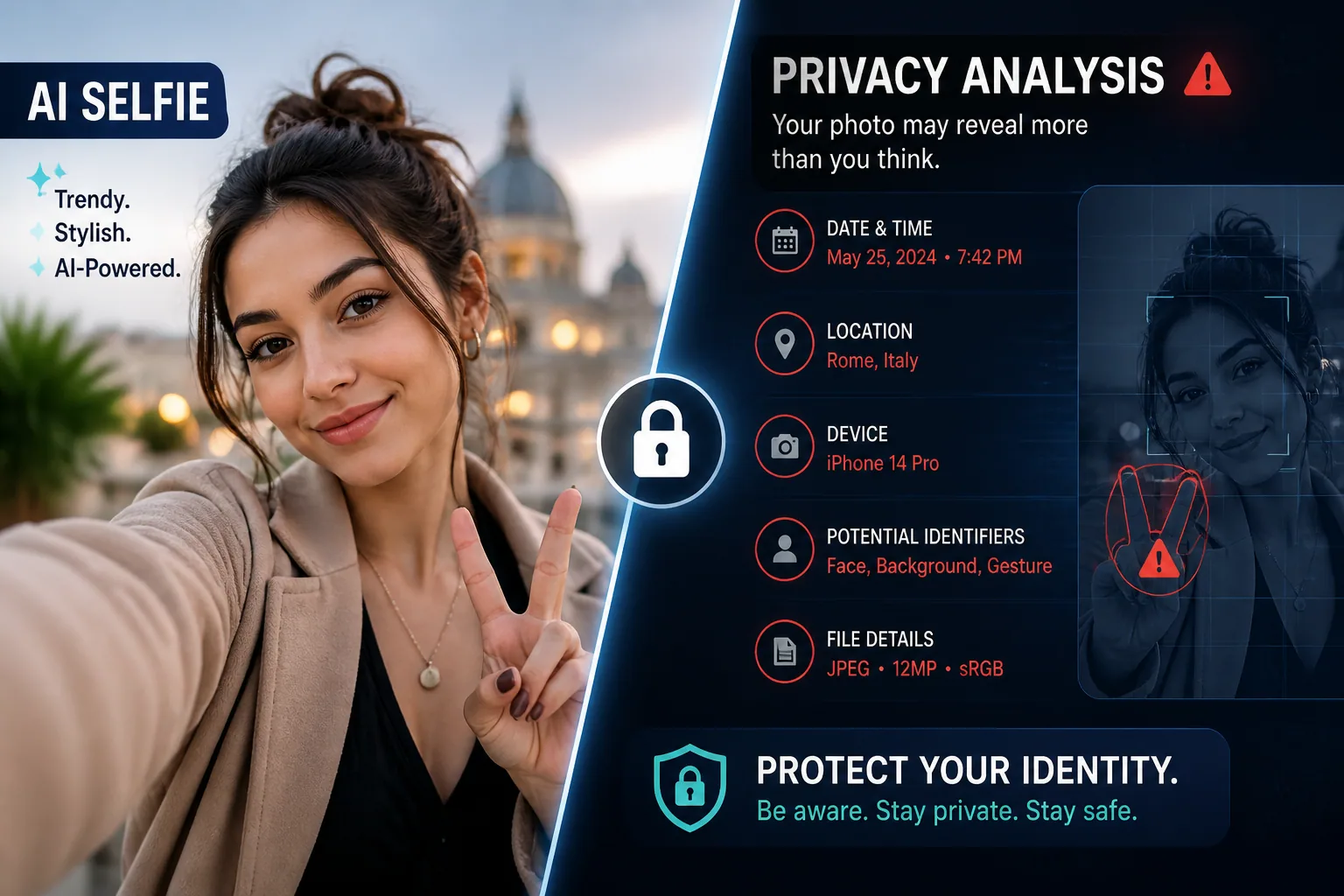
The most obvious risk in a selfie is the face itself, but the hidden data in the file can be just as sensitive. Smartphone and camera photos often include EXIF metadata by default. According to LegalClarity and ImageToolkit, this can include the capture date and time, GPS coordinates, camera make and model, serial number, device settings such as aperture and ISO, optional author fields, editing history, and sometimes even thumbnails of pre-cropped versions of the image: https://legalclarity.org/exif-metadata-in-photos-privacy-risks-and-how-to-strip-it/
That means a picture that looks harmless on the surface may quietly reveal when it was taken, what device captured it, and where it was captured. In practical terms, that can link your selfie to your home, office, favorite cafe, travel schedule, or daily routine. Metadata is invisible to the eye, but very visible to software.
There is also a deanonymization risk. LegalClarity notes that photo metadata can include device serial numbers or unique image identifiers, which can connect multiple photos together even after some personal details are removed. So if you are trying to stay private, simply blurring a face or removing a caption is not enough if the file still carries a persistent device fingerprint.
How Background Clues Can Expose Your Identity
AI selfie privacy is not just about the face. The background in a portrait often contains the easiest clues to your real-world identity. A street sign, a skyline, a restaurant menu, a company logo, a school hoodie, a framed diploma, a unique piece of furniture, or even a recognizable room layout can narrow down who you are and where you are.
Indoor selfies are especially risky because the surroundings tend to be personal and repeatable. A bedroom wall, a kitchen finish, a mirror, or a view from a window can reveal more than you realize. If the image includes a reflection, the chance of accidental disclosure grows even more. Mirrors, glasses, shiny appliances, and phone screens can all capture details outside the original frame.
For AI portraits, a plain background is usually safer because it gives the model fewer clues to preserve or reinterpret. The more distinctive the setting, the easier it becomes for someone to connect a generated image back to the original photo, especially if the portrait is shared online alongside other content from the same account.
Gestures, Poses, and Visual Signals Scammers Can Exploit
A selfie can reveal more than identity. It can also expose habits, social context, and even vulnerability. Gestures, poses, and expression can signal whether you are relaxed, rushed, playful, formal, or trying to look a certain way. That information may sound harmless, but it becomes useful when paired with other data points.
For example, a recurring angle or pose across multiple photos can help someone match posts from different platforms. Clothing choices can reveal workplace rules, religious affiliation, fitness habits, or nightlife routines. Accessories can show you are likely traveling, attending events, or using expensive gear. Even the way you hold your phone or tilt your head can become part of a recognizable personal pattern.
Scammers and social engineers are especially good at using these tiny details. A convincing fake message feels more believable when it is built from clues pulled from your real imagery. The more your selfie reveals about your habits and surroundings, the easier it becomes to personalize a scam, impersonation, or targeted phishing attempt.
What AI Can Infer About You From a Selfie
One of the most important privacy shifts in the AI era is that systems can infer things you never explicitly stated. A large megastudy published in PubMed, based on 2,646 facial images of 969 people, found that AI could predict 82 out of 349 personal attributes, about 23%, significantly better than random chance. Those attributes included body-mass index, preferences for iPhone versus Android, skin features, and facial hair: https://pubmed.ncbi.nlm.nih.gov/38030632/
That does not mean a selfie can perfectly reveal your whole life. It does mean that portraits are information-rich enough for machine learning systems to extract patterns about health, style, behavior, and preferences. If a model can guess your device preference, body composition, or facial characteristics from your photo, it can also create a more detailed profile of you than you intended to provide.
Another study, reported in the Journal of the European Academy of Dermatology & Venereology, found that an AI tool could accurately grade seven facial signs from selfies, including wrinkles, texture, and pigmentation, with strong correlation to dermatologist assessments, though performance dropped for certain skin tones: https://openurl.ebsco.com/contentitem/doi%3A10.1111%2Fjdv.18541?id=ebsco%3Adoi%3A10.1111%2Fjdv.18541&sid=ebsco%3Aplink%3Acrawler
The takeaway is simple: if a system can infer skin condition or demographic signals from a selfie, the image is not merely a picture. It is data about health, appearance, and potentially sensitive traits. That is why treating selfies as lightweight, disposable uploads can be a mistake.
Metadata Matters: Location, Device, and Timestamp Leaks
If you only remember one technical privacy point, make it this: metadata can expose your exact location. MetaStrip notes that GPS values in EXIF tags can be precise to within one to two meters when stored with five decimal places of latitude and longitude, which means a single indoor selfie can reveal a home address: https://metastrip.ai/blog/metadata-security-risks
That precision is a big deal. A timestamp can reveal when you were at a certain place. GPS can reveal where. Device details can reveal what kind of phone or camera you used. Together, those details can create a traceable pattern of your movements and habits.
Even when location tags are stripped, other metadata may still remain. Camera model, software version, and image identifiers can sometimes be enough to link photos across platforms or sessions. If you are trying to keep a portrait private, metadata should be cleaned before upload, not after the image is already in a third-party system.
How to Sanitize Photos Before Uploading Them to AI Tools
The safest approach is to prep your image as if you were sending it to an unknown audience. Start by making a copy of the original file and keeping the original untouched on your own device. Then strip metadata using an image viewer, export function, or privacy tool that removes EXIF data completely, not just file names or captions.
Next, inspect the image itself. Ask what is visible in the frame, not just what is stored in the file. Remove or crop out anything identifying, such as badges, addresses, paperwork, car plates, family photos, maps, windows with recognizable views, and mirrors that may capture the room or the phone. If the file is destined for a generator, less context is better.
If you need a more privacy-conscious workflow, consider transformations that reduce identifiability before upload. Cropping, masking, and generalization can help. So can using a neutral pose and a plain backdrop instead of a detailed setting. Research on image anonymization and privacy protection recommends removing or replacing metadata, applying deidentification techniques, using transformations like cropping and masking, encrypting or hashing identifiers, anonymizing early in ingestion, and establishing retention and deletion rules for biometric identifiers: https://pmc.ncbi.nlm.nih.gov/articles/PMC11810855/
A useful rule of thumb is to share the minimum facial data needed for the tool to work. If an app only needs a clear front-facing portrait, do not send a full photo album. If it only needs one headshot, do not upload extra images with different backgrounds, outfits, or locations unless you are comfortable with them being analyzed together.
Safer Backgrounds, Styling Choices, and Framing Tips
Small visual choices can make a big privacy difference. The safest selfie for AI generation is usually one that is straightforward, evenly lit, and low in context. Solid or softly blurred backgrounds are preferable. A clean wall, neutral curtain, or studio-style setting helps reduce accidental disclosure and makes it harder for a model to preserve identifying details from the original environment.
Clothing matters too. Avoid outfits with work logos, school names, home addresses, event badges, or rare accessories that your audience would recognize. If you are uploading multiple photos to build a personalized model, aim for consistency without being overly distinctive. You want enough variation for the tool to learn your face, but not so much contextual information that it can reconstruct your lifestyle.
Framing is another easy win. A tighter crop that focuses on the face and upper shoulders can reduce background leakage. At the same time, avoid cropping so aggressively that the app has to guess at missing features in a way you do not control. The ideal upload is clear, simple, and boring from a privacy standpoint.
Which App Privacy Settings You Should Check First
Before you upload anything to an AI selfie app, check the privacy settings that govern retention, training, and sharing. Look for whether your images are used to improve models, whether uploads are stored indefinitely, whether generated content can be shown in public galleries, and whether you can delete both source files and outputs later.
Also review permissions on your phone. Does the app need access to your full photo library, or can you select only the specific images you want to use? Can it access location services, contacts, or background activity that it does not truly need? The less permission an app has, the less exposed your broader data trail becomes.
This is especially important because biometric and facial data can fall into a sensitive category under law and regulation. In the United States, there is no single comprehensive national biometric privacy law. Instead, there is a patchwork of state laws such as Illinois’s Biometric Information Privacy Act, or BIPA, plus federal oversight through the FTC. LegalClarity notes that BIPA gives private individuals rights to sue over improper collection or handling of biometric data, including face geometry: https://legalclarity.org/biometric-facial-recognition-privacy-laws-and-your-rights/
The FTC has also warned companies about unfair or deceptive practices involving biometric technologies, including the collection of face, iris, and fingerprint data and the potential inference of traits like age, gender, race, personality, or emotional state: https://www.ftc.gov/news-events/news/press-releases/2023/05/ftc-warns-about-misuses-biometric-information-harm-consumers
If a product is vague about deletion, training, or third-party sharing, treat that as a signal to proceed carefully. Privacy policies matter more than sleek interfaces.
Legal, Ethical, and Workflow Best Practices for Anonymizing Images
The best privacy strategy is to build protection into your workflow from the start. That means anonymizing early, not as an afterthought. It also means separating your creative experiments from your identifying photos. Keep a private, curated set of images for AI use, and do not mix them with sensitive personal albums.
If you work with portrait images regularly, adopt a simple internal checklist. Remove metadata. Review visible context. Limit retention. Delete source uploads when the project is done. Use strong account security. If a service supports local processing or user-controlled deletion, prefer it. These steps align with broader best practices used in research and regulated environments, where image de-identification and retention controls are standard risk-reduction tools.
Ethically, the key question is consent. Just because an AI system can infer something from a face does not mean it should, and just because an app can retain a selfie does not mean it should keep it forever. If the portrait includes other people, make sure they consent too. Group images can carry privacy obligations that are easy to overlook when the goal is only to create a fun edit.
This is also where a product like Selfie AI: AI Photo Generator can fit naturally into a careful workflow. It is designed to turn selfies into portraits and animated videos in many styles, and if you use it, the smartest approach is still to upload only sanitized images you are comfortable sharing: https://findthe.app/selfie-ai-0xi7wd
A Quick Privacy Checklist Before You Generate Your Next AI Portrait
Before you hit upload, run through a quick mental check. Does the file still contain EXIF metadata? Is GPS turned off or removed? Are there any names, addresses, logos, reflections, screens, or documents visible in the frame? Could the outfit or background identify you? Are you comfortable with the app’s storage, retention, and training rules?
A good privacy-minded selfie is one that gives the AI enough to work with and nothing more. Use plain backgrounds, reduce distinctive clues, strip metadata, and keep control of your uploads. If you make those habits part of your creative process, you can enjoy AI portraits with far less risk of leaking the hidden data that makes you identifiable.