How to Create AI Selfies That Look Like You and Why It Matters
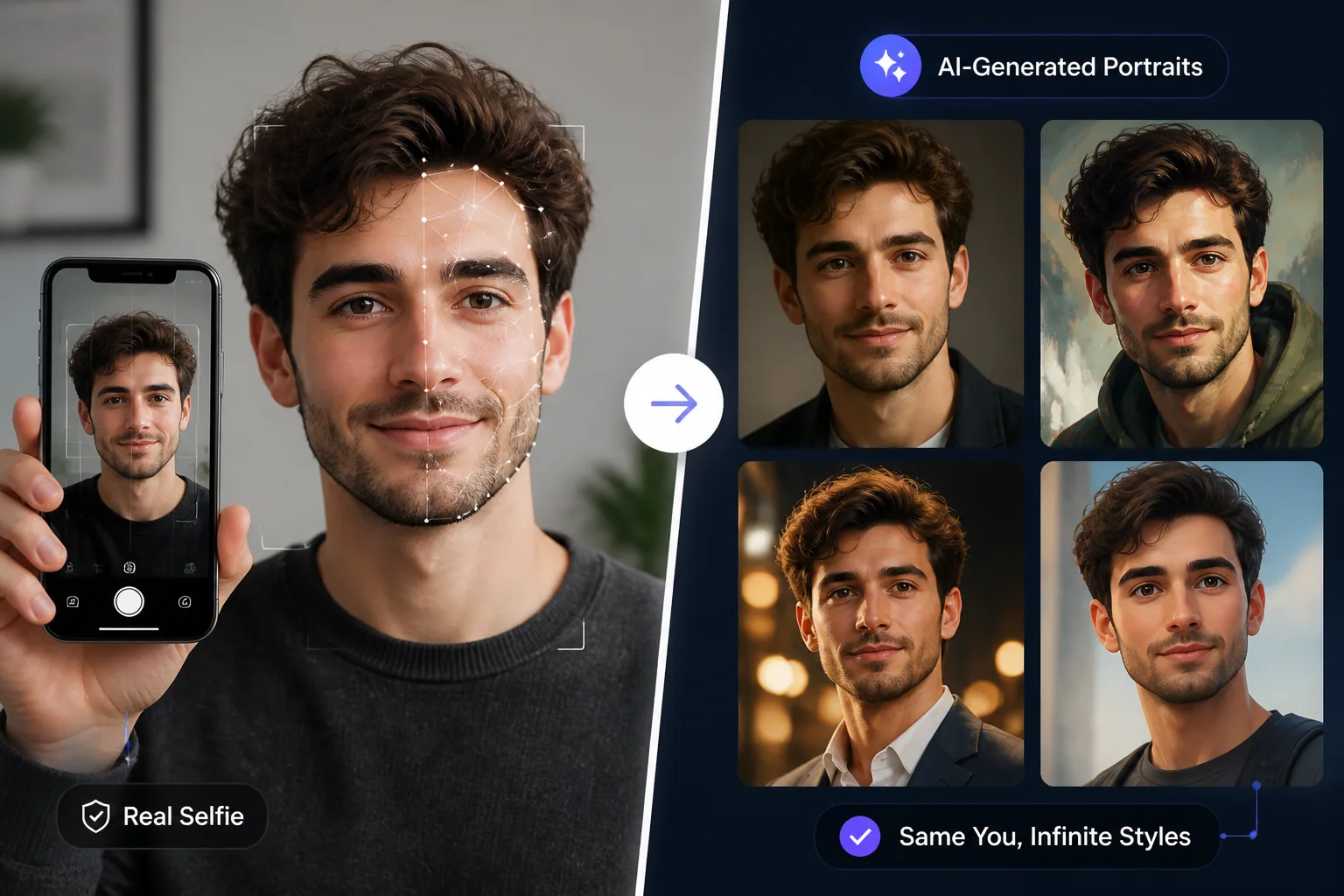
AI selfies can be fun, flattering, and wildly creative, but the best ones do something more important than simply look polished. They still feel like you. That difference matters because a portrait is not just an image, it is a signal. It tells people who you are, what you value, and whether the image in front of them feels trustworthy or artificial. When AI portraits preserve your real likeness, they become more useful for social profiles, personal branding, dating, professional headshots, and creative self-expression. When they do not, they may look impressive for a moment, but they lose the very thing that makes a selfie meaningful.
This is why the goal is not to erase imperfections until the face becomes generic. The goal is to guide the model toward your identity while still allowing style, mood, and imagination to do their work. The best AI selfies usually come from a mix of strong reference images, carefully written prompts, pose and lighting variation, and consistency checks that protect your unique features from being smoothed away. Done well, the result is a portrait that feels stylized but recognizably yours.
Why AI Selfie Likeness Matters More Than You Think
Likeness matters because people read faces very quickly. We are sensitive to small cues like face shape, eye spacing, hairline, smile pattern, skin texture, and expression. If those details are wrong, the portrait may still look attractive, but it stops feeling personal. That can create a strange effect where the image looks like a stranger wearing your style rather than an upgraded version of you.
There is also a trust dimension. Research on authenticity in visual self-presentation suggests that genuine, less filtered images tend to create better audience trust and engagement than overly curated ones. In one study, more authentic-style images were linked to higher purchase intention and better follower well-being, while highly idealized depictions increased upward social comparison. Source: https://onlinelibrary.wiley.com/doi/abs/10.1002/mar.21920
That matters beyond social media vanity. If you use AI portraits for a profile, a portfolio, a creator page, or a brand presence, the image should help others recognize you as real and consistent. Selfie research also shows that people use selfies as identity signals in much the same way they do offline presentation, projecting cues such as attractiveness, health, and status. Source: https://ojs.aaai.org/index.php/ICWSM/article/view/14896
In other words, likeness is not a minor detail. It is the foundation that makes an AI selfie feel believable, useful, and socially effective.
What Makes an AI Portrait Actually Look Like You
An AI portrait looks like you when it captures identity anchors instead of only surface style. Identity anchors are the features that stay recognizable across angles, lighting, and outfits. These usually include face shape, hairline, hair silhouette, eye color, nose structure, smile shape, skin tone, age cues, and any signature marks or facial asymmetries.
The more clearly the model learns those anchors, the less likely it is to drift into a generic face. This is why prompt quality and reference quality matter so much. A beautiful image can still fail if it ignores the details that make your face distinctive. A slightly less polished image can actually be better if it preserves your underlying structure more faithfully.
Consistency guidance from AI image workflows repeatedly points to the same idea: define a fixed identity DNA, reuse reference images, and keep changes gradual from one generation to the next. Oakgen.ai describes this as keeping a stable set of traits such as face shape, hairline, hairstyle, skin tone, and signature marks, while changing scene or pose in controlled steps. Source: https://oakgen.ai/blog/ai-character-consistency-guide
A similar principle appears in prompt guidance from PixelDojo, which recommends separating immutable identity traits from variation instructions. Restate core characteristics every time, especially eye color, hair silhouette, and face shape, so the model does not forget who it is supposed to depict. Source: https://pixeldojo.ai/guides/consistent-character-prompting-guide
How to Choose Source Selfies That Teach the Right Features
The quality of your source selfies determines how well the model can learn your likeness. If all your reference photos are nearly identical, the model learns a narrow version of your face and often overfits to one flattering angle. That can make outputs look repetitive or strangely off when the pose changes.
A better set of source selfies includes variety. Choose images with different lighting conditions, different angles, and different expressions. Include a mix of close-up and slightly wider framing, and make sure at least one reference is sharp, well-lit, and easy for the model to read. Pict.AI recommends using a strong anchor reference image, ideally a front-facing or three-quarter view, because identity preservation improves when the model can clearly see stable facial structure. Source: https://pict.ai/blog/how-to-keep-same-face-in-ai-images/
This also aligns with face recognition research. A study on face recognition under varying poses found that recognition performance drops with profile or full-face views compared with three-quarter views, while front-facing and three-quarter facial views help preserve recognition better. Source: https://pubmed.ncbi.nlm.nih.gov/8759445/
So if you are building a personal AI selfie set, do not just upload your most flattering photos. Upload photos that show how your face actually behaves in real conditions. Variety teaches the model what stays constant about you.
Why Lighting, Angles, and Expressions Should Vary
Variation is what helps an AI model separate your identity from your pose, your background, or your expression. If every photo is front-lit, smiling, and taken from the same angle, the model may confuse those conditions with your actual face. Then the moment you ask for something different, like a side-lit editorial portrait or a serious expression, the likeness can collapse.
A useful reference set should include a range of lighting styles, such as natural daylight, indoor soft light, and slightly dramatic shadows. It should also include a few angle changes, such as straight-on and three-quarter views. Expressions matter too. A soft smile, neutral face, and slight laugh all help the model learn the real structure of your mouth, cheeks, and eyes when your expression changes.
The point is not randomness. The point is controlled variety. You want enough diversity to teach identity, but not so much that the model loses the thread. In practice, that means making small changes batch by batch rather than jumping from one extreme style to another.
When possible, keep the most important variables stable while you test everything else. That gives you a much cleaner read on whether the likeness is improving or drifting.
How to Preserve Distinctive Features in Your Prompts
Prompts work best when they name the features you never want to lose. Think of these as your identity anchors. If your eyes are one of your most recognizable traits, say so. If your jawline, nose shape, smile, or hairline is distinctive, include it. Do not assume the model will infer those details from a reference image alone.
A strong prompt usually separates fixed identity from creative changes. First, describe the person: face shape, eye color, hair silhouette, skin tone, age range, signature marks, and general style. Then describe the scene: studio portrait, beach light, cinematic dusk, business setting, historical costume, or fashion editorial. This ordering helps the model hold onto your face before it starts decorating the image.
Identity-preserving edit prompts also work better when the invariants come first. MagicPixels recommends naming pose, camera angle, composition, and facial identity traits before specifying the change, such as a new background, outfit, or lighting style. Sequential edits can give you more control than trying to change everything at once. Source: https://magicpixels.ai/blog/image-editing-prompts-that-preserve-identity
This is one of the simplest ways to avoid the common problem of a portrait that looks vaguely similar but not really like you. The more explicitly you protect the face, the less likely the style will overpower the identity.
Using Pose Variance and Texture Detail for More Realistic Results
Realism is not only about flawless rendering. It is also about the right amount of texture and pose variation. A portrait that is too smooth, too airbrushed, or too symmetrical can quickly feel artificial, even if the overall composition is attractive. Texture matters because real faces have pores, fine hair, subtle skin variation, and natural asymmetry.
That is why prompts should often include texture realism. Words like natural skin texture, visible pores, soft facial details, realistic hair strands, and authentic skin finish can help counter the overly plastic look that many models produce by default. You are not asking for imperfection for its own sake. You are asking for visual evidence that this is a real human face rather than a concept of a face.
Pose variance helps in a similar way. If all portraits have the same stiff pose, they may look generated even when the face is accurate. A slight head tilt, relaxed shoulders, or a natural seated posture can make the image feel more believable. The key is to change only one creative variable per batch, as Pict.AI recommends, so you can tell whether realism is improving or whether the face is drifting. Source: https://pict.ai/blog/how-to-keep-same-face-in-ai-images/
Realistic AI selfies often work best when the camera behavior also feels believable. Small differences in focal length, composition, and perspective can make the result feel more photographic and less like a template.
How Negative Prompts Help Avoid Generic Faces
Negative prompts are useful because they help you tell the model what not to do. This is especially important for AI selfies, where default outputs often drift toward smooth skin, over-symmetry, exaggerated glamour, or faces that look too polished to be real.
Common negative ideas include generic face, overly smooth skin, plastic skin, extreme beauty filter, distorted eyes, exaggerated jawline, overexposed face, and uncanny symmetry. You are trying to remove the traits that make AI portraits feel mass-produced. The goal is not to make the image rough or unappealing, but to prevent the model from replacing your individual features with a stock version of attractiveness.
Negative prompts can also help protect the emotional tone of the portrait. If you want a calm, natural expression, you may need to exclude forced smiles, exaggerated makeup, or dramatic editorial styling. The more precise your exclusions are, the more room the model has to preserve your actual likeness.
One practical approach is to build a reusable negative prompt set for your personal portraits. That way you can keep steering the model away from generic outputs without rewriting your constraints every time.
Common Mistakes That Make AI Portraits Feel Off
The biggest mistake is using source photos that are too similar. When every reference selfie shows the same pose, same lighting, and same expression, the model learns a narrow appearance and becomes fragile when conditions change. You might get one great result, then several that look like distant cousins instead of the same person.
Another common mistake is editing away unique features. People sometimes assume that more flattering means more successful, but removing small asymmetries, texture, or facial character often makes the portrait less recognizable. The irony is that the attempt to improve the image can actually reduce its usefulness.
A third mistake is chasing trends too hard. If you push every portrait toward the same hyper-stylized aesthetic, the face becomes secondary to the trend. Over time, this creates a visual identity that feels borrowed rather than owned. Authenticity research suggests that audiences respond better to genuine depictions than to excessively idealized ones, so style should support identity, not replace it. Source: https://onlinelibrary.wiley.com/doi/abs/10.1002/mar.21920
There is also a consistency mistake: changing too many things at once. If you alter face angle, hairstyle, lighting, background, expression, and outfit all in the same generation, it becomes hard to tell what caused the likeness to break. Keep your tests small and controlled.
Balancing Authenticity With Style and Creativity
The best AI selfies do not choose between realism and creativity. They balance both. Authenticity gives the portrait its anchor, while style gives it energy. Without authenticity, the image feels fake. Without style, it can feel flat or forgettable.
This is especially relevant because people often want portraits that express a role or mood rather than just a likeness. You may want to appear more cinematic, more professional, more playful, or more heroic. That is perfectly fine, as long as the face still reads as yours. The trick is to style the environment, wardrobe, and lighting more aggressively than the identity itself.
Research on virtual influencers suggests that more humanlike appearance, including visible texture and facial features, combined with authentic communication, produces higher engagement. Source: https://link.springer.com/article/10.1186/s40691-024-00380-0
That finding is useful for anyone creating AI portraits for public-facing use. A human, imperfect, specific face can perform better than a perfectly polished but emotionally empty one. In many contexts, a little realism goes a long way.
When Realistic AI Selfies Matter for Trust, Branding, and Identity
Realistic AI selfies matter most when the image is doing social work. That includes profile photos, creator branding, business pages, portfolio headshots, dating profiles, community accounts, and any situation where the viewer expects a person rather than a character.
In those contexts, the image should reinforce identity rather than obscure it. For example, brand-related selfie imagery can influence both engagement and purchase intention depending on how the face and brand cues are presented. Hartmann et al. found that images featuring visible faces can drive more social engagement, while product-focused visual self-presentation can be more effective for purchase intention. Source: https://journals.sagepub.com/doi/10.1177/00222437211037258
That does not mean every AI selfie must be conservative. It means the image should match the purpose. If the goal is trust, make the likeness stronger. If the goal is fantasy, keep the identity stable while expanding the setting. If the goal is personal branding, make sure the face still communicates familiarity, consistency, and credibility.
This is also where a tool like Selfie AI can be useful, because it is designed to turn a few selfies into personalized AI portraits across many styles and scenarios while keeping your likeness central. You can explore it here: https://findthe.app/selfie-ai-0xi7wd
A Simple Checklist for Better, More Personal AI Portraits
Before generating your next AI selfie, run through a simple checklist. Start with a sharp anchor photo, ideally front-facing or three-quarter view. Add a small set of reference selfies that vary in lighting, angle, expression, and background so the model learns your face, not just one look. Keep the set clean, well-lit, and close enough for the model to read your features.
Next, write prompts that explicitly preserve identity. Restate face shape, hairline, hair silhouette, eye color, skin tone, age cues, smile, and any signature traits. Separate those fixed details from the style instructions, such as wardrobe, scene, season, or art direction. If possible, lock the seed and change one variable at a time so you can judge what helps and what hurts likeness.
Then add texture and realism cues. Ask for natural skin texture, realistic facial detail, believable lighting, and a natural pose. Use negative prompts to push away plastic skin, over-smoothing, symmetry artifacts, and generic beauty-filter looks. After each batch, compare results against your real features and ask a simple question: does this still look like me?
If the answer is yes, you are on the right track. If the answer is no, reduce the stylization and strengthen the identity anchors. AI portraits are most powerful when they are creative without becoming counterfeit. That is how they stay personal, credible, and genuinely useful.