Crafting AI Selfies for TikTok & Reels: The Styles, Motions, and Edits That Stop the Scroll
AI selfies are taking over short-form video because they solve two problems at once: they give creators a fast way to produce highly polished visuals, and they make it easier to build content that feels native to TikTok, Instagram Reels, and YouTube Shorts. When a portrait can be turned into a cinematic clip, a neon-lit beauty shot, or a Y2K-inspired reaction video in minutes, creators suddenly have more ways to post without starting from zero every time.
That matters even more now because the platforms do not perform the same way. AI-based short-form clipping research shows top-quartile YouTube Shorts clips averaging about 5.9% engagement, compared with roughly 2.8% on TikTok and about 0.65% on Instagram Reels. In other words, the same visual can behave very differently depending on where it is posted, which is why platform-specific styling is no longer optional. Sources like Clipperz note that AI tools increasingly match content to platform presets to improve results: https://www.clipperz.ai/research/state-of-ai-video-clipping-2026
Why AI Selfies Are Taking Over Short-Form Video
The reason AI selfies spread so quickly is simple: they compress creativity. A creator can test cinematic lighting, soft glam, neon city scenes, or hyperreal beauty edits without booking a shoot, renting gear, or waiting for an edit cycle. For short-form platforms, that speed is a real advantage because trends move fast and audiences reward consistency. If your content can keep up with the pace of sound trends, meme cycles, and visual aesthetics, you get more shots at a scroll-stopping moment.
AI portraits also work especially well in video because they can be repurposed. One strong selfie can become a slideshow, a zoom-in reveal, a lip-sync background, a before-and-after comparison, or a looping animated portrait. That kind of versatility is exactly why creators are building content systems around AI rather than treating it as a one-off novelty.
There is also a psychological reason these visuals perform. A stylized selfie feels personal, but a highly polished AI version feels elevated enough to make people pause. It gives viewers a quick read on identity, mood, and aspiration. That makes AI selfies especially useful for creators who want to blend beauty, branding, fashion, and personality in a format that is instantly readable on mobile.
What Makes a Selfie Stop the Scroll in the First 2 Seconds
The first two seconds decide almost everything. Strong hooks on TikTok, Reels, and Shorts tend to show credentials, showcase a project or product, or create a comparison or showdown, because these structures immediately give viewers a reason to keep watching. OpusClip’s engagement benchmarks point out that these hook types outperform the median by a wide margin: https://www.opus.pro/research/engagement-benchmarks-short-form
For AI selfies, that means the image needs instant clarity. The viewer should understand the subject, the mood, and the point of the post at a glance. A face that is too small, an expression that is too subtle, or a background that is too busy can all kill retention before the animation even begins.
The best scroll-stopping selfies usually have one dominant focal point. That might be sharp eyes, a bright neon outline, reflective makeup, a dramatic hair shape, or a striking color contrast. If the portrait is animated, the motion should reinforce the focal point rather than compete with it. A small blink or head turn is enough if the face is already visually strong.
Best AI Selfie Styles for TikTok Right Now
TikTok tends to reward personality, novelty, and strong visual trends. That is why bold aesthetics often outperform plain realism. Neon lighting and sign backgrounds are especially powerful right now because they create depth, mood, and branding in a single frame. Viral creators often lean on a warm-amber glow or RGB-style gradients to make the portrait feel more cinematic and memorable. This fits the current wave of neon-heavy content described by Oasis Neon Signs: https://oasisneonsigns.com/blogs/news/how-u-s-tiktok-creators-use-neon-to-build-viral-setups
Y2K-inspired looks are also still very alive. Glitter makeup, metallic textures, retro tech, playful pastel palettes, early-2000s fashion, and velour-inspired styling continue to show up in trend lists for TikTok aesthetics. That makes Y2K a smart direction if the goal is playful energy rather than ultra-serious polish. Clipchamp and Books by Knight both point to the continued strength of these visual cues: https://clipchamp.com/en/blog/make-aesthetic-videos-tiktok/
Another style gaining traction is Icy Glam, which pushes cool-toned shimmer, frosty highlights, strong eye makeup, and high-contrast lighting. It is especially effective in close-up AI portraits because the eyes become the main event. Hypebae’s breakdown of the trend shows how strongly it leans into cool light and eye-focused beauty: https://hypebae.com/2025/1/icy-glam-makeup-tiktok-trend-explained
For creators who want something cleaner but still high-performing, street portrait filters are a strong option. These filters keep skin tones crisp while adding punchy contrast and cinematic shadows, which works beautifully for urban scenes, nightlife looks, and moody creator branding. Filmora’s coverage of street portrait effects highlights how well they preserve facial clarity while letting backgrounds glow: https://filmora.wondershare.com/video-creative-tips/street-portrait-filters-for-tiktok.html
What Works Best on Instagram Reels vs YouTube Shorts
Instagram Reels usually rewards a more polished, aspirational look. Soft glam, editorial lighting, luxury-inspired settings, and cleaner color grading tend to feel more native there. Reels viewers are often more receptive to visually refined content that looks like a beauty campaign, fashion shoot, or lifestyle montage. That does not mean Reels needs to be bland, but it does mean the aesthetic often benefits from a smoother finish and less chaos in the frame.
YouTube Shorts, on the other hand, can tolerate a broader mix of styles as long as the idea is instantly legible. It performs well with clearer framing, stronger concepts, and visuals that feel informative or curious. Since top-quartile Shorts engagement is notably higher than Reels in the benchmarks cited above, Shorts can be a strong place to test comparison edits, transformation sequences, and portrait reveal formats that deliver a clean payoff fast.
TikTok remains the most trend-sensitive environment. It is where a more playful, experimental, or edgy AI selfie can catch fire faster, especially if it aligns with a sound trend or a fast-moving aesthetic. If you want the most freedom, TikTok is usually the best place to go bold. If you want clean branding and a more polished personal image, Reels is often the better fit. If you want clarity and retention-driven concepts, Shorts can be the strongest testbed.
How to Design AI Portraits for Vertical 9:16 Video
Vertical composition is essential because 9:16 fills the mobile screen and removes wasted space. Research on vertical formats consistently shows that portrait video outperforms horizontal and square layouts across TikTok, Reels, and Shorts. Vibbit and Kubeez both emphasize that vertical creatives feel more immersive and avoid letterboxing: https://vibbit.ai/blog/vertical-video-guide
For AI selfies, the face should usually sit in the upper middle of the frame, with the eyes close to the upper third. That helps with safe-zone composition and reduces the chance that platform UI will cover key features. Experts in vertical cinematography also recommend leaving around 10 to 20 percent headroom and avoiding important text near the very top or bottom edges, since overlays can hide it. ReelMind and Garage Productions both outline these framing habits clearly: https://reelmind.ai/blog/vertical-video-cinematography-best-practices-adapting-cinematic-language-to-9-16
When framing an AI portrait for video, think in layers. Put the face first, then the shoulders, then the background. A strong foreground subject with slight background depth creates better motion opportunities later, especially if you want parallax or light movement. If the portrait is too wide or too centered, it often loses its punch once it is cropped for mobile.
A useful trick is to design with the UI in mind. Leave negative space where captions might sit, and make sure hair, accessories, or lighting accents do not get cut off by the app interface. If the composition is planned correctly, even a static AI selfie can look like a premium short-form asset instead of a cropped still image.
The Micro-Motions That Make AI Selfies Feel Alive
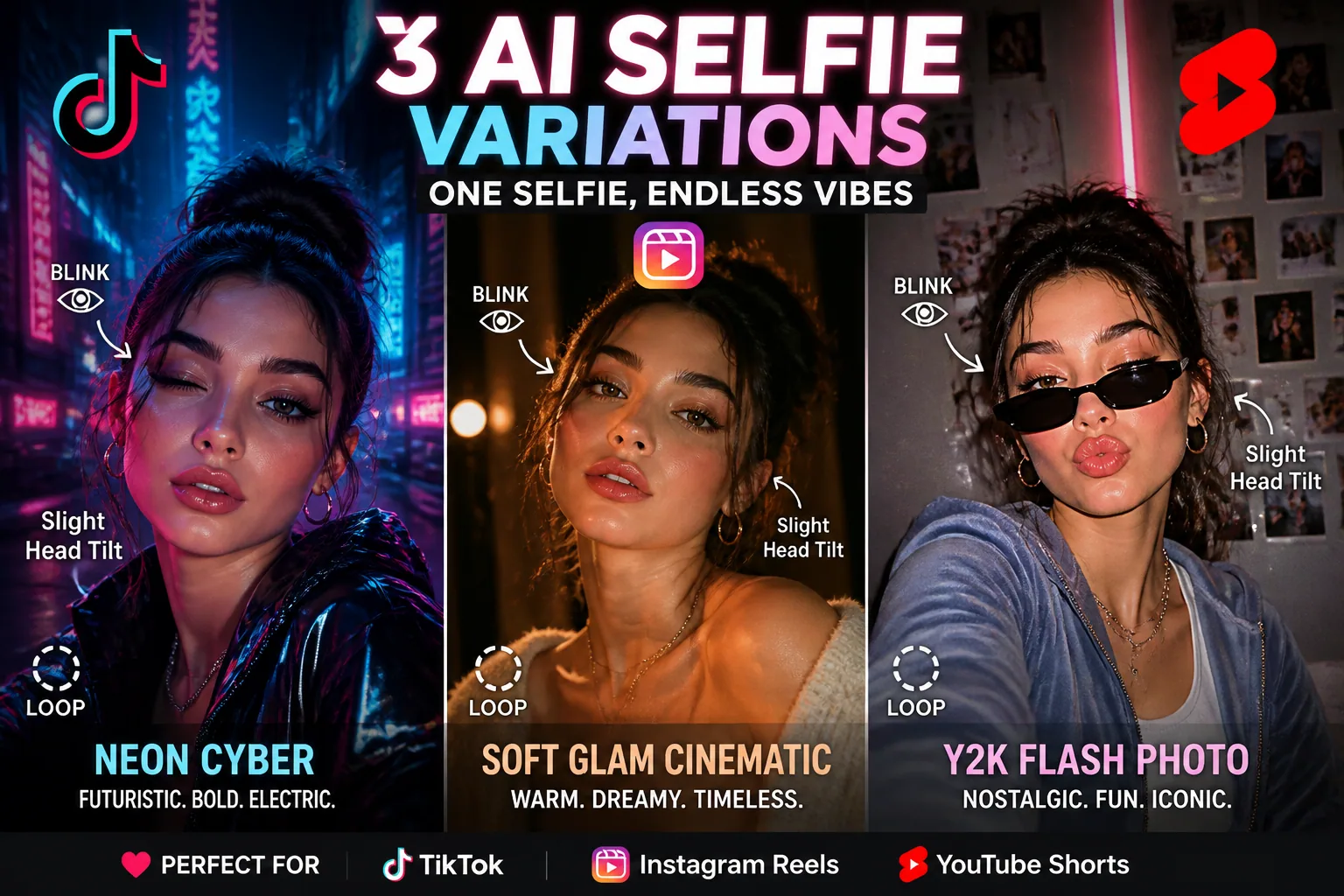
The best animated portraits do not move too much. In short-form video, tiny motion often feels more believable than dramatic animation. Subtle blinking, slight eye tracking, soft head turns, gentle hair movement, and a touch of parallax depth can make the portrait feel alive without turning it uncanny. Filmora’s portrait and neon effect discussions point to how light and detail interplay can support this kind of restrained motion: https://filmora.wondershare.com/video-creative-tips/tiktok-night-city-cinematic-luts.html
Blinking works because it is human and immediate. Eye tracking works because viewers naturally follow the gaze, especially in close-up portraits. A slight head turn can add a sense of presence, as if the subject has just noticed the camera. Hair movement can add softness and elegance, but it should stay minimal unless the style is intentionally dramatic. The goal is to make the portrait feel animated, not artificially busy.
Parallax depth is especially effective when the background has clear lighting elements like neon signs, city bokeh, or soft gradients. When the foreground face moves a little differently from the background, the image gains dimensionality. That is one reason cinematic and urban styles work so well for motion edits. They give the eye more layers to perceive, which can extend watch time.
Looping is another important detail. A seamless micro-animation can make viewers rewatch without realizing it. A blink at the end of the loop, a slow head tilt that resets naturally, or a hair sway that returns to the starting position all help the clip feel smooth. The more natural the loop, the better it supports repeat viewing.
Facial Expressions, Eye Contact, and Head Angles That Boost Attention
The expression in an AI selfie does a lot of the hook work. Neutral faces can work if the styling is very strong, but most of the time you want a readable emotion. Confidence, curiosity, softness, flirtation, surprise, and cool detachment all translate quickly on mobile. The expression should make sense even on a tiny screen.
Eye contact is particularly powerful because it creates an immediate sense of connection. In short-form video, the viewer often decides in an instant whether the subject feels inviting, aspirational, or boring. Direct eye contact can increase that sense of presence, while an off-camera gaze can be useful when you want mystery or editorial energy. Both can work, but they should be intentional.
Head angle matters too. A slight chin lift can create confidence. A gentle tilt can soften the portrait. A three-quarter angle often looks more dynamic than a straight-on pose because it gives the face shape and depth. For beauty-focused content, keep the eyes clearly visible and avoid angles that obscure the expression, since facial readability is critical on a small screen.
If you are building a content series, assign different emotion profiles to different post types. For example, use direct eye contact for hook-driven reveals, a soft smile for glam edits, and a side glance for fashion or mood posts. That helps your AI selfie library feel varied without losing your visual identity.
Cinematic, Neon, Y2K, Soft Glam: Which Aesthetic Fits Which Platform?
Cinematic looks work well when you want depth, drama, and a premium feel. They are especially strong for YouTube Shorts and Reels because they can make a portrait feel like a trailer frame or a polished campaign shot. Darker shadows, directional light, and rich contrast help the face pop while making the overall clip feel intentional.
Neon is ideal for TikTok and urban-themed Reels. It creates instant atmosphere, and the glowing color edges make the face more memorable. If the background includes a sign or light source, keep the subject well-lit enough that the facial expression remains clear. Neon should enhance the portrait, not swallow it.
Y2K works best when you want fun, nostalgia, and trend alignment. This is a strong choice for TikTok because the platform is still deeply connected to playful micro-aesthetics and remix culture. It is also useful for creators targeting younger audiences or fashion-forward niches.
Soft glam is the safest option for polished branding. It suits Reels especially well because it looks elegant, clean, and versatile. If your goal is to appear aspirational without seeming too experimental, soft glam gives you the broadest utility across audiences. Icy Glam sits somewhere between soft glam and editorial beauty, making it a good fit when you want something cooler and more fashion-driven.
Prompt Ideas for Viral-Looking AI Selfies and Animated Portraits
Good prompts are specific about style, framing, light, and motion. If you only ask for a beautiful portrait, the output may be generic. If you describe the camera angle, mood, makeup, background, and animation behavior, you get something much closer to a ready-to-post short-form asset.
Here are a few prompt directions that work well: cinematic close-up portrait, vertical 9:16 framing, direct eye contact, subtle blinking, soft head turn, neon city background, high contrast lighting, clean skin tones, glowing reflections. Another version might be: Y2K inspired beauty selfie, pastel palette, metallic makeup, playful expression, animated hair movement, glossy finish, loopable motion, mobile-first composition.
For a more premium aesthetic, try: soft glam editorial portrait, centered subject with upper-third eyes, warm natural light, subtle parallax depth, gentle smile, minimal motion, luxury feel, vertical crop safe for short-form video. These prompts work because they combine visual style with practical composition rules.
If you want a product-style reveal, prompt the AI for a character moment rather than a static photo. For example, a confident portrait with a slight smirk, studio lighting, and a background that suggests a launch, announcement, or transformation. That kind of framing is useful for creators who want their AI selfie to act like a hook rather than just a pretty image.
How to Turn One AI Selfie Into Multiple Short-Form Variations Fast
One of the biggest advantages of AI is scale. A single base selfie can become multiple posts if you vary the crop, color grade, motion intensity, and caption. Start with one strong master portrait, then create variations for each platform. A close crop can emphasize the eyes for TikTok, while a slightly wider crop can work better for Reels or Shorts where the full outfit or background matters more.
You can also create thematic versions of the same image. Try a cinematic version, a neon version, a soft glam version, and a Y2K version. That lets you compare which aesthetic is strongest without needing an entirely new shoot. Over time, you will learn which visual identity best matches your audience.
Another efficient approach is to change only one variable per version. Keep the face, pose, and basic composition the same, then swap the background or motion style. That makes A/B testing easier because you know exactly what changed. It also helps you build a repeatable production workflow instead of improvising every time.
Simple A/B Tests for Hooks, Motion, Crops, and Style Filters
A/B testing is where creators turn creativity into a system. Start by testing hooks. Does a direct credential hook outperform a beauty reveal? Does a before-and-after comparison beat a simple portrait intro? Since top-performing short-form hooks often showcase credentials, a project, or a comparison, it is worth testing these formats first.
Next, test motion intensity. One version can have only blinking and eye tracking, while another adds head movement and hair motion. If the subtle version keeps viewers longer, that tells you your audience prefers realism and restraint. If the stronger motion version wins, you may be posting into a more novelty-driven niche.
Cropping should also be tested. A tighter crop may boost clarity and emotional impact, while a wider crop may create more atmosphere and style. Similarly, style filters can be tested against one another: neon glow versus soft glam, cool-toned versus warm-toned, high contrast versus smoother grading. Each change can shift how the portrait reads on a phone screen.
The key is to compare one variable at a time and track watch time, saves, shares, and rewatches, not just likes. Likes can flatter a post, but retention tells you whether the portrait really stopped the scroll. Over a few rounds of testing, you will usually see a clear winner for each platform.
Common Mistakes That Make AI Selfies Look Fake or Easy to Skip
The most common mistake is overdoing the effects. Too much motion, too much sharpening, too much glow, or too many visual elements in the background can make the portrait feel artificial and distracting. Short-form audiences are used to fast content, but they still want the face to feel readable and coherent.
Another issue is weak composition. If the eyes are too low, if the face is too small, or if the background competes with the subject, the image loses impact quickly. In vertical video, safe-zone errors can also make the content look awkward because captions, buttons, or UI elements can cover critical details.
A third mistake is using the same styling for every platform. What works on TikTok may look too chaotic on Reels, while a highly polished Reels aesthetic may feel too stiff on TikTok. This is where platform-aware editing matters. The same AI portrait should not necessarily be exported identically everywhere.
Finally, creators sometimes trust automation too much. Research from RendezvousVid notes that AI-generated highlights selected or edited by humans tend to match or exceed baseline engagement, while fully automated publishing can underperform by 20 to 40 percent. That is a strong reminder that human taste still matters: https://www.rendezvousvid.com/ai/research/short-form-content-performance-benchmarks
A Fast Workflow for Scaling AI Selfie Content Across Platforms
A practical workflow starts with one base concept. Decide on the audience, aesthetic, and platform first. Then generate a master portrait in vertical format with a clear focal point and safe-zone awareness. From there, create three or four variants with different lighting, color palettes, or emotional tones.
Once the images are ready, animate them with the least amount of motion needed to feel alive. Add a blink, a subtle head turn, and some light movement if the portrait can handle it. Then export platform-specific edits: a more playful cut for TikTok, a polished cut for Reels, and a clean, curiosity-driven version for Shorts.
This is also where a tool like Selfie AI: AI Photo Generator can fit naturally into the workflow, since it lets you turn ordinary selfies into stylized portraits and animated videos across multiple scenarios, from professional looks to custom prompt-based transformations. It is especially useful when you want to scale variety without manually rebuilding every concept from scratch. You can check it here: https://findthe.app/selfie-ai-0xi7wd
After that, schedule content in batches. Use one hook style, one motion pattern, and one caption formula across a set of posts so you can compare results cleanly. When you see a winner, keep the successful structure and swap only the visual theme. That is how you build a scalable AI content engine without sacrificing creativity.
Final Checklist Before You Post Your AI Reel or Short
Before posting, make sure the portrait reads instantly on a phone screen. The face should be clear, the eyes should be visible, and the focal point should be obvious in the first second. If the image takes too long to understand, it probably will not hold attention.
Check the frame for 9:16 composition, safe-zone spacing, and UI-friendly placement. Keep the eyes in the upper third, leave enough headroom, and avoid critical details at the edges. Then confirm that the motion feels natural and does not distract from the subject.
Finally, choose the style that matches the platform. Use neon or Y2K for more trend-driven TikTok content, soft glam or cinematic polish for Reels, and clear, concept-forward framing for Shorts. If you keep the visual idea simple, test one variable at a time, and let the portrait do the talking, your AI selfies have a much better chance of stopping the scroll.