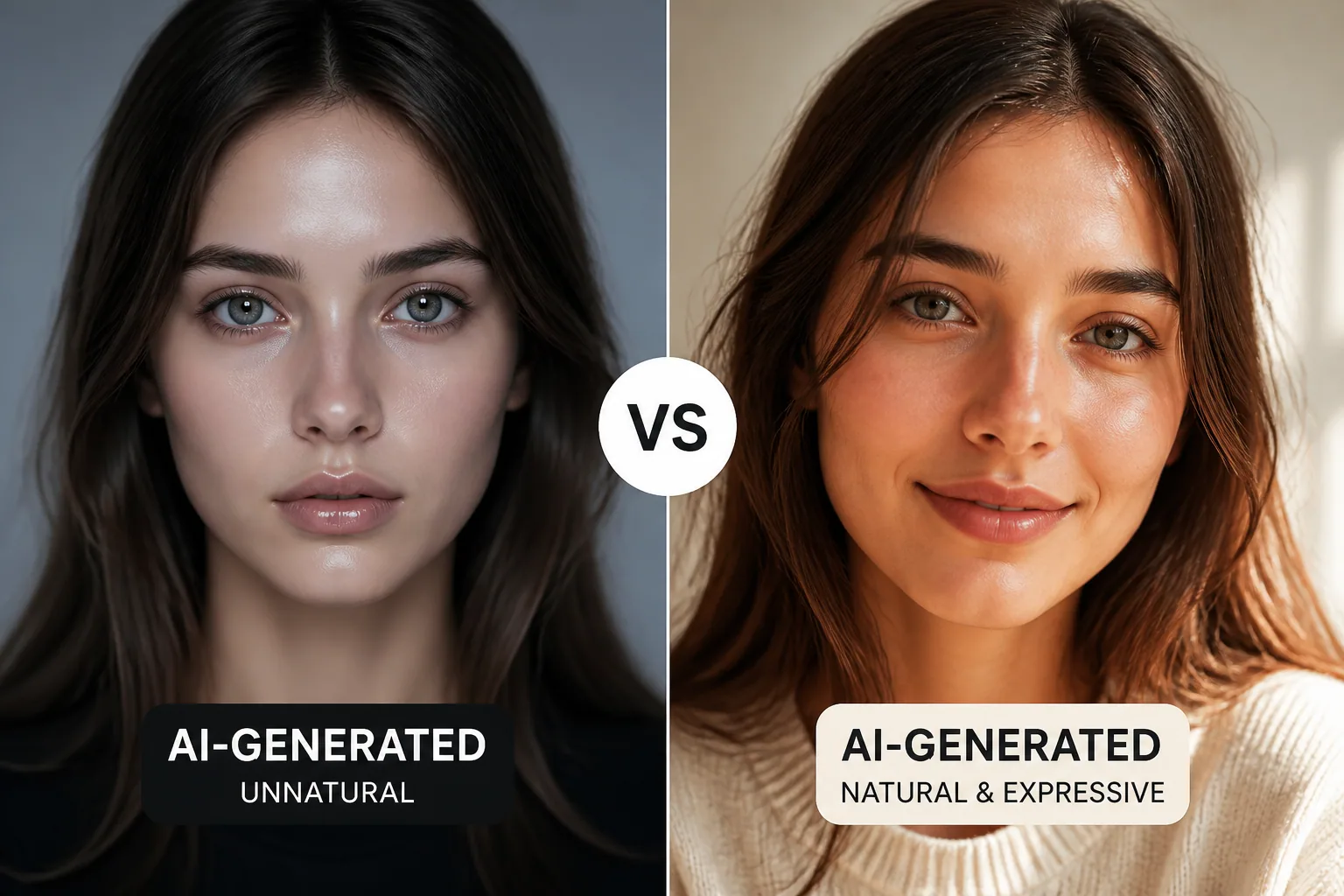
Why Some AI-Generated Selfies Feel Creepy and How to Make Yours Feel Alive
AI-generated selfies can look impressive at first glance, but not every polished portrait feels good to look at. Some images feel warm, expressive, and believable. Others land in the uncanny valley, where the face is close enough to human to be recognizable, but off in a way that makes people uneasy. The difference usually comes down to subtle visual cues, not one dramatic flaw. Eyes, skin texture, lighting, proportions, and expression all work together to create either a sense of life or a sense of something slightly artificial.
That is why some AI portraits perform beautifully on profile photos, social media, and even dating apps, while others quietly repel attention. Recent research suggests that realism is not automatically better. In many cases, medium realism or soft stylization creates a more comfortable and trustworthy result than hyper-realism. The goal is not to make a portrait look like a perfect photograph at any cost. The goal is to make it feel coherent, human, and emotionally readable.
What Makes an AI Selfie Feel Creepy?
A creepy AI selfie usually does not have one obvious mistake. Instead, it contains a cluster of small mismatches that the brain notices before the viewer can fully explain them. A face may have beautiful skin but strangely fixed eyes. It may have realistic lighting but an expression that seems pasted on. It may appear technically detailed while still lacking the tiny irregularities that make a real face feel alive.
This is the basic logic of the uncanny valley in portraits and avatars: when a face becomes very human-like without fully behaving like a human face, discomfort rises. A 2023 systematic review, Uncanny valley effect: A qualitative synthesis of empirical research, found that observers consistently rated virtual faces as less familiar and more eerie than real human faces, with eeriness often linked to mismatches in lighting, texture, and facial proportions rather than dramatic distortions alone. Source: https://www.sciencedirect.com/science/article/pii/S2451958823000210
The Uncanny Valley in Portraits and Avatars
The uncanny valley is often described as a problem of near-perfect realism, but in practice it is more about expectation. When a portrait is obviously stylized, the brain accepts the rules of that style. When a portrait is clearly a photo, the brain expects natural motion, imperfect skin, and expressive eyes. Problems begin when an AI image lands halfway between those two worlds and fails to fully satisfy either one.
Research increasingly supports this idea. A 2025 network meta-analysis on avatar realism found that high-realism avatars, with detailed skin textures and human proportions, were often rated as more attractive, but also risked being judged eerie. Medium realism tended to balance familiarity and stylization more effectively, while low realism, such as cartoonish or sketch-like avatars, was often seen as less eerie and more trustworthy in many use cases. Source: https://pmc.ncbi.nlm.nih.gov/articles/PMC12709275/
In other words, realism can help, but only if it is internally consistent. If a portrait is trying to look like a real person, it has to behave like one too.
The Biggest Visual Triggers: Eyes, Skin, Lighting, and Expression
If you want to understand why one AI selfie feels alive and another feels strange, start with the eyes. Human beings are intensely sensitive to eye contact, gaze direction, and tiny asymmetries around the eyelids. Eyes that are too glossy, too perfectly centered, or too frozen can create an immediate sense that something is off. Even when everything else looks polished, the eyes can break the illusion.
Skin texture is another major trigger. Real skin is never perfectly uniform. It has pores, slight redness, small tonal shifts, and unevenness that changes across the face. AI portraits that over-smooth skin often look like plastic, while portraits that add too much synthetic texture can feel noisy or artificially sharpened. The sweet spot is believable variation, not perfect perfection.
Lighting matters just as much. When shadows, highlights, and facial contours do not agree with each other, the brain notices the inconsistency immediately. A face may look well-rendered, but if the lighting suggests a different environment than the background or if the facial structure is lit in a way that defies physics, the image starts to feel fabricated. The same is true for facial proportions. Small distortions in eye size, jawline, mouth placement, or cheek structure can produce an uncanny reaction, especially when the face otherwise looks highly realistic.
Expression is the final layer. A face can be anatomically accurate and still feel dead if the smile does not reach the eyes or the mouth and brows are out of sync. A 2026 study on AI-generated face images of emotional expressions found that AI tools can now generate facial expressions that are often indistinguishable from real ones, but realism depends heavily on consistency in micro-expressions around the eyes and mouth. When those details are off, the synthetic origin becomes easier to detect. Source: https://link.springer.com/article/10.1007/s10919-026-00517-3
Why Hyper-Realism Often Backfires
Hyper-realism is seductive because it promises the strongest resemblance to a photo. But the more a portrait tries to pass as a genuine photograph, the more the viewer expects photographic behavior from it. That means natural blink patterns, subtle asymmetry, coherent skin behavior, and tiny signs of life become mandatory. If even one of those elements fails, the whole image can collapse emotionally.
This is especially true when the face is familiar. In a 2025 study on human digital doubles, researchers found that avatars with highly realistic appearance but representing familiar faces had lower perceived realism and affinity than less realistic avatars portraying unknown people. In plain terms, realism can backfire when the identity cues are strong enough for the viewer to know what is missing. Source: https://arxiv.org/abs/2509.17748
That is why hyper-realistic AI selfies often provoke stronger reactions than clearly stylized ones. The image is asking to be judged like a real photograph, and viewers are very good at noticing when a face is almost human but not quite functioning like one.
Stylized vs Photorealistic Avatars: What Recent Research Suggests
The best style depends on the job the portrait needs to do. Recent research is clear that there is no single winner for every context. In branding studies from 2024 to 2025, stylized celebrity avatars often produced more favorable attitudes because they reduced the sense of commercial intent and felt more approachable. But for serious or utilitarian brands, photorealistic avatars tended to signal credibility and expertise more effectively. Source: https://www.sciencedirect.com/science/article/pii/S0969698925004230?dgcid=rss_sd_all
Mixed reality work studies tell a similar story. Realistic avatars are often preferred for professionalism and clarity, while cartoon-like avatars can score higher on emotional expression and comfort in informal settings. Preference changes with the task, the audience, and the social atmosphere. Source: https://www.microsoft.com/en-us/research/wp-content/uploads/2025/10/2025-IJHCS-RealVsCartoonAvatarFacesInMixedReality-Longitudinal.pdf
So the decision is not simply realism versus cartoon. It is about matching style to context. A polished but slightly stylized portrait may be ideal for many profile uses because it looks intentional without overpromising photographic realism.
Why Some Users Trust Stylized Faces More
Stylized faces often feel safer because they are honest about being digital. A softer or more illustrated look signals that the viewer should not expect perfect photographic fidelity. That lowers the risk of uncanny disappointment. It can also reduce perceived manipulation, which matters a lot in branding and online identity.
This is one reason stylized avatars often perform well in social and consumer contexts. People may interpret them as more expressive, more playful, and less commercially aggressive. In contrast, highly realistic AI faces can sometimes trigger suspicion because they appear to be trying too hard to imitate a real person. When the intent feels transparent, trust tends to rise.
There is also evidence that familiarity affects tolerance. Research on the uncanny valley and the other-race effect found that subtle distortions in faces are judged more unpleasant when the face belongs to one’s own race, suggesting that face familiarity changes how harshly small errors are perceived. This helps explain why the same AI selfie can feel fine to one viewer and unsettling to another. Source: https://www.sciencedirect.com/science/article/pii/S1071581922000970
How to Prompt for Portraits That Feel Warm and Alive
If you are generating a selfie with AI, the prompt matters, but not in the way many people think. The most effective prompts usually do not pile on technical adjectives alone. Instead, they guide the image toward a coherent mood, lighting style, and emotional expression. The aim is to create a face that feels relaxed, natural, and believable, not just detailed.
Good prompt language often includes cues like soft natural light, relaxed expression, subtle smile, realistic but not overprocessed skin, gentle eye contact, and balanced contrast. These phrases help the model avoid the most common traps: frozen eyes, plastic skin, harsh shadows, and exaggerated symmetry. If you want warmth, describe warmth. If you want confidence, describe confidence. If you want calm, describe calm.
It also helps to specify context. A professional portrait benefits from clean framing and controlled light. A lifestyle selfie may feel better with a candid posture, slight movement, and a less formal background. The more the portrait has a believable setting, the easier it is for the viewer to accept the face as part of a real moment.
If you want an easy way to experiment with different portrait directions, Selfie AI: AI Photo Generator can help you turn ordinary selfies into a wide range of AI-generated portraits and animated videos, from business looks to more playful scenarios. You can explore it here: https://findthe.app/selfie-ai-0xi7wd
Style Tips to Avoid the Most Common AI Portrait Mistakes
One of the most common mistakes is over-sharpening. When every pore, lash, and strand of hair is pushed to maximum detail, the result can feel synthetic rather than premium. Real portraits have focal hierarchy. Not every feature should scream for attention at once.
Another mistake is excessive symmetry. Human faces are naturally asymmetrical in small ways, and those imperfections are part of what makes them relatable. When both sides of the face are too mirrored, the image can become doll-like. The same applies to teeth, lips, and eyes. Slight irregularity is often more trustworthy than perfect alignment.
Be careful with backgrounds too. A face may look great on its own, but if the background is too busy, too blurred, or inconsistent with the lighting on the subject, the whole image can feel fake. The best AI portraits usually keep the background supportive rather than distracting.
Finally, check the mouth and eyes together. A smile without eye engagement often feels forced. A serious expression with bright, expressive eyes can feel strong and authentic. The relationship between the eyes and mouth matters more than either feature alone.
When to Use Realism, Soft Stylization, or Cartoon Avatars
Realism works best when credibility matters most. That includes LinkedIn-style profile photos, professional bios, work presentations, and settings where you want people to read you as competent and serious. Even then, it is usually safer to aim for realistic enough rather than hyper-realistic. Research on workplace avatars found that formal realistic avatars were accepted well when they matched context and avoided exaggerated hyperreal texture. Source: https://www.microsoft.com/en-us/research/publication/me-and-my-avatar-exploring-users-comfort-with-avatars-for-workplace-communication/?locale=zh-cn
Soft stylization is often the most versatile option. It can preserve likeness while smoothing over the tiny imperfections that push portraits into the uncanny valley. For Instagram, personal branding, creator profiles, and many dating app scenarios, this middle path can be the strongest choice because it feels current, attractive, and intentionally designed.
Cartoon or highly stylized avatars can be best when personality, playfulness, or safety are more important than realism. They are often easier to interpret emotionally and may feel more comfortable in casual communities, gaming, or informal digital spaces. They are less likely to be judged as creepy because they do not attempt to imitate human flesh too closely.
What This Means for Profile Photos, Dating Apps, and Social Media
For profile photos, the main goal is usually trust. People want to know who you are, but they also want the image to feel natural. Overly synthetic selfies can create doubt, even if they look attractive. A portrait that feels grounded, modestly expressive, and visually coherent is often more effective than one that is technically dazzling but emotionally flat.
On dating apps, warmth and authenticity matter even more. A face that looks approachable, relaxed, and honest tends to invite more curiosity than a face that seems overly perfect or strangely polished. You want viewers to think, this feels like a real person I could meet, not this feels like an ad for a person.
On social media, the best style depends on your brand voice. Creators who want to feel artistic may benefit from stylized portraits, while entrepreneurs or consultants may prefer realism with subtle refinement. The point is to align the image with the expectation you want to set.
A Practical Checklist for Better AI-Generated Selfies
Before publishing an AI portrait, check the eyes first. Do they feel alive, focused, and naturally lit? Then check the skin. Does it look like skin, or like polished plastic? Next, inspect the lighting. Does it match the environment and the face evenly? After that, look at the mouth and eyebrows. Do they support a believable emotion, or do they feel disconnected?
Then zoom out and judge the whole image. Does the portrait have a clear identity and mood? Is it trying too hard to be photo-real? Would a viewer trust this face in the context where you plan to use it? If any of those answers feels uncertain, reduce realism slightly and strengthen coherence instead.
A good AI selfie does not need to fool people. It needs to feel human enough to connect, expressive enough to engage, and consistent enough to avoid the uncanny valley.
The Future of AI Portraits: More Human, Less Uncanny
The next generation of AI portraits will likely improve less by becoming more detailed and more by becoming more consistent. Expression, motion, lighting, and identity cues will matter just as much as skin realism. That is already visible in research showing that believable micro-expressions and behavioral realism strongly affect whether an AI face feels authentic.
As models get better, the old rule of thumb may change from make it look real to make it act real. That means better blinking, better gaze behavior, better emotional alignment, and better coherence between face and scene. The future of attractive AI portraiture is not maximum realism at any cost. It is believable life.
And that may be the most important lesson of all: the selfies people love are not always the most realistic ones. They are the ones that feel like someone is home.