AI Selfies in Job Applications: What Works, What Backfires, and How to Do It Right
AI headshots are everywhere right now because they solve a very specific problem: most people need a polished professional image, but not everyone has the time, budget, or access to a great photographer. With a few uploaded selfies, modern tools can generate a portrait that looks studio-made, well lit, and ready for LinkedIn, a resume, a speaker bio, or a personal website. That convenience is exactly why the format has spread so quickly.
But convenience is not the same as credibility. In job applications, the photo is not just decoration. It shapes first impressions, signals professionalism, and can quietly affect trust before a recruiter reads a single bullet point. The question is not whether AI selfies can look good. The real question is when they support your brand, when they create risk, and how to use them without making yourself look less authentic.
Why AI Headshots Are Suddenly Everywhere in Professional Profiles
The rise of AI portraits is tied to a simple reality of modern hiring and networking: visual identity matters more than ever. LinkedIn profiles, personal websites, portfolio pages, and virtual meeting tools all rely on a clear headshot to make a person feel real and approachable. At the same time, people are under pressure to appear polished across multiple platforms without paying for an elaborate photoshoot.
AI changes that equation. It lets someone create a clean business-style image from a handful of casual selfies, often with far more control over clothing, background, expression, and lighting than a normal phone photo. For many users, that means finally having a portrait that matches the professional version of themselves they want to project.
There is also a broader shift happening in recruitment. AI is already embedded in hiring workflows. According to SHRM, 66% of HR professionals already use AI for writing job descriptions, and 44% use it for resume screening. That does not mean employers automatically accept AI portraits, but it does show that AI is now part of the hiring landscape, which makes profile-image expectations more complicated than before.
How Recruiters and Employers Are Reacting to AI-Generated Portraits
Recruiter reactions are mixed, and the research suggests why this topic is so sensitive. In a 2024 double-blind experiment with 1,247 LinkedIn users, identical profiles shown with AI-generated images scored 27% lower in trustworthiness than the same profiles with real photos. Even when participants were told in advance that the image was AI-generated, trust improved only a little and still stayed about 12% below the real-photo version. Source: https://www.alibaba.com/product-insights/are-ai-generated-profile-pictures-actually-making-you-look-less-trustworthy-on-linkedin.html
At the same time, recruiters are not especially good at identifying synthetic photos. Surveys cited by Ringover and FotosDePerfi found that recruiters correctly identified AI-generated LinkedIn photos only about 39.5% to 40% of the time. In other words, they often cannot tell. But when they do suspect manipulation, the reaction can turn negative quickly.
That tension is important. In one set of evaluations, 76.5% of recruiters preferred high-quality AI headshots over real photos when they could not tell the difference and were judging professionalism and approachability. But if the AI use was discovered later, 66% of recruiters reacted negatively. So the photo itself may win attention, while the revelation can damage trust.
This is why AI portraits are not just a design choice. They are a trust decision. In some contexts, a better-looking image helps. In others, even a very polished image can create suspicion if it feels misleading or too far removed from the real person.
The Authenticity Problem: Realistic Enough Without Looking Fake
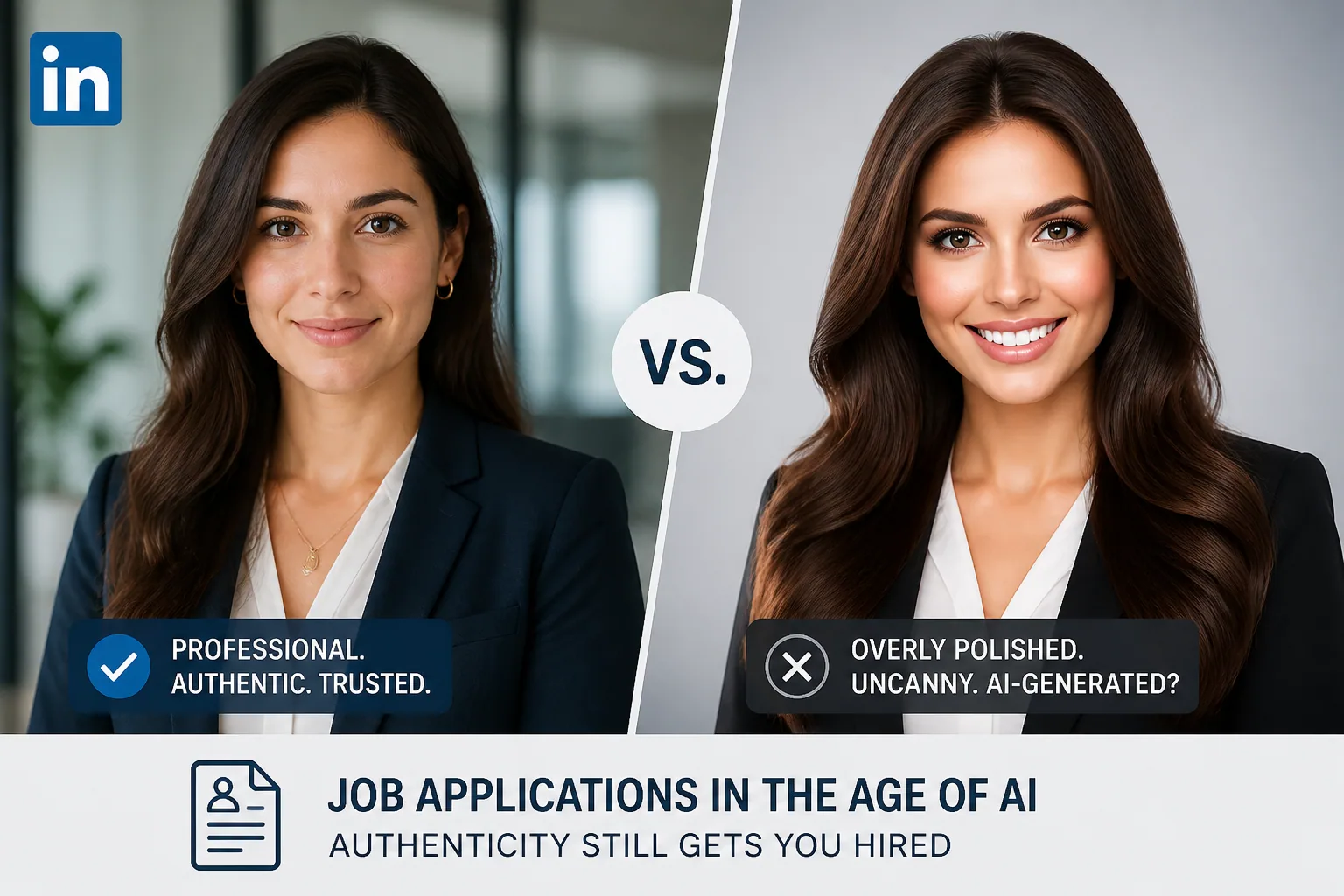
The hardest part of using an AI headshot well is balancing polish and realism. A portrait that is too rough will look amateurish. A portrait that is too perfect can look synthetic, which is often worse because it creates an uncanny effect. The goal is not to look heavily filtered or idealized. The goal is to look like your best believable self.
A few visual cues tend to expose AI images. Overly smooth skin can look plastic or waxy. Catchlights in the eyes may be physically implausible. Background details may contain subtle artifacts. Lighting may be inconsistent across the face, especially around the jawline, hair, or ears. Those imperfections might not jump out instantly, but they can create a quiet sense that something is off.
That is why prompt quality and editing restraint matter. Good AI headshots should preserve natural texture, believable shading, and ordinary facial asymmetry. If the image starts looking like a beauty ad or a fantasy render, it may be visually striking but not professionally trustworthy.
A useful rule is that the image should feel enhanced, not invented. If you would still recognize yourself in it after a long workday and in bad office lighting, it is probably close to the right balance.
Legal, Ethical, and Bias Concerns Around AI Profile Photos
AI profile photos raise ethical questions even when no one is trying to deceive anyone. The biggest concern is identity distortion. If a portrait changes your appearance too much, it can create problems during interviews, onboarding, badge photos, or face-to-face meetings. In high-trust jobs, that mismatch can feel like a red flag.
This matters especially in regulated industries such as legal, finance, and healthcare. In those environments, accuracy and transparency are not just nice-to-haves. A portrait that substantially differs from the real person may lead recruiters or clients to wonder whether the applicant is also shaping other facts more aggressively than they should.
Bias is another issue. AI systems may over-smooth skin, alter age cues, or unintentionally standardize features in ways that make people look less like themselves. That can be especially harmful if the model produces a face that does not faithfully preserve skin tone, texture, or individual characteristics. Prompting for realistic skin detail and the correct undertones helps reduce this risk, but it does not eliminate it entirely.
There is also a practical compliance angle. Platforms are building detection tools. LinkedIn has described detection approaches using PCA and autoencoder models to identify synthetic profile photos from GANs and Stable Diffusion with about 99.6% true positive rate and roughly 1% false positive rate on real images. Source: https://www.linkedin.com/blog/engineering/trust-and-safety/new-approaches-for-detecting-ai-generated-profile-photos
The safest takeaway is simple: do not treat an AI portrait as a disguise. Treat it as a styled representation. The closer it remains to your actual appearance, the fewer ethical and practical problems it creates.
What Makes an AI Selfie Look Professional and Trustworthy
Professional-looking AI portraits usually share the same fundamentals as strong studio photography. First, the lighting is controlled. Portrait experts often recommend a key-to-fill ratio around 2:1 because it creates soft dimension without harsh shadows. Classic lighting setups like Rembrandt, loop, or butterfly lighting can make a face feel polished while still realistic. Flat, evenly lit images tend to remove shape and depth. Source: https://circularstudios.com/blog/portrait-photography-studio-tips
Second, the background is clean. A distracting office mess, strange texture, or overdesigned backdrop can pull attention away from the face. A plain or softly blurred corporate background usually works better because it gives the image room to breathe. If possible, the subject should be separated from the background with gentle rim light or thoughtful framing. Source: https://skywork.ai/blog/how-to-ai-portraits-skin-tone-lighting-backgrounds-2025/
Third, the face should look alive. That means subtle skin texture, natural pores, believable shadows around the nose and chin, and eyes that reflect the environment in a realistic way. Prompting for natural detail matters. Phrases like natural pores, subtle texture, and accurate undertones are usually more useful than requests for perfect or flawless skin. Source: https://skywork.ai/blog/how-to-ai-portraits-skin-tone-lighting-backgrounds-2025/
Finally, clothing should fit the setting. A blazer or smart shirt can work for corporate fields, while a clean crew neck or creative business-casual look may be better for startups, design, or personal branding. The best AI selfie is not the fanciest one. It is the one that feels plausible in the exact work context you want to enter.
How Closely Your AI Portrait Should Match Your Real Appearance
This is one of the most important questions, and there is no perfect universal rule. But the closer you are to client-facing work, interviews, regulated industries, or in-person meetings, the closer the portrait should match reality. If your AI image changes your hairline, age, facial shape, or style too much, the mismatch can become an issue very quickly.
A useful test is this: if you saw yourself from a few feet away in a conference hallway, would people recognize you from the photo? If the answer is no, it is probably too far from your actual appearance for professional use.
Consistency across platforms also matters. When your LinkedIn photo matches your speaker bio, Zoom profile, company website, or portfolio image, it reinforces reliability. When the images feel inconsistent, people notice, even if they cannot explain why. That subconscious dissonance can lower trust. Source: https://www.alibaba.com/product-insights/is-using-ai-generated-profile-pictures-on-linkedin-hurting-your-credibility-or-boosting-visibility.html
In practice, the best AI headshot is usually the one that looks like you on a very good day, under flattering light, with excellent grooming, but without altering your core identity.
When an AI Selfie Can Help Your Resume, LinkedIn, or Personal Brand
There are situations where an AI portrait can be genuinely useful. If your current photo is outdated, low resolution, badly lit, or cropped awkwardly, an AI-generated headshot can be a practical upgrade. It can also help if you need a consistent look across multiple channels and you do not have time to schedule a professional shoot.
AI selfies can be especially effective for personal brands, freelancer profiles, portfolio sites, and creator pages where presentation matters and the image is only one part of a broader narrative. In those cases, a polished portrait can help you look more established and more intentional.
They can also be useful for early-stage job seekers who need something clean and credible fast. If the choice is between no photo, an unflattering vacation snapshot, or a carefully made AI headshot that still resembles you, the AI option may be the strongest of the three.
For a tool that can help you create a polished, realistic look without a full photoshoot, Selfie AI: AI Photo Generator can be a practical option: https://findthe.app/selfie-ai-0xi7wd
When Using an AI Portrait Can Backfire in a Job Search
AI portraits are more likely to backfire when trust is central to the role. That includes legal work, finance, healthcare, education, executive leadership, and any position involving sensitive client relationships or identity verification. In those settings, a dramatic difference between the profile image and the real person can create discomfort during video interviews or in-person meetings.
Recruitment research suggests that this concern is not theoretical. A Checkr survey from 2025 found that 35% of hiring managers had seen candidates look significantly different in person or on video than in their profile photo, and 17% of HR managers reported seeing deepfake tech used during live video interviews. That means hiring teams are already alert to visual inconsistencies, even if they cannot always detect the exact tool used.
AI portraits can also hurt when they feel too stylized for the role. If you are applying for a conservative corporate position and your image looks glamorized or artistic, the mismatch may signal poor judgment. Likewise, if the headshot looks extremely filtered or dramatically altered, it may undercut the very professionalism you are trying to project.
The strongest warning sign is overreach. If the image is trying to make you look younger, slimmer, more glamorous, or fundamentally different, it is probably crossing from branding into misrepresentation.
Choosing the Right Style for Your Industry: Corporate, Creative, or Personal Brand
Not every industry wants the same visual language. Corporate roles usually call for a clean, neutral, well lit headshot with simple clothing and a restrained expression. You want approachable competence, not personality overload.
Creative industries give you more room. Designers, marketers, founders, and creators may benefit from slightly more stylized lighting, warmer color palettes, or a background that suggests individuality without becoming distracting. The image can still be professional, but it does not need to feel identical to a bank executive portrait.
Personal brands sit in the middle. Coaches, consultants, speakers, and independent professionals often need a portrait that feels both trustworthy and distinctive. In that case, the image should align with the tone of your website, your content, and how you speak about your work. Visual consistency becomes part of the brand message.
Whatever the industry, the deciding question is the same: does this image support the story I am telling about myself, or does it create friction?
What to Look for in AI Headshot Tools Before You Upload Your Photos
Not all AI headshot tools are equal. Before uploading selfies, check how the tool handles data, whether it stores your images, how long it keeps them, and whether you can delete them later. Privacy matters because you are giving the system sensitive likeness data, not just a casual snapshot.
You should also look closely at output quality. Good tools should preserve facial identity, skin texture, eye shape, and natural expression across multiple variations. If every output starts to look like a different person, the model is too unstable for professional use.
Pay attention to resolution and watermarking as well. Low-resolution images can look fuzzy on LinkedIn or a company bio page, while watermarks can make the image look less credible. You want clean, sharp, and platform-ready files.
Finally, test whether the app gives enough control over style. Useful tools let you influence attire, background, mood, and portrait framing. If the results are random, you will waste time correcting images that should have been close on the first pass.
A Step-by-Step Workflow to Create an AI Portrait That Works
Start with good input photos. Use several selfies with clear lighting, neutral expressions, and different angles, but keep them recent and representative of how you actually look. Avoid sunglasses, heavy filters, dramatic makeup experiments, or unusual poses that confuse the model.
Next, define the target use case. A LinkedIn headshot for a finance analyst should not be styled like a personal brand portrait for a content creator. Be specific about clothing, background, and mood before generating anything.
Then refine the prompt. Ask for realistic skin texture, natural pores, subtle lighting, and a clean background. If the tool allows, specify portrait lighting, a modest depth of field, and simple professional attire. The goal is to make the image believable, not airbrushed into fiction.
After generation, compare the best result against your actual appearance. Check hair, face shape, age cues, skin tone, glasses, and expression. If you would need a long explanation to justify the difference, reject the image.
Finally, test the image in context. Upload it to LinkedIn, view it at small size, and compare it with your resume, email signature, speaker bio, and meeting profile. If the image still feels consistent across those settings, it is probably doing its job.
Final Checklist: Should You Use This AI Selfie or Skip It?
Use the AI selfie if it looks like you, matches your industry, and improves on the quality of your current photo without changing your identity. It should be clean, realistic, and consistent with how you will appear in interviews and meetings.
Skip it if the image feels overly perfect, dramatically different from your actual appearance, or risky for a role where trust is everything. If you work in a regulated field, face clients in person, or expect heavy video interviewing, authenticity usually matters more than visual polish.
A good rule is to choose the portrait that helps people recognize you, not the one that tries to reinvent you. The best professional image is not the most artificial one. It is the one that makes hiring managers feel confident they know who they are talking to.