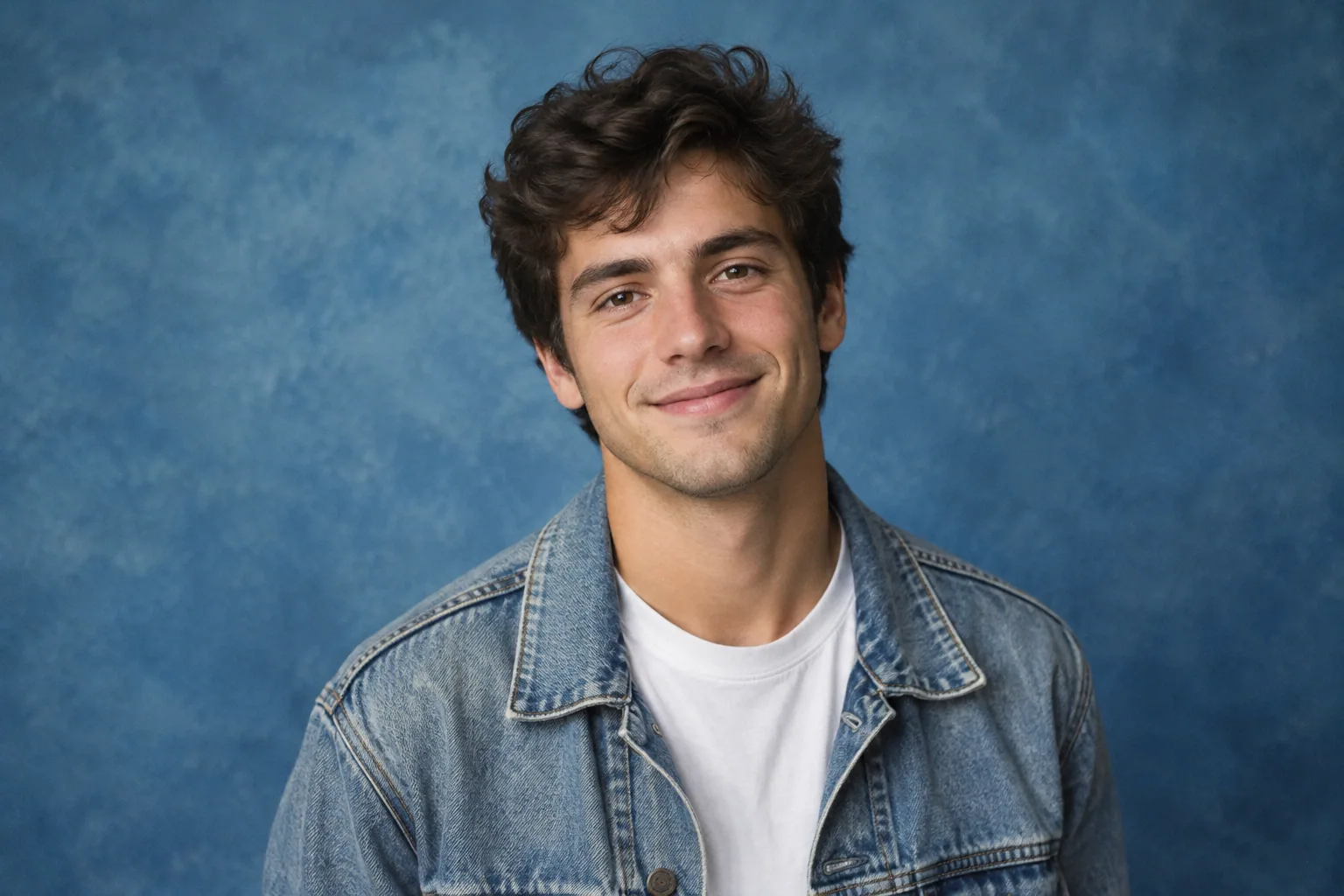
To make a recognizable 1990s-style portrait, upload your own selfies to a tool that supports photo references or a personalized model, then paste the prompt below. It pairs your current face and age with denim, a blue studio backdrop, soft lighting, and a restrained film finish.
Copy this 90s AI photo trend prompt
Create a realistic 1990s-inspired studio portrait of me using my uploaded selfies as the identity reference. Preserve my facial structure, eye color, nose, jawline, skin tone, and current age. Frame me from the chest up, with my shoulders slightly turned and my face toward the camera. Dress me in a classic denim jacket over a plain crewneck T-shirt. Use a mottled blue studio backdrop and soft, diffused frontal studio lighting. Add subtle film grain and slightly warm, restrained print color. Keep my eyes clear and retain natural skin texture. Exclude text, logos, smartphones, smartwatches, modern accessories, excessive skin smoothing, heavy grain, and exaggerated neon effects. Change the styling and setting, not my identity.
A prompt alone cannot preserve your likeness. Without your selfies or a model trained on them, the tool has no reliable reference for your face. Even with references, review the result rather than treating “preserve my features” as a guarantee.
Start with this version before adding extra effects. If it looks too clean, request slightly more print texture, not a stronger filter across your face.
Five 90s portrait variations to try
These are different 1990s-inspired aesthetics, not one universal decade look. Pick one complete prompt rather than combining yearbook lighting, grunge clothing, neon scenery, and disposable-camera effects in the same image.
1. Studio yearbook portrait with a gray-blue backdrop
Use my uploaded selfies to create a realistic 1990s-inspired yearbook studio portrait of me at my current age. Preserve my facial structure, eye color, nose, jawline, and skin tone. Dress me in a plain burgundy crewneck sweater over a white collared shirt. Frame me from mid-chest up, with shoulders slightly angled, my face toward the camera, and a small natural smile. Use a mottled gray-blue cloth backdrop, soft frontal studio lighting, mild lens diffusion, subtle film grain, and gently warm print color. Keep natural skin texture and clear eyes. No text, school names, logos, modern accessories, or exaggerated retouching.
For a related starting point, explore the yearbook portrait category. It is a category to consider, not a promise of a dedicated 90s preset.
2. Flannel-and-denim grunge portrait outdoors
Create a realistic 1990s-inspired grunge portrait of me from my uploaded selfies. Preserve my recognizable facial features, skin tone, and current age. Dress me in an open red-and-black flannel shirt over a plain charcoal T-shirt with loose blue jeans. Place me beside an unmarked brick wall outdoors. Use a waist-up crop, relaxed shoulders, and a neutral expression matching my reference photo. Light the scene with soft overcast daylight. Use muted color, modest contrast, and fine film grain while keeping my face clear. Exclude lettering, logos, phones, smartwatches, heavy makeup changes, and excessive skin smoothing.
Keep the styling simple so the flannel does the work. The grunge style category is another relevant starting point for this variation.
3. Colorful windbreaker portrait at a recreation court
Create a realistic 1990s-inspired casual portrait of me using my uploaded selfies. Keep my facial structure, eye color, skin tone, and current age unchanged. Dress me in a teal-and-purple color-block windbreaker over a plain white T-shirt. Place me at an empty outdoor recreation court with a chain-link fence behind me and no signs. Use a three-quarter-length vertical composition with my hands out of frame and a relaxed smile. Light me with gentle late-afternoon daylight. Keep the jacket colorful but the overall image restrained, with subtle film grain and natural skin texture. No logos, text, smartphones, modern wearable devices, or neon glow.
4. Minimalist black-and-white fashion portrait
Use my uploaded selfies to make a realistic 1990s-inspired black-and-white fashion portrait of me at my current age. Preserve my facial proportions, eye shape, nose, jawline, and recognizable skin details. Dress me in a plain black turtleneck with no jewelry. Place me against a simple light-gray studio wall. Use a close head-and-shoulders crop, a slightly turned head, and a calm expression. Light my face with a large soft light from one side and gentle fill on the other. Use moderate contrast and fine monochrome film grain. Avoid crushed shadows, plastic skin, exaggerated facial reshaping, text, and logos.
5. Casual disposable-camera snapshot
Create a realistic 1990s-inspired disposable-camera snapshot of me using my uploaded selfies as the identity reference. Preserve my facial features, skin tone, and current age. Dress me in a plain forest-green sweatshirt and blue jeans. Show me seated on a simple park bench at dusk, framed from the waist up, with my hands outside the crop and a natural smile. Use direct on-camera flash on my face with a dimmer background, a slightly off-center composition, modest film grain, and gently faded print color. Keep my eyes and teeth realistic. No date stamp, lettering, logos, phones, modern accessories, heavy scratches, or exaggerated light leaks.
Choose selfies that keep the result looking like you
Choose references that make your features easy to read. A dramatic selfie can be a good social photo but a poor identity reference if shadows hide half your face.
- Start with a clear front-facing selfie. Your eyes, nose, jawline, and hairline should be visible, without blur or a beauty filter.
- Add modest angle variety. Include slight left and right turns rather than only extreme side views or high-angle selfies.
- Use even lighting. Face a window or choose another soft light source. Skip photos with strong shadows across your eyes or nose.
- Keep your appearance consistent. Use recent selfies that show your current age and the hairstyle you want to preserve.
- Remove confusing references. Avoid sunglasses, group photos, heavy filters, and anything covering your face.
Selfie AI lets you upload a few selfies to create a personal model. Its custom text prompts require Premium, so check that you have access before planning to use these exact prompts in the app.
If your results keep drifting from your face, revisit the references before adding more descriptive words. Use this guide to choose input selfies with useful lighting and angles for a more detailed checklist.
Customize the prompt without losing the 90s look
Keep the identity instructions unchanged and swap one or two variables at a time. Use these slots to make controlled changes:
| Editable slot | Options to try | Keep consistent |
|---|---|---|
| Outfit | Denim jacket, plain sweater, flannel, color-block windbreaker | No visible branding |
| Hairstyle | Your current hair, a simple side part, softly brushed volume | Your hairline and recognizable features |
| Backdrop | Mottled blue cloth, gray studio wall, brick wall | No modern objects or lettering |
| Expression | Small smile, relaxed neutral expression | An expression close to a reference selfie |
| Crop | Head-and-shoulders, chest-up, waist-up | Enough room around your head to crop later |
| Photographic finish | Warm print color, fine monochrome grain, direct-flash snapshot | Visible eyes and natural skin texture |
Before:
Preserve my facial features and current age. Create a chest-up portrait in a denim jacket and plain T-shirt, against a mottled blue backdrop, with soft frontal lighting and subtle film grain.
After, changing only the outfit and expression:
Preserve my facial features and current age. Create a chest-up portrait in a burgundy crewneck sweater and white collared shirt, with a small closed-mouth smile, against a mottled blue backdrop, with soft frontal lighting and subtle film grain.
Leave lighting, crop, and finish alone for that attempt. Otherwise, you will have trouble identifying which change improved the image. For other styles, use these broader AI portrait prompt-writing techniques.
Fix modern details and weak facial likeness
Inspect the face first, then clothing and background. Text instructions are requests, not guarantees, so reject or regenerate images with persistent errors.
| Problem | What to change | Corrective prompt phrase |
|---|---|---|
| Contemporary clothing | Replace vague “retro fashion” with one specific outfit | “Use a classic denim jacket over a plain crewneck T-shirt, with no branding.” |
| Smartphones in the background | Simplify the setting and exclude devices | “Use an empty mottled studio backdrop; no phones, screens, or electronic devices.” |
| Excessive grain | Reduce the finish rather than sharpening everything | “Use barely visible film grain; keep facial details clear.” |
| Overly smooth skin | Request texture and less retouching | “Retain natural skin texture; no airbrushing or plastic-looking skin.” |
| Changed facial features | Check references and simplify styling changes | “Preserve my reference eye shape, nose, jawline, skin tone, and current age; change only wardrobe and setting.” |
| Distorted accessories | Remove the accessory instead of adding more detail | “No jewelry, glasses, or wrist accessories.” |
| Unwanted lettering | Remove signs, branded garments, and date stamps | “No text, letters, numbers, logos, watermarks, or date stamps.” |
If teeth or hands look wrong, try a closed-mouth smile or a crop that keeps hands outside the frame. Avoid compensating for weak likeness with heavier grain or blur, which only hides the problem.
Do not use 1960s styling or heavy neon as the default fix for an image that feels insufficiently retro. Return to the chosen outfit, backdrop, lighting, and print finish first.
Choose and crop your portrait for sharing
Before choosing your final image, check:
- Likeness: Do your eyes, nose, jawline, skin tone, and age match your references?
- Clothing: Are collars, seams, buttons, and jacket edges plausible?
- Background: Are there stray letters, floating objects, devices, or warped lines?
- Face detail: Do eyes and teeth look natural at full size?
- Thumbnail readability: Can you still recognize yourself when the image is small?
For a profile image, try a square crop with your face centered and some space above your hair. Preview it inside a circle before posting so the crop does not cut off your head or chin.
For a social feed post, try a vertical 4:5 crop with room for the outfit and backdrop. For a full-screen vertical story or video layout, try 9:16, but choose a wider source composition rather than stretching the image. Use your usual editor and check the destination app’s preview.
Label it honestly with a caption such as “AI-created 90s-style portrait” or “Trying a retro AI yearbook look.” Avoid presenting it as an actual childhood photo or archival photograph.
FAQ
What is the difference between the 80s and 90s AI photo looks?
There is overlap, so “retro” alone is too vague. To keep these portraits distinct from an exaggerated 80s-inspired look, request plain denim or flannel, restrained color, and a simple studio backdrop rather than big hair and heavy neon. Specify the clothes and lighting you want instead of relying only on the decade label.
Can I animate my 90s AI portrait?
Yes. Selfie AI has a video animation feature for generated portraits. Choose a still image with accurate facial features and no obvious artifacts first, then animate that version and review the face in motion before sharing.